


 Reply With Quote
Installation to external drives is only possible if your bios supports booting from those devices. If yours does, I don't know.


Hello all:
After downloading the new Knoppix 3.4 CD and thoroughly trying the Live version out with both the 2.5 and 2.6.5 versions of the kernel, I went on to do a hard disk install with the new knoppix-installer script.
As expected everything went off quite well and besides having to modify the vga=xxx entry (to 'normal') in the lilo.conf file and having to manually start CUPS, there were no major surprises.
I had already practised a lot with the Knoppix 3.3 CD.
The rig is composed thus:
First drive SCSI
sda1 W2000
sda5
Second drive SCSI
sdb5
sdb6
Third drive SCSI
sdc1
sdc2
sdc3
Fourth drive
sdd5 IDE HDD FAT32 in a USB 2.0 enclosure.
The Knoppix install is on the third SCSI drive (sdc1) and LiLO is on the first SCSI drive's (sda1) mbr.
At boot, besides the W2000 option at sda1, LiLO offers three additional options:
Linux
Linux (2.4)-1
Linux (2.6)-2
The first and the second options boot into kernel 2.4 with this error message:
mount: fs type devfs not supprted by kernel.
The third option does not boot and gives the following error message:
pnp: unable to assign resources to device 01:01.01.
Kernel panic: VFS:unable to mount root fs on unknown block(8.33)
From there, only a hard reset gets me out.
It would seem to me that this is a LiLO problem as the Live CD works perfectly well with both kernel options.
It is at this point that my first question comes up:
Why are there 'three' options (instead of just the two kernels) to boot into Linux?
I'd expect just two, 2.4 and 2.6.
The first two have apparently the same effect and boot into 2.4.26 although the corresponding entries in the
lilo.conf file point to different kernel images:
Label='Linux'
/boot/initrd.img
Label='Linux (2.4)-1'
/boot/initrd.img-2.4.26
Curiously enough, the third option ...
Linux (2.6)-2
... does not point to any image at all, the space is just blank.
If I add what would seem to be the correct line: (which is an existing image file)
/boot/initrd.img-2.6.5
LiLO will balk when run and say:
Fatal: empty map section.
My second question is:
How to solve the problem presented by 'mount: fs type devfs not supprted by kernel problem'?
Is it a problem at all?
And the last and most important question ....
How can I fix this so as to be able to boot into the 2.6.5 kernel?
Ahhh ...
Another last one
KMix loads along with X ...
Can't find where to tweak so as to stop it from loading.
Thanks in advance.
CIV
Installation to external drives is only possible if your bios supports booting from those devices. If yours does, I don't know.
Hello:
Nope ...
I am not installing to the external drive.
I have successfully installed Knoppix 3.4 to the third drive's first primary partition, sdc1.
The problem is booting to the 2.6.5 kernel.The Knoppix install is on the third SCSI drive (sdc1) and LiLO is on the first SCSI drive's (sda1) mbr.
Thanks anyhow,
CIV
Hello again:
I've been able to trace the problem to the existence of a zero-length initrd.img-2.6.5 file ... ;-/
That's why Knoppix won't boot with the 2.6.5 kernel.
So then it is not a LiLO problem.
But I have no idea how to go from here.
Is this a bug in the knoppix-installer script?
Or is it something I have not done correctly?
Anyone?
Thanks in advance,
CIV
Hi,Originally Posted by Calvi Risorta
well you can try to rebuild the initrd and see what problems are there:
mkinitrd -o /boot/initrd.img-2.6.5 2.6.5
And tell me whats happening ...
cu
Fabian
PS: Nice that means SCSI does work with installer. Despite there were some reports that said the opposite.
PPS: The first entry is just for you that you don't need to change lilo.conf when you install a new kernel ...
Hi all,
I tried the above suggestion and found that mkinitrd fails as below
root@ttyp0[boot]# mkinitrd -o /mnt/sda1/boot/initrd.img-2.6.5 -r /dev/sda1 2.6.5
/usr/sbin/mkinitrd: add_modules_dep_2_5: modprobe failed
FATAL: Module sd_mod not found.
What now? Is this a problem with the makeup of the Knoppix 3.4 disk?
Regards,
Dave
Hello FabianX:
Thanks for the reply and the info.
I was beggining to lose hope.
Indeed ...PS: Nice that means SCSI does work with installer. Despite there were some reports that said the opposite.
I find that it works quite well, at least from what I can see from my polluted MS background.
FWIW, this Celeron 366 rig has 512Mb RAM and boots with an Adaptec AHA-29160 card running these units:
Seagate ST39140LW Ultra2
Seagate ST39140LW Ultra2
IBM DCAS 34330 UW (where Knoppix lives)
Toshiba 40X CD-ROM
Sony 926S 2x6 CD-R
HP Surestore 5000i DAT Drive
Thank you for this bit of info.PPS: The first entry is just for you that you don't need to change lilo.conf when you install a new kernel ...
I was really wondering about that and I see that it is not explained anywhere.
As I could not wait to see what was up, I just reinstalled using the Debian option.
But I still cannot boot into Knoppix26.
I get the same error as before.
The lilo.conf file is still missing the pointer to an image file and my guess (haven't checked yet) is that the zero length file is still there.
The Knopppix CD will boot into 2.6.5 (boot: knoppix26) but strangely enough, if I boot using cheatcodes 'knoppix26 2 [whatever options], the Knoppix CD will simply 'not' boot into 2.6.5, complaining that it does not see the (2.6.5, evidently) filesystem.
No idea as to what's going on.
Could it be a layout problem as Dave suggests?
Best regards,
CIV
PS: Say, what's the deal with devfs?
Hello FabianX:
I tried your suggestion and had the same result as Dave:
root@Groucho-lnx:~#
root@Groucho-lnx:~# mkinitrd -o /boot/initrd.img-2.6.5 2.6.5
/usr/sbin/mkinitrd: add_modules_dep_2_5: modprobe failed
FATAL: Module sd_mod not found.
root@Groucho-lnx:~#
I can confirm that the zero-length /boot/initrd.img-2.6.5 file is still there.The lilo.conf file is still missing the pointer to an image file and my guess (haven't checked yet) is that the zero length file is still there.
ie: once again, it was not created on install.
Anyone with ideas?
Thanks in advance,
CIV
PS: UPDATE 14/05/04 19:46 -03:00 GMT
I googled "FATAL: Module sd_mod not found." and found a few references in the Gentoo forum relating to module-init-tools-3.0.
Quote:
module-init-tools-3.0_pre6, 7, 8, and 9 are buggy
SOLUTION: downgrade to pre5
This problem is over my head at this moment, so if anyone has any ideas as to how to fix it, I'd be very grateful if they were posted.
Tks.
whats lilo huh
Stands for LInux LOader. Probably the most commonly used bootloader for Linux HD installations, but GRUB - GRand Unified Bootloader is gaining ground. Both allow multiple boots, so that you can still do stuff in Windows that Linux won't do yet (e.g., accommodate someone else in your household who doesn't want to use linux).
 Posting Permissions


Fujinet 1.7.1 Atari 400 800 800XL 130XE 65XE XEGS Assembled, Tested, Working
$99.99

Atari 800 8-bit Computer System Fully Tested Great Condition 48k READ
$350.00

Atari 130 XE/Atari 1050 Bundle W/ Cords And Extras (Powered On)
$300.00
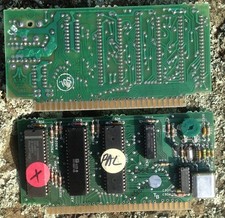
DEFECTIVE Atari 400800 PAL CPU6502C Sally PCB with PAL ANTIC GTIA G3D
$70.00

Atari XE 130XE Computer NTSC with Power Supply Powers On Untested
$159.95

SOLD AS IS Lot of 5.25" Floppy Disks w/ Games & Software? Commodore 64 Atari 800
$59.99

Atari 520ST Vintage Home Computer Keyboard Unit
$199.97

Gotek USB Floppy Emulator v3.44 OLED (no speaker) Amiga Atari IBM Roland AKAI
$44.00

DEFECTIVE Atari 810 Vintage Computer Disk Drive powers on Unit Only Boo G3D
$49.29

VTG Atari 1200XL Home Computer System 1200 XL ** Tested ** Parts or Repair
$323.75
