

 Reply With Quote
a dirty trick:
as root:
this should probit writing to the file.Code:chmod a-w /etc/resolv.conf
Perhaps you get an errormessage from the program, which tries to write to the file, and can change that program instead.
Please reply if it works.


Ok, so I edit the reolv.conf, putting in my two DNS IP's and run the PPPOE config utility AFTER having done so.
Here I click "no" when asked if the resolv.conf should be updated automatically....
And still it updates the DNS's, which unables the connection..
What am I doing wrong, is there a way round this ? So I wouldn't have to edit the resolv.conf every time I start up the machine..
btw, I'm dual-booting with win2000.

a dirty trick:
as root:
this should probit writing to the file.Code:chmod a-w /etc/resolv.conf
Perhaps you get an errormessage from the program, which tries to write to the file, and can change that program instead.
Please reply if it works.
I tried the trick, found a link /etc/resolv.conf -> /etc/dhcpc/resolv.conf and did the same to that file.
DHCP broadcasting ... backgrounding when rebooting and when I check the reolv.conf it's got a local area IP.
I'm on a homepna (pppoe) connection.
 Posting Permissions


Dell 6P85J 4TB ST4000NM0063 7.2k 6Gb/s 3.5” SAS SED Hard Drive with Tray
$39.99

Western Digital HUS726T4TAL5204 4TB 7.2K SAS 12Gb/s 3.5" 512e HDD NetApp X375A
$64.00

HGST Ultrastar HUS726040AL5210 4TB 7200RPM SAS 12Gb/s Enterprise HDD
$41.00

20TB 7200 RPM SATA III Internal 3.5" White Label Hard drive
$349.99

Seagate Barracuda ST1000DM003 1 TB SATA III 3.5 in Desktop Hard Drive
$23.99

Dell ST6000NM0034 1HT27Z-150 NWCCG 6TB SAS 3.5 7.2K ENTERPRISE SERVER DRIVE
$68.99

Seagate Exos ST2000NX0253 HDD 2TB SATA 7.2K 2.5" 512b/s
$58.00

Lot of 2 HP 4TB / 128MB SATA 7.2K RPM 3.5" Hard Drive MB4000GCWDC /ST4000NM0033
$125.00
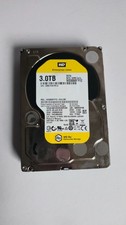
WD Re 3TB Enterprise 3.5" HDD SATA 6Gb/s 7200RPM 64MB Cache
$70.00

Toshiba DT01ACA100 1 TB 3.5" SATA III 3.5 in Desktop Hard Drive
$24.99