

 Reply With Quote
No.Do i load the Grub Bootloader to the computer before i install the Knoppix O/S.


Do i load the Grub Bootloader to the computer before i install the Knoppix O/S. The instructions i intend to use are as follows, i hope they are right for the Knoppix 3.3 distro CD i have. Regards. Bobby.
Introduction.
Full GNU/Linux Desktop installed in 20 minutes flat!
No more excuses for running W--dows!
Knoppix is a remarkable Linux 'demo' distribution, in that it can run totally from a CD, without disturbing any existing software or disks on the system it's running on.
Even better, Knoppix can auto-detect hardware as it starts up, and does quite a good job of configuring this hardware.
And still better, Knoppix is chock-full of the best desktop software which GNU/Linux has to offer - office software, games, productivity suites, software development tools, multimedia - you name it!
After seeing a Knoppix demo, many users decide that they'd like to have Knoppix permanently installed on their system. This HOWTO gives a simple step-by-step guide to putting Knoppix on the hard disk, with the added bonus that it will run faster from then on.
This guide covers a couple of obvious points which are strangely missing from the Knoppix website, and will help you to go from first boot to a fully set up GNU/Linux desktop in 20 minutes flat!
System Requirements
To install and run Knoppix on your PC, you'll need:
Pentium-class processor, preferably 300MHz+
64MB RAM
A spare partition on your disk, min 3GB
(of course) a Knoppix CD
Installation Procedure
To get Knoppix installed onto your hard drive:
Boot the Knoppix CD.
When the boot prompt comes up, choose your language.
Most of us speak English, so we'll type:
boot: knoppix lang=en
then press ENTER (you don't type the 'boot:' part, of course)
Wait till the system is fully launched, including the KDE desktop
Press CTRL-ALT-F1, to get a root console. You should see a shell prompt
Type: knx-hdinstall
Follow the guided installation menus. This will include:
Creating a Linux partition (at least 2.5GB
Creating a Linux Swap partition (at least 256MB)
'Mounting' the Linux partition as root
Initialising the swap partition
Copying all the required files (automatically)
Setting up networking
Setting passwords
Setting up the bootloader (Note: take care with this stage - it could render your system incapable of booting into Windows. If you really need Windows, then it might be a good idea to set up GRUB Bootloader with a 'chainloader' entry, so that you can dual boot. Working this out is an exercise left to the reader - there are too many possible scenarios for me to cover in this short guide. Also see man grub and the files in /usr/share/doc/grub)
Rebooting (without the CD)
When you've rebooted Knoppix from your hard disk, click on the KDE Control Centre icon in the launcher at the bottom of the screen (icon of a colour monitor with a card in front of it)
Within the Control Center, click on Personliche Einstellungen
Click on Land und Sprache
Choose the locale and language of your choice
Click on Andwenden at bottom of that window
Close and restart the Control Center
Click on Peripherals, then Keyboard, and choose your preferred keyboard layout (which will probably be US.English. Click OK and close the window
Press CTRL-ALT-F2 to get to the root console, and log in as root (using the password you chose when you ran the installer)
(Optional) - type apt-get update (followed by ENTER). This will update your list of available packages, and takes about 5-10 minutes.
Hey, presto, you've got a fully installed GNU/Linux desktop.
No.Do i load the Grub Bootloader to the computer before i install the Knoppix O/S.
Thankyou fingers 99 for answering the fist part of my questune. Can you tell me if those installation instructions are the right ones. I dont really want to lose my Windows 98 just yet. My hard drive is in two parts, i have a C drive and a D drive. There is nothing on the D drive. Regards. Bobby.
 Posting Permissions


INTEL XEON E5-2680V4 SR2N7 2.40GHZ CPU
$11.00

Dell EMC PowerEdge R440 Xeon silver 4215 2.5GHz 16 GB ram 2x 550W PSU No HDD
$275.00

Dell Precision Tower 7810 Xeon E5-2630 v3 @ 2.40GHz , 32GB Ram, NO HDD, NO OS
$239.99

Dell Precision T7820 2x Xeon Silver 4114 2.20GHz 950W No RAM GPU HDD 4x SATA
$350.48

Dell Precision T5820 Workstation 3.70GHz W-2135 No RAM/ GPU/ HDD/ OS
$179.98

Intel Xeon E5-2699 V4 2.20GHz 55M 22-CORES LGA2011-3 Server Processor 145W SR2JS
$84.49

Intel Xeon E5-2690 v4 SR2N2 14 Core 2.6GHz 35MB LGA2011-3 CPU *km
$15.99
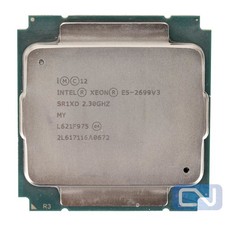
Intel Xeon E5-2699 v3 18 Core 2.3 GHz 45MB SR1XD LGA 2011-3 B Grade
$15.95

DELL Precision T3420 | Xeon 1240v6 | 525GB SSD |16GB RAM |Nvidia GPU |Win11
$149.00

Lenovo ThinkServer TS460 Part Number: 70TS-S01U00
$279.00