

 Reply With Quote
Click the penquin on the taskbar next to Kmenu. Then select Network/Internet > Network card config. Select your network card (mostly eth0) > dhcp.


When using Knoppix 3.4 everything works fine except my network card. I have broadband. I'm a total noob and don't have any idea how to set it up. The only distro of Linux that has ever worked with it was MandrakeMOVE. It works fine there without doing anything but nowhere else.
Anyone know what I need to do to connect to the internet??
Click the penquin on the taskbar next to Kmenu. Then select Network/Internet > Network card config. Select your network card (mostly eth0) > dhcp.
 Posting Permissions

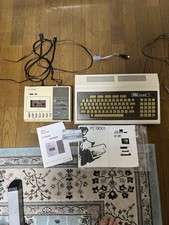
Vintage NEC PC-8001 32KB RAM Fully Working Set w/ Monitor Cable & Tape
$499.00

Vintage Jetway J-620BF Socket 370 Celeron AT Motherboard SiS 620 Brand New
$75.00

Vintage HP Hewlett Packard 2112A 21MX 1000 M-Series 16-Bit Minicomputer
$599.99

Vintage ECS Micro-ATX Desktop Case | Beige/Dark Grey | *READ*
$80.00

Factory Sealed Windows 2000 Professional Upgrade Edition Vintage PC Software NOS
$50.00

Vintage AppleCare Protection Plan Box for Mac Model 607-3517 COLLECTIBLE ONLY
$20.00
![Apple Macintosh Boot Disk System [1.0 - 8.0] 400/800k/1.4 Floppy for Vintage Mac picture](/store/img/g/EhEAAOSwg7ZnexmU/s-l225/Apple-Macintosh-Boot-Disk-System-1-0-8-0-400-800k-.jpg)
Apple Macintosh Boot Disk System [1.0 - 8.0] 400/800k/1.4 Floppy for Vintage Mac
$11.75

Rare Vintage Macintosh Apple Wooden Disk Storage Box Dovetailed
$69.95

Vintage Toshiba Satellite 4090XDVD Intel Celeron 400Mhz Retro - Powers up Cards
$57.59

Vintage 1986 Goldenrod Research Corp CP/M Desktop Computer Syste w/Keyboard
$350.00