

 Reply With Quote
su-to-root and:
'modprobe ehci-hcd'
Maybe then have a look:
'dmesg |grep ehci'
Then to have it start (as it should) every time you boot into knoppix, add ehci-hcd to /etc/modules-2.x.xx


Anyone have any luck at all getting any version of Linux to utilize the high speed mode of their USB 2.0 card?
I have no problems with getting any of my USB stuff to work in Knoppix 3.4 or Debian or Mandrake 10.0. But all version are only using the USB in the slow mode (v1.1). It would be nice to get it to high speed. In Win2000 I get a huge speed increase. I can copy a 4 meg file in less than 2 seconds in Win2000. On Linux it takes about 7 seconds or about 600KB/s.
Is there some driver that must be loaded to get the speed up?
Using an 80Gig external USB drive in slow mode can be painfull.
Card in question is a Belkin USB 2.0 PCI card.
Kenneth
su-to-root and:
'modprobe ehci-hcd'
Maybe then have a look:
'dmesg |grep ehci'
Then to have it start (as it should) every time you boot into knoppix, add ehci-hcd to /etc/modules-2.x.xx
HeiOriginally Posted by Bothersome
Until yesterday I was sure my Asus p4pe motherboard's usb hubs were 1.1 &/or 2.0. I found however that the 3 hubs available on the back of my machine are actually 1.1 only, while the single 2.0 hub requires installation of game port i/o hardware!
Are you sure yours are 2.0 hubs? Info Center USB devices shows the right info in my case..
regards
I'm sure. The exact same hardware/cabling/ports/drives show a large difference in speed with reguard to Win2000 vs Knoppix/Debian/Mandrake 10.
I'll give kelmo's suggestions a try when I get home.
Try booting with the linux26 cheatcode .
Hi Kelmo:
Your suggested fix worked for my problem with USB2 throughput but can you please explain in more detail what you mean about changing /etc/modules-2.x.xx? I can only find a /etc/modules and it doesn't contain anything.
Also, would I have to burn a new CD to make this change permanent or is there some way to change files in /etc without a burn?
I've come up with a way to modify knoppix.sh in such a way that it is not overridden by doing a save Knoppix configuration so I have put the modprobe command in there for now.
Thanks
Pete
el_supremo, I was commenting on a hdd install of knoppix where each modules list 'wears' the suffix of the kernel it corresponds to. (/etc/modules-2.65 & /etc/modules-2.4.26) There also exists /etc/modules, which transiently represents the contents of the module lists for each specific kernel as they are active.
In knoppix cd mode there is some 'magic' that handles kernel modules automatically, hence the success of the distro. So it would be very difficult to 'properly' modify a remaster with such changes without intimate knowledge of how the hardware autoconfig works. There may exist a way to make the changes to a remastered cd which would work for only your system?!
Thanks Kelmo.
Pete
FWIW, this doesn't seem to work with the 2.6 kernel of Knoppix 3.6 after an HD Install. Though it works just fine for 2.4.27. Does it work for you if you run off the CD using Knoppix26?
Thanks,
Ewan
 Posting Permissions


🔀 Juniper Networks EX2300-C-12P 12× Gigabit PoE+ • 2× 10G SFP+ Compact Switch ⚡
$119.00

Juniper EX2300 12-Port Gigabit PoE+ Managed Network Switch P/N: EX2300-C-12P
$149.99

New Juniper Networks EX3400-48P 48-Port PoE+ 4-Port SFP+ Ethernet Switch Sealed
$466.65

Juniper Networks EX2300-48P 48-Port PoE Gigabit Switch (Renewed)
$345.97
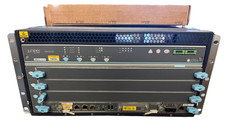
Juniper SRX5400X-BASE2 Services Gateway Firewall SRX5K-RE3-128G SCB3 2x AC PS
$5495.00

Juniper AP34-US Mist AI Wireless Access Point WiFi 6 Indoor AP (no power)
$200.00
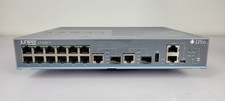
Juniper EX2200-C-12T-2G 12-Port Gigabit Ethernet 2x SFP Fanless Switch
$110.00

New Sealed Juniper EX4100-F-12P 12x 1GbE PoE 2x 10GbE uplinks 1 Year Warranty
$895.00

Juniper QFX5100-48S-3AFI 48-Port SFP+ 6 QSFP+ 2x SFP/RJ-45 Management
$249.97

Juniper Networks EX2300-48P 48-Port Gigabit PoE Managed Ethernet Switch
$79.99