

 Reply With Quote
Have you tried copying them to your desktop first, then to the other hard drive? I am not positive but I believe I may have read something stating such.


Hi folks
My buddy was very impressed 'tother day when I re-enlivened his dead Windows XP box using Knoppix 3.3
It appears something on his system has gone wonky, the system won't boot from anything resembling a hard disk on either IDE 1 or 2.
It'll boot ok from floppy & CD.
Once you're in, you can see everything on the hard disks, in Knoppix, just fine.
I currently have his main NTFS HDD on IDE1 as master, and a blank, dos-formatted small HDD on IDE1 as slave. CD is on IDE2.
NOW, although I can see hda1 and hdb1 plain as day in konqueror, plus any files that reside on them, what I can't do is copy anything across from hda1 to hdb1. The issue seems to be one of permissions, although when I look at 'properties', the 3x3 grid of permissions is already showing 9 x's
I'm wondering if I need to change to root (su passwd or similar?) then change read/write permissions for user knoppix$ (now knoppix#)?
So that I can get all his classwork off of hda1 and stick it on hdb1 for 'safe keeping', before we do the computer maintenance equivalent of taking a pickaxe to the bizarrely-acting motherboard / bios?
What is my best bet for allowing hdb1 to be written to within knoppix.
Thanks for any help.
Have you tried copying them to your desktop first, then to the other hard drive? I am not positive but I believe I may have read something stating such.
Oh right! I'll give it a go.. I'm not near his machine right now (& if fact he has it to bits I believe) I'll give him a tinkle on his mobile & see if we can have a go at that later. Thanks for the idea
See if this might help
http://www.shockfamily.net/cedric/knoppix/
If you've tried everything else, you might look at this strategem using the cat command.
http://www.knoppix.net/forum/viewtop...?p=22775#22775
It took well over 24 hours to go from one 80GB HD to another with the cat command, but when my main Windows NTFS HD was hosed, and I had files that were too large to burn to CD, it was the only thing that saved me. You will think the computer is hung, and be tempted to restart, but it just takes that long. AFAICT, it's kind of like using xcopy in DOS, only slower, so the target drive has to be at least as large as the source, and the target drive must be formatted as vfat (FAT32). This is what I had to resort to when I had a wonky MB or BIOS, and no backup of my NTFS drive.
Might also consider that since then, K3B has been enhanced to handle DVD burning, if you have a DVD burner. That option wasn't available to me when I needed it, though.
Oh, and I guess it would be too easy to suggest that you check to make sure that you have told Knoppix to make the second HD writable, right?
HTH
JD
Call me a noob..
erm.. if I right click hda2, the 3x3 permissions grid already has all items checked (like as if you were chmodding files '777' on a remote linux server in cute ftp say).. but I have a sneaking suspicion what you're referring to is something different there? Nope - I haven't explicitly done anything to make the second HD writable..told Knoppix to make the second HD writable, right?
No, I made the same mistake recently, NBD.
I'm in Windows now, so I can't be specific, but you started out correctly with the right-click on the drive, left click on properties. IIRC, from that dialog box you described, a button or tab takes you to a second one, which has a check box that says 'make this disk writable', or something to that effect, and you click Apply or OK, or something like that. Poke around and see if you can find it. If not, I'l try to see if I can find some time late tonight to log into Knoppix and find it for you.
My bet is that you'll be able to find it on your own, though. Remember, all drives are set to read only and are made non-write by default, because of a fear of a catastrophic noob error. In truth, I think this creates more errors than it prevents, but at least they aren't as catastrophic.
JD
It really couldn't be simpler. Right click, menu item 10, "Change read/write mode".
How the heck did I miss *that*
Mind, 'twas a dicky computer I was on. Wonder if Knoppix saw the dickiness & decided it wouldn't bother putting the option up, since it knew it wouldn't be able to do it anywaywell.. it's a theory anyway. To camouflage my eye problems.
I need to eat more carrotsthanks for the help JD.
On mine, it's right click the drive, permissions -> device tab -> (uncheck read-only), then OK.
I'm not sure what you mean by #10 (I'm using 3.4 2004-05-17, kernel 2.6)
At any rate, glad it worked for you!!
JD
Hmm. I just tried to copy some mp3 audio books from an NTFS partition to a DVD+R, using K3b in Knoppix 4.0.2. Everything seemed to go fine until I clicked "burn", at which point the DVD drive spun up and sat there without the HD activity light doing anything, until K3b gave an error message and spat out the still blank DVD.Originally Posted by j.drake
Do I need to tell Knoppix to make the DVD drive writable before K3b can write with it? If so, would it be asking too much for K3b to point that out when you try to use it to write?
 Posting Permissions


AMD Ryzen 7 9800X3D 8-Core AM5 CPU 4.7GHz 96MB L3 8MB L2 100MHz
$389.99

Apple MacBook Air 13.6” M2 8GB 256GB SSD 2022 MLY33LL/A 8‑Core CPU 8‑Core GPU
$529.95

8-core 10-core GPU baseboard 8654 to PCIE 5.0x16 GPU expansion baseboard
$377.77

Panasonic Toughbook CF19 MK8 Core i5 3610ME 2.7GHz 12GB RAM 512GB SSD Win 10 Pro
$319.00

(New) AMD Ryzen 7 5700X 8 Core 16 Thread AM4 Unlocked 3.4 GHz CPU OEM Tray
$169.99

AMD Ryzen 7 9850X3D 8-Core 4.5GHz Socket AM5 CPU 96MB L3 100-000001973
$439.94
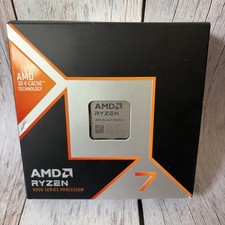
AMD Ryzen 7 9800X3D - Ryzen 7 9000 Series Zen 5 8-Core 5.2 GHz - Socket AM5 120W
$399.99
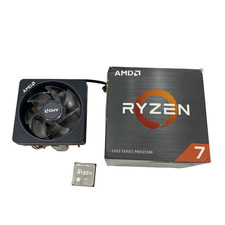
AMD Ryzen 7 5800XT 3.80GHz 8 Core 16 Thread AM4 #U6325 (AR)
$189.88
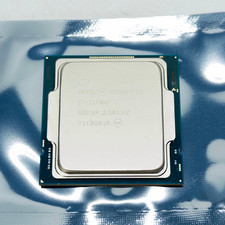
Intel Core i7-11700F SRKNR 2.5GHz 8-Core 16MB CPU Processor Socket LGA1200
$149.99

READ 2020 MacBook Pro A2338 - 13", 8-core M1, 8GB RAM, 256gb SSD,
$250.00