

 Reply With Quote
FAT32? This is Linux. Use cfdisk to delete those parts you made and create new ones. Try ext3 or something.


I am trying to set Knoppix up on my second hard drive. I first created a partition that is FAT32 with Partition Magic. Later, within cfdisk, I am able to select this partition and I am able to configure the root and the swap, (5 gigs for root, 500 MB for swap - my memory is 256 MB).
I set up my partitions and get to the point where it says, "this will take 10 to 40 minutes". It installs to about 60% and then the screen goes black and the hard drive stops and nothing happens - just the black screen. I have tried this install procedure with cheatcodes and without - same results.
Version is 3.3.
Suggestions?
FAT32? This is Linux. Use cfdisk to delete those parts you made and create new ones. Try ext3 or something.
Well, he said install on a second HD, so I assume he intends this as a shared drive between Windows and Linux. But the point is that you want ext2, ext3 or reiser for your program partitions, but if you want to save your data to FAT32, that can be done. If you do everything in ext3, your Windows install won't be able to use it. Get used to partitions for linux - it's not like windows where everything is just all thrown together.Originally Posted by mzilikazi
JD
Okay, so I deleted the partitions I set up with Partition Magic and set them up within cfdisk as ext3. Still no luck.
You set the partitions as ext3 in cfdisk? If you really did do that then you've discovered a new function of cfdisk.
You can set the swap partition type to 'swap' or 'type 82' simply by selecting [type] and hitting <enter> a few times. It will then be Linux swap. The other partition only need be type Linux which is default for cfdisk.
Now....I presume you know about dpms and the monitor blacking out to save power. Hit the up arrow when the screen goes black and see if it comes back. Don't hit <enter> or <space> as you may unknowingly select something.
Another something to try? Boot like so:
knoppix testcd
It should return 'Everything looks ok'
If none of the above works then my last suggestion is to try the text mode installer. Just boot like so:
knoppix 2
Thanks guys for the help. If the screen turns black just hit an up arrow key, lol.
Knoppix rocks!
 Posting Permissions


IBM System X3850-X5 Server w/4x Intel Xeon E7-4870 CPU , 512 GB DDR3 RAM,NO HDD
$1299.99

Unused IBM 09P0037 MAINBOARD For RS/6000 7044-170 P-Series
$375.00

IBM QRadar xx29 2x Xeon E5-2650v4 2x 900W PSU M5120 12x 3.5" Bay Server No RAM
$179.99

Rare Vintage IBM 93ZZ PowerPC Server Board - MCM Ceramic CPU - 40N1844 - 1.1 lbs
$49.99

Compaq ProLiant 1500R 5/100 rack server, Series 3155, with IBM 2.1GB HD, VINTAGE
$295.00

IBM SYSTEM X3500 M3 SERVER 7380AC1 TOWER Server XEON E5620 8GB RAID SEE NOTES
$110.30

IBM 4262 SYSTEM x3200 Tower - HDD Wiped, NO OS
$80.00
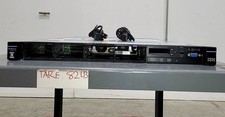
IBM SYSTEM X3550 M5 5463AC1 2.5x8 Server 2*XEON E5-2640 V3 8GB SEE NOTES
$85.99

IBM ADP Server Type 7870 AC1 NO HDD | 128GB RAM PC3L | 2 x Xeon E5620
$199.99

IBM 7014-T00 Enterprise 19" Rack Enclosure No Keys
$549.95
