

 Reply With Quote
At the bash prompt, type: XFree86 -version.


Hello reader!
I'm a hard-core Window$ user that just turned to the "good side" of the force.
I have one simple question that I believe you hard-core Linux users should be able to help me out with:
How do I determine what version of XFree86 I run?
I've looked at the manuals, FAQs etc at XFree86's homepage but I can't find it.
Any ideas?
Appreciate you taking the time to read my post.
Thanx!
/Freddy
At the bash prompt, type: XFree86 -version.
Thank you very much!Originally Posted by eco2geek
Works like a charm!
 Posting Permissions


Intel Core i7-3770K 3.5 GHz Processor
$39.00

Intel Core i7-9700 3.0 GHz Octo-Core (SRG13) Processor
$79.00
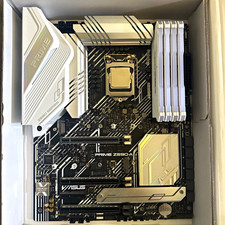
CPU-RAM-MOBO COMBO- 32gb DDR4 3600MHz, i5 CPU, Asus Prime Motherboard
$370.00

HP ProDesk 405 G8 Desktop AMD Ryzen 5 PRO 5650GE 16GB RAM 512GB SSD W11P
$319.99

Intel SRG17 Core i7-9700T Desktop Processor CPU
$74.99

Intel Core i7-9700 SRG13 3.0 GHz Desktop CPU
$80.00

Intel Core i5-14600KF Unlocked Desktop Processor
$259.99

Matched Pair _ Intel Xeon E5-2698 V4 2.2GHz 20-Core Processor CPU LGA2011 SR2JW
$94.99

GAMING COMBO: ASUS Prime H470M-PLUS MOTHERBOARD + i5-10600KF CPU + 16GB DDR4
$229.95

AMD Ryzen 7 PRO 8700GE 8-Core/16-Thread Up to 5.1GHz AM5 (FL1)
$175.00