

 Reply With Quote
Someone requested a new user section, and eadz indicated his approval of the idea. http://www.knoppix.net/forum/viewtop...?p=51523#51523 This would really make a good sticky for that section too if it is created.
jd


Due to the flood of posts on questions ranging from:
What is the root password?
How do I get root access?
What is the Administrator password?
etc, etc, etc... when using the Knoppix CD.
( NOTE: When you install Knoppix to your hard drive, you are asked during the install what the default user "knoppix" and "root" passwords are going to be, and this does not apply. Only when you use the CD to boot with, and have not booted under a hard drive install )
This post should get those posts down to an answer here, I hope...
Thanks Markus for the quote from the FAQ.Originally Posted by Here is what Markus
If this post does not answer your question about passwords, Knoppix passwords that is, you can also type root password in the box above, labeled Search Knoppix.net, to find other posted questions and responses.
Thank you.
Someone requested a new user section, and eadz indicated his approval of the idea. http://www.knoppix.net/forum/viewtop...?p=51523#51523 This would really make a good sticky for that section too if it is created.
jd
If you don't like to set a root password you can alway launch an application from the command line. Just get root first.
su
qtparted&
voila! qtparted launched as root.
If you havent noticed,
#su
#passwd
Will let you set the root password, simple.

-thank you all for helpw with root passwordw!
-now if I could just get rid of this for ever wthat keeps w showing up every where
even using Suse also on this machinew.
I'm using a logitech wireless itouch keyboard and I only have this problem in Linux although not sow far in Red Hat 9.
-any suggestionsw?
-can only delete by highlighting and then deleting
-if I back space it automaticawlly shows upw.
[email protected]
Hi
I have followed the instructions from the FAQ but when I type "passwd" I get the "Changing password for knoppix (current) UNIX password:" request, but I can't type anything at all after that.
I assume (as the FAQ quote says) that there's no password, so press enter without typing anything, but I get the message "passwd: Authentication faliure". I have also tried typing something, anything, but the console window won't let me enter any characters at this point.
I have tried this a number of times but to no avail.
Do you have any suggestions?
Never mind, got it.
I wasn't running the root shell window, just a standard console window.
appearantly YOU DON'T NEED TO CHANGE THE PASSWORD!!
Just go to the BASH shell (terminal) and just type "su" (w/ out the quotes)
There, u got root access!
This is ONLY FOR THE LIVE CD THOUGH!
xboxrulz
In some cases, you do... If you are logged in as the "default" Knoppix user, running off the Live CD, and want to make changes with, say, Control Center - some things require you to enter the "Administrator" password, or the "Super User" password... If a root password is not set, then entering nothing in that querry, reports an error. If you want to change the format of time and date, within Control Center, you need to be able to enter a Super User password... If you wanted, you could get around this, by doing a su in your own konsole, then typing kcontrol, or, you could just type sudo kcontrol - but some people will just want to click on the menu entry Control Center - and using the menu entry, will start the program in your "user" rights / permissions, and not root's.
Just a little enlightenment...
If you noticed, this post being directed to anyone new to Knoppix / Debian / Linux, that you have two options for being a root; su, and sudo.
Possible uses for these two Command Line commands:
sudo program - where program is something that you want to be run as root user priveledges. This can be used to run only one program as root, and when that program ends, your regular user priveledges are returned in the konsole you entered this command in.
su - This can be used when you need to enter more than one command, and they all need to be run as root. This command is good when you need to run more than one command as root, and dont want to keep adding the sudo in front of all of them...
For some examples:
sudo kcontrol
su
kcontrol
guarddog
netcardconfig
exit
( note, the exit at the end of the su "block" will cause the root logged in to "exit", and log out root, returning you back to your regular user account. It should also be pointed out that all three of the programs, listed inbetween su and exit, are run as root )
 Posting Permissions


OPNsense pfSense 8-Core Atom C3758 2.2GHz 8GB DDR4 64GB SSD 8x NIC QAT AES VPN
$145.00

pfSense Firewall 16-Core Atom C3958 8GB DDR4 RAM 64GB SSD 8x 1Gbe QAT AES-NI VPN
$184.99

OPNsense pfSense 16-Core Atom C3958 16GB ECC RAM 512GB SSD 8-Port QAT AES-NI VPN
$258.00

SonicWall TZ280 Firewall 03-SSC-6933 Advanced Edition 3YR NEW SEALED
$999.99
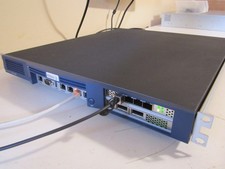
PfSense: 4x1Gb 4x10Gb 2x40Gb, E3-1275 v5, 32GB, 80GB, AES-NI (Supermicro X11SSW)
$359.00

Firewalla Gold Pro - 10 Gbps Cyber Security Firewall
$680.00

Fortinet FortiGate 60F FG-60F P24286-03-13 Network Firewall Security Appliance
$155.75

Firewalla Gold Pro 10GbE Firewall Router with Rack Mount Ears and USB Key
$829.99

Cisco Meraki MX67-HW Security Appliance Firewall NEW Unused Unclaimed
$202.50

Zero Trace Pen: All-in-one Tor Network Anonymous Drive + Cryptocurrency Wallet
$147.00