
Hi I'm using Knoppix 3.4. Is it bundled with an FTP client with a GUI that I can use to upload files to my FTP server?


Hi I'm using Knoppix 3.4. Is it bundled with an FTP client with a GUI that I can use to upload files to my FTP server?
You should be able to use konqueror for ftp transfers, just put-
ftp://ftp.your.site.com
and konqueror should give you the option to login. Then just drag and drop.
I like to use ncftp (CLI program) or Gftp (gui program), but they are not in Knoppix as far as I know. So I put them in my custom remaster, Overclockix.
Well, when I drop a .png file in my ftp folders shown in Konqueror, instead of uploading the file to the server, it just opens it in the browser.Originally Posted by arkaine23

How can I tell it to upload it instead of view it within Konqueror?
PS. The same happens with Mozilla, i.e. both applications behave as browsers not as ftp clients.
Oops! I believe this is happening because I am behind a company gateway/firewall. I have setup the proxy in Konqueror to use the gateway IP address on port 80 for ftp, but I assume that the company's gateway server will not allow any ports (1026, 1027) to open up for ftp exchange of data.
Am I correct in my assumptions?
 Posting Permissions

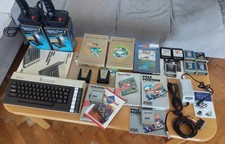
Atari 600XL Ultimate collection, 2xQuickshot1, psu Atari Keelog, 13x cart
$699.00
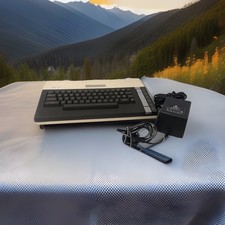
ATARI 800 XL 8-Bit Computer w/ Power Supply
$169.00

DEFECTIVE Atari 810 Vintage Computer Disk Drive powers on Unit Only Boo G3D
$55.24

Atari 400 Computer System console with Power Supply TESTED and Working
$160.00
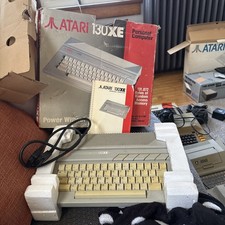
Atari 130XE Personal Computer Desktop w original box/cable/manual
$350.00
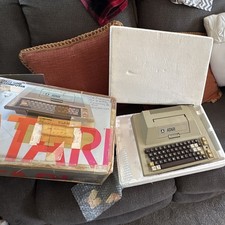
Atari 400 Vintage Home Computer System w/ Original Box MPN Atari 400
$175.00
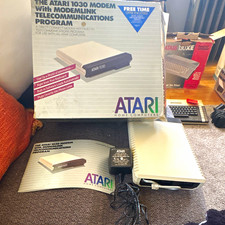
Atari 1030 External Dial-Up Modem 300 bps w/ ModemLink Box Manual Guide
$110.00

Fujinet 1.7.1 Atari 400 800 800XL 130XE 65XE XEGS Assembled, Tested, Working
$99.99

Atari Owner's Manuals Lot 130XE 1050 DOS 3 BASIC AtariWriter Vintage 6-Piece
$24.99
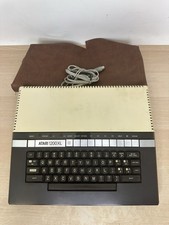
Vintage Atari 1200XL Home Computer System - NO Power Supply - UNTESTED
$224.98

 Reply With Quote