

 Reply With Quote
I'm not sure what you mean by "install software on them" but the first step is to put a file system on the partition you made.
For an ext3 format do:
mke2fs -j /dev/hda2
If you;ve done that then issue mount and see if your partition is mounted rw


hi
i recenlty made 2 partions 4 knoppix so that i can install software on them. But when i go to try and make a new folder to a partion it says that "it could not make this folder". I have un ticked read only and it still wont do anything??
HELP?????
I'm not sure what you mean by "install software on them" but the first step is to put a file system on the partition you made.
For an ext3 format do:
mke2fs -j /dev/hda2
If you;ve done that then issue mount and see if your partition is mounted rw
okay i just want to be able to write to my linux partition.Originally Posted by mzilikazi
i done wat u said and this comes up
invalid option -- /
Usage: mke2fs [-c|-t|-l filename] [-b block-size] [-f fragment-size]
[-i bytes-per-inode] [-j] [-J journal-options] [-N number-of-inodes]
[-m reserved-blocks-percentage] [-o creator-os] [-g blocks-per-group]
[-L volume-label] [-M last-mounted-directory] [-O feature[,...]]
[-r fs-revision] [-R raid_opts] [-qvSV] device [blocks-count]

You must be typing it wrong. Once you get the partition formatted you'll need to mount it before you can write to it.
yea sorry i was typing it wrong
How ever when i do type it i get this messgae
noppix@ttyp0[knoppix]$ mke2fs -j /dev/hda3
mke2fs 1.35 (28-Feb-2004)
mke2fs: Permission denied while trying to determine filesystem size
wtf???
oh and yea i cant write to my flash drive either (used to work with debain) but not now with live cd.
Update: Ive done the above(had to do it in root knosole) adn still cant wrtie to it
Then i went to konsole and done MOUNT and this is wat comes up
knoppix@ttyp0[knoppix]$ mount
/dev/root on / type ext2 (rw)
/dev/scd0 on /cdrom type iso9660 (ro)
/dev/cloop on /KNOPPIX type iso9660 (ro)
/ramdisk on /ramdisk type tmpfs (rw,size=816980k)
/proc/bus/usb on /proc/bus/usb type usbdevfs (rw,devmode=0666)
automount(pid487) on /mnt/auto type autofs (rw,fd=4,pgrp=487,minproto=2,maxproto=4)
/dev/sda1 on /mnt/sda1 type vfat (ro,nosuid,nodev,umask=000,uid=1000,gid=1000)
/dev/hda3 on /mnt/hda3 type ext3 (ro,nosuid,nodev)
What to do now?
**deleted double post*** DELETE THIS
My USB flash drive is seen as /dev/sda1
Well /dev/hda3 is already mounted which means it has to have a filesystem on it already. Notice however that it's mounted ro (read-only)Update: Ive done the above(had to do it in root knosole) adn still cant wrtie to it
Then i went to konsole and done MOUNT and this is wat comes up
knoppix@ttyp0[knoppix]$ mount
/dev/root on / type ext2 (rw)
/dev/scd0 on /cdrom type iso9660 (ro)
/dev/cloop on /KNOPPIX type iso9660 (ro)
/ramdisk on /ramdisk type tmpfs (rw,size=816980k)
/proc/bus/usb on /proc/bus/usb type usbdevfs (rw,devmode=0666)
automount(pid487) on /mnt/auto type autofs (rw,fd=4,pgrp=487,minproto=2,maxproto=4)
/dev/sda1 on /mnt/sda1 type vfat (ro,nosuid,nodev,umask=000,uid=1000,gid=1000)
/dev/hda3 on /mnt/hda3 type ext3 (ro,nosuid,nodev)
What to do now?
That ougtta get you write access.Code:mount -o remount,rw /dev/hda3
 Posting Permissions


16GB KIT (2x8GB) DDR3 Gamer Desktop RAM PC3 MIXED BRANDS VIPER VENGEANCE FURY
$10.00

Netac DDR4 32GB 16GB DDR4 3200MHz UDIMM C16 Desktop Internal Memory RAM Kit
$99.99

A-Tech 8GB DDR3 1600 PC3-12800 Laptop SODIMM 204-Pin Memory RAM PC3L DDR3L 1x 8G
$21.68

Samsung 32GB DDR4-2666V-2Rx4-RB2-12 RAM M393A4K40CB2-CTD6Q
$169.00

Major Brand 16GB (2x8GB) PC3-12800U DDR3-1600MHz DDR3-12800 DESKTOP RAM NON-ECC
$29.99

DDR4 Laptop RAM 4GB 8GB 16GB 32GB 2400 2666 3200 Samsung Hynix
$66.00

Samsung 16GB LPCAMM2 PC5 7500 DDR5 LPDDR5X CAMM2 M561K1LC4DM0-CCTGM RAM Memory
$189.00
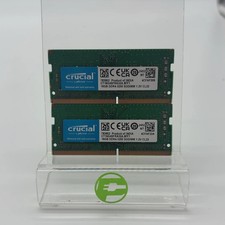
Crucial Laptop Ram 32GB (2x16GB) RAM DDR4 3200MHz CT16G4SFRA32A
$119.99

Corsair Vengeance DDR3 8GB 16GB 32GB 1866MHz PC3-14900 Desktop RAM Memory DIMM
$85.00

Crucial DDR3L 16GB 2 x 8GB 1600 MHz PC3L-12800 Laptop RAM Sodimm Memory 1.35V
$41.00
