
Sorry, I am still reading doc, FAQ, but I cannot find this:
How can I copy a file to a floppy disk. The disk has been formatted under Windows and I need to copy this file onto a Windows workstation.
Thank you.


Sorry, I am still reading doc, FAQ, but I cannot find this:
How can I copy a file to a floppy disk. The disk has been formatted under Windows and I need to copy this file onto a Windows workstation.
Thank you.
CasaBlanca,
You want the easy, or harder, more command line, way???
Easy way ( the GUI way )
1 ) Click on the icon on your desktop that is for the floppy drive (device) -=- this should mount the floppy device...
2 ) Click on the "House" icon you have that runs on the bottom of your screen -=- this should open a Konq. window ( like Windows Explorer )
3 ) Locate the file you want to copy, right-click on it, and select "copy"
4 ) Repeat click on the "<-" button on the top of the Konq. window, until you get to "/", then locate the folder "floppy", and click on it
5 ) Right-Click in the file view pane, and select "paste" -=- this should copy your selected file.
The Command Line Way
1 ) Open a Konsole window - the little "monitor" icon that runs along the bottom of your screen.
2 ) At the prompt, type "mount /dev/floppy" -=- without the double-quotes -=- this should mount the floppy device
3 ) Do the following command "cp [path-to-original-file][file name] [space] /floppy/[target-filename]
This should copy the file from [path]filename to the floppy, as [target-filename]
After you are done, be sure to "unmount" your floppy device, if you want to do it through the GUI - close the Konq. window, right-click on the floppy icon and select "unmount" - to do the same thing in the command line - just use "umount /floppy" - again, without the double-quotes...
Hope this helps,
Ms. Cuddles
Thank you so much, Ms. Cuddles.
CasaBlanca,
My pleasure... ( after re-reading my reply -previous- -=- I realized I had "maybe" a few typo's in it, hopefully, you caught them? )
One "notable" boo-boo, was the "mount" and "umount" - in one I say /dev/floppy, and the other I say /floppy -=- if you haven't gotten mount to work, or a umount to work, you might want to do a ...
and see what your devices look like... since "mount" and "umount" will look in that file to resolve any of these commands... As in the case of my fstab file:Code:cat /etc/fstab
(pardon my long fstab file, I like to comment things)Code:cuddles@Morpheus:~$ cat /etc/fstab # /etc/fstab: filesystem table. # # filesystem mountpoint type options dump pass # Root partition /dev/hda5 / ext3 defaults,errors=remount-ro 0 1 # Home partition /dev/hda6 /home auto defaults,auto 0 2 # Swap partition /dev/hda3 none swap defaults 0 0 # USB hub mount point usbdevfs /proc/bus/usb usbdevfs defaults 0 0 # SYS hub mount point sysfs /sys sysfs defaults 0 0 # Boot partition /dev/hda1 /mnt/hda1 ext3 noauto,users,exec 0 0 # proc /proc proc defaults 0 0 # Secondary HD part1 VFAT DOS FS /dev/hdc1 /mnt/hdc1 vfat defaults,users,noauto,exec,umask=000 0 0 # Secondary HD part2 Linux FS /dev/hdc2 /mnt/hdc2 ext3 defaults,users,noauto,exec 0 0 # SanDisk USB /dev/sda1 /mnt/sda1 vfat noauto,users,exec,noatime,umask=000 0 0 # Remaining devices /dev/fd0 /floppy vfat defaults,user,noauto,showexec,umask=022 0 0 /dev/dvd /dvd iso9660 defaults,ro,user,noexec,noauto 0 0 /dev/cdaudio /cdaudio iso9660 defaults,ro,user,noexec,noauto 0 0 /dev/cdrom /cdrom iso9660 defaults,ro,user,noexec,noauto 0 0 /dev/cdrom1 /cdrom1 iso9660 defaults,ro,user,noexec,noauto 0 0 cuddles@Morpheus:~$
My mount point would be /floppy -=- but the actual device name would be /dev/fd0
Hopefully, you figured that out on your own system, if you did the command line way, and you aren't just sitting at a command Konsole wondering what is going on... ( sorry bout the quick, unthought-out, response, initially - I should have been more "detailed" on it, before )
Hope this has helped,
Ms. Cuddles
 Posting Permissions


Crucial BX500 1TB SATA III 2.5" Internal SSD (CT1000BX500SSD1)
$79.00
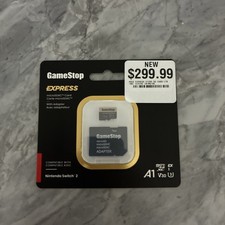
‼️NEW GAMESTOP EXPRESS 1TB MICROSDXC MEMORY CARD w/ ADAPTER NINTENDO SWITCH 2 ‼️
$222.22

1TB SanDisk Extreme Portable SSD (Recertified) - A196-SDSSDE61-1T00
$150.99

NEW 2026 SGIN 18.5" Laptop Windows 11 PRO Intel N5095 16GB DDR4 1024GB SSD
$444.99

Fanxiang 1/2/5/10Pcs 2.5'' SATA SSD Lot 1TB 2TB 4TB 512GB 256GB TLC Internal SSD
$759.99

Acer Aspire 14" AI Copilot+PC Laptop Core Ultra 5 226V Gen 4 ARC 16GB 1TB Refurb
$490.58

SAMSUNG T7 Portable SSD 1TB Indigo Blue USB 3.2 Gen2 External MU-PC1T0H/AM
$159.99

Acer Predator Helios Neo 16S AI 16" i9 275HX 2S RTX 5070 Ti 32GB 1TB SSD Refurb
$1775.56
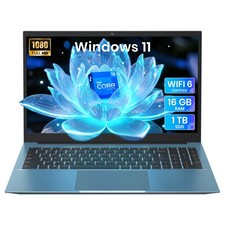
2026 NEW SGIN 15.6" Laptop Win11 Intel i3 16GB RAM 1TB SSD Wi-Fi 6 RJ45 USB-C
$302.99
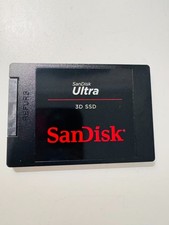
SanDisk Ultra 3D SSD 1TB, SDSSDH3 2.5" SSD Drive SATA III 6GB/S (SDSSDH3-1T02)
$138.56

 Reply With Quote