

 Reply With Quote
The profile file is /etc/profile which applies to all users, you should be able to find the .bashrc and .bash_profile file in your home directory. As for the C shell I have no idea.


Hi All
I am new to KNOPPIX. I have a question concerning the read/write/save ability of .profile and .bshrc files. I need to edit these files but I am unable to find them (and subsequently edit and save them) in KNOPPIX. Does anyone know if this is possible? I have noticed that after running KNOPPIX, two files name bash.history and .history are created in the root directory in the 'C' drive. Would the .profile and .bshrc files be created in a similar manner.
As a side note, I have had trouble running C Shell accessed from the Shells dropdown menu. When I select C Shell, the window opens and quickly disapears. Is this suppose to happen?
Regards
Marcus Jacobs
The profile file is /etc/profile which applies to all users, you should be able to find the .bashrc and .bash_profile file in your home directory. As for the C shell I have no idea.
--' cat /etc/shells ' and see ' man chsh '. Start an rxvt or Konsole, and see if you can run ' csh ' from there.
' man bash ' and "/" search for ".bashrc". If you are the knoppix user, they are/will be created in "~/knoppix" (/home/knoppix). If root, they are in "/root/.bashrc".
--Don't forget, you may have to chmod +x these files.
Originally Posted by marcdevon
 Posting Permissions


Intel Core i7-3770K 3.5 GHz Processor
$39.00

Intel Core i7-9700 3.0 GHz Octo-Core (SRG13) Processor
$79.00

INTEL CORE I9-10940X X-SERIES PROCESSOR | 3.30GHZ | SRGSH
$179.99

Intel 6th Gen Core i7-6700K 4.0GHz (Turbo 4.2GHz) 4-Core LGA1151 CPU SR2L0
$38.00

Intel Core i7-9700 SRG13 3.0 GHz Desktop CPU
$80.00
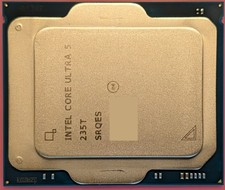
Intel Core Ultra 5 235T SRQES CPU Processor Excellent Used Condition
$88.00

Intel Xeon E3-1230 v3 SR153 3.3GHz Quad Core LGA 1150 CPU Processor
$14.49

Intel Core i5-7500 SR335 3.4GHz 4-Core LGA 1151 CPU PROCESSOR
$14.99

PS5 Over Heating Problem Solver 1.5 Grams Liquid metal thermal paste CPU, GPU
$15.99
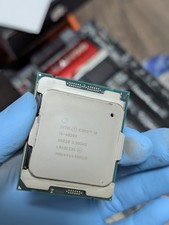
Intel® Core™ i9-9820X 3.3GHz CPU
$68.00