

 Reply With Quote
As root visudo then use the examples in the file for your guide.Originally Posted by rrfish72


How do I add myself to the sudoers.
As root visudo then use the examples in the file for your guide.
Aw cmon Stephen are you gonna punish the noobs w/ vi?vi is about as friendly as a coiled rattlesnake! You don't have to use vi you can use any editor you want.
su
<passwd>
xedit /etc/sudoers
Not according to that ...Code:# sudoers file. # # This file MUST be edited with the 'visudo' command as root. # # See the man page for details on how to write a sudoers file. #
Well I don't even have vi on my Linux boxen but I'm a sudoer! OK so I'm a rebel. :P
Me too! I purged vi because, I couldn't figure that editor out. How anyone ended up liking vi as an editor is beyond me, that is the most unfriendly, unintiutive editor I have ever laid eyes on. Perhaps the warning could have said that it can be edited in a straight ascii editor such as nano, mcedit, ... you get the idea, as long as it is anything but vi.
The warning is there because when using the visudo it locks the file and prevents any other editing access to it for as long as you have it open this is the same reason vipw exists as well. Oh and BTW you were using VIM (vi improved) not VI if you think it was bad you should try the real thing.
I never understood why this warning was there before. I've long since edited it out.
Personally I use Kate, I have a RootKate icon on the desktop. Just drag'n'drop the Kate icon from the start menu & edit to run as root...with KDE3.2 this is in 'advanced application' properties setups. Anyway, I highly recommend using Kate for newbies unfamiliar with CLI editors.
For CLI editor I use 'joe' (Ms Cuddles favorite app javascript:emoticon('') just because it's an interface I'm familiar with from a long time ago in the land before Windows or Linux.
Is this where you post your favorite editor?
I think visudo also refuses to save the file if you've made a mistake in the syntax, or at least tells you about the mistake.
That said, I once ran vimtutor and the next command was apt-get install nano.
So how do I add to the llist? I don't know how to edit the list because I can't find it. Help?
 Posting Permissions


INTEL XEON E5-2680V4 SR2N7 2.40GHZ CPU
$11.00

Dell Precision Tower 7810 Xeon E5-2630 v3 @ 2.40GHz , 32GB Ram, NO HDD, NO OS
$239.99

Dell EMC PowerEdge R440 Xeon silver 4215 2.5GHz 16 GB ram 2x 550W PSU No HDD
$275.00

Dell Precision T7820 2x Xeon Silver 4114 2.20GHz 950W No RAM GPU HDD 4x SATA
$350.48

Dell Precision T5820 Workstation 3.70GHz W-2135 No RAM/ GPU/ HDD/ OS
$179.98

Intel Xeon E5-2699 V4 2.20GHz 55M 22-CORES LGA2011-3 Server Processor 145W SR2JS
$84.49
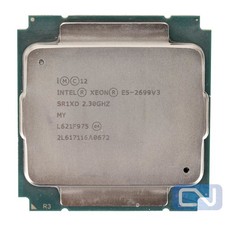
Intel Xeon E5-2699 v3 18 Core 2.3 GHz 45MB SR1XD LGA 2011-3 B Grade
$15.95

Intel Xeon E5-2690 v4 SR2N2 14 Core 2.6GHz 35MB LGA2011-3 CPU *km
$15.99

Dell Precision T5820 950W Workstation 4.00GHz W-2125 No RAM/ GPU/ HDD/ OS
$144.98

Intel Xeon Phi 5110P 60-Core 1.053GHz Coprocessor
$50.00
