

 Reply With Quote
Boot with "knoppix wheelmouse" to enable protocol for wheelmice.


Hello...I cannot get my USB 2 button wheel mouse to work on my laptop. The touch pad works fine but I would like to use external mouse. Any help appreciated....thanks.....bob58
Boot with "knoppix wheelmouse" to enable protocol for wheelmice.
I had similar problems trying to activate my usb optical wheel mouse. I ended up reloading Knoppix on my hd. In the process, when I loaded the live CD, V3.4, happened to notice that my usb optical wheel mouse worked fine. When I installed to my hd, using knoppix-installer, at one point it asked me if I wanted to install similar like the live CD, I marked yes and rest is history. Everything works fine.
So this begs a question of what is the difference between the Live CD and what is loaded on a standard install?
I'm a newbie so where can you see the install scripts?
I see where you say to use "knoppix wheelmouse" but how can I do that with a HD install?
 Posting Permissions


Yealink T48S VoIP/SIP Phone, 2 x Gigabit Ports PoE 7" Color SIP-T48S | TESTED
$34.95

SIM Bank 32 SIM Card Slots Ethernet SIM Server for GoIP
$400.00
Cisco IP Phone CP-8821 No Battery C2-F3
$185.00

Poly CCX 400 Desktop Business Media Phone VoIP 2200-49700-019
$49.99

Yealink SIP-T33G IP Phone 4-LineSpeakerphone VoIP Desk Phone Black w/ Power Sply
$25.00

5 Allworx Verge 9312 VoIP IP Phone 12-Line Speakerphone Black RJ-45 MPN 8113120
$999.00
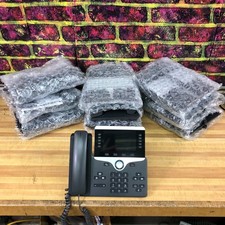
Lot of 10 Cisco CP-8851 5-Line VoIP Business Phone w/ Stand
$249.95

Yealink SIP-T44W VoIP Phone 12-Line Gigabit Speakerphone RJ-45 Gray/Black
$44.00

Grandstream WP810 Portable Cordless Wi-Fi IP Phone
$49.28

Cisco CP-8841 IP Phone Charcoal Handset And Stand Included
$27.99