

 Reply With Quote
This occurs often after an install. Just delete existing cdrom icon and make a new one by right clicking on the desktop and select for 'New device' etc.


I have installed knoppix by booting into knoppix off the cd and then doing a hdd install from within knoppix...
But for some reason after the install has completed and i have rebooted, the cd-rom link from the desktop gives this error
"Unable to run the command specified. The file or directory file:/mnt/cdrom does not exist."
Can anybody help me with this ?
This occurs often after an install. Just delete existing cdrom icon and make a new one by right clicking on the desktop and select for 'New device' etc.
I tried redoing the icon but does not work. It tells me that the device does not exist
I tried mounting at the root shell but no success.
It works when I boot live from the cd, I have v3.4.
when I watch the boot up sequence, it says it recognizes it as a TEAC cdrom rw...
any suggestions?
I'm a newbie with knoppix, so I think I cannot yet help others. I can boot from a
v3.4 CD-ROM when I use an old-fashioned, read-only Compact-Disc reader device.
Then all is OK.
But when I try to boot from a CD-RW Mitsumi CR487-ETE, the boot sequence
ends with a message: " Knoppix File system not found. Sorry! " I'm using the same
disc (v3.4) in each case. The CD-RW read-write device is correctly recognized
during boot as hdd:
After the "not found" message, Knoppix puts me into a very limited shell.
Can I somehow command
1) the KNOPPIX filesystem to be mounted from device hdd,
and
2) the knoppix/KDE to continue initialization ?

I just resolved this problem today, but my answer was 20 - 25 pages back in another catagory on this forum. So let me clue you in and someone here can fill in the blanks. The desktop icon is not pointed at where your cdrom actually is, so ignore it. To find your cdrom there is a grep command that can be executed in a shell console. It could be hd3, sr0, sr1 et/al. When you actually find how it is recognized, you will have to edit etc/fstab. FIRST place a # sign in front of the cdrom identifier line in fstab. That changes it to a comment and if you need to retrieve it, just remove the # sign. Next you will have to insert an identifier line eg: dev/<the grep location>/cdrom, < options (don't ask me?)>. Then you have to point whatever you need at this location. i:e cd player. Then there are permissions to deal with so it is available to users that have a need for it.
Sombody please fill in the grep command blank for me and WHERE TO FIND FSTAB. I couldn't find that on this site. Actually how to navigate to fstab.
Fstab opens in Kwrite so editing is similar to writing posts to this site.
After you think its working use the -t iso9660 (remember I need someone to fill in the blanks) to verrify its operation, you will hear it trying to find a diskin the cdrom.
Remember the desktop icon is probably useless. When you know where your cdrom is and point things at it and ithey work, then delete the existing cdrom icon and create a new one, pointed in the right place.
Please someone fill in the blanks.
By the way, this should provide an idea as to what NooBs need in the way of info.
I solved the problem that I posted here on Aug 16, by
replacing the Mitsumi CD-RW with a different model which
knoppix v3.4 is able to mount; the new model registers as an
HL-DT-ST GCE-8525B.
The old, replaced CD-RW Mitsumi CR487-ETE could correctly
mount my knoppix v3.4.0 boot disk as an iso9660 filesystem
when it was driven with Windows2000. Knoppix 3.4.0 .
It could not mount the same boot disk as the same filesystem
when driven by knoppix or Debian(sarge) software
It appears that linux's drivers treat the CR487-ETE differently
than do Microsoft's.
 Posting Permissions

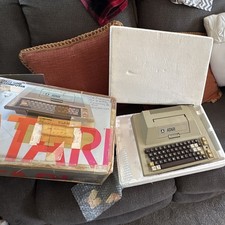
Atari 400 Vintage Home Computer System w/ Original Box MPN Atari 400
$175.00
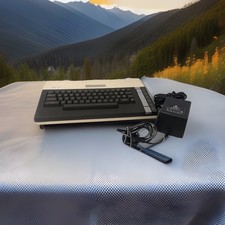
ATARI 800 XL 8-Bit Computer w/ Power Supply
$169.00
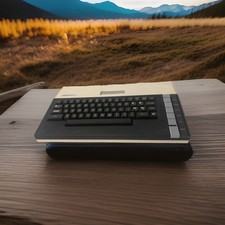
Atari 800XL Home Computer - For Parts only
$99.95

DEFECTIVE Atari 810 Vintage Computer Disk Drive powers on Unit Only Boo G3D
$55.24

Fujinet 1.7.1 Atari 400 800 800XL 130XE 65XE XEGS Assembled, Tested, Working
$99.99
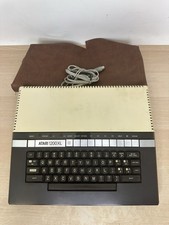
Vintage Atari 1200XL Home Computer System - NO Power Supply - UNTESTED
$224.98

Atari 810 FLOPPY DISK DRIVE ● UNTESTED READ
$35.99
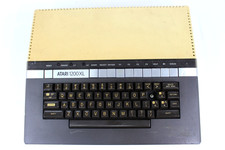
VTG Atari 1200XL Home Computer System 1200 XL ** Tested ** Parts or Repair
$248.75

Atari 400 Computer System console with Power Supply TESTED and Working
$160.00

Atari 800 8-bit Computer System 48k Tested Power. Has Cords And Left Cartridge
$279.95