

 Reply With Quote
According to http://www.linux-wlan.org/docs/wlan_adapters.html.gz, the DWL-G650+ uses a TI (Texas Instruments) chipset. Try Googling for 'linux TI chipset' or similar.


Some good soul I hope can help me with this:
I bought a D-Link DWL-G650+ wireless card. Well, so far so good...
Googling, I got in to:
http://www.wearablelinux.org/modules...showpage&pid=1
Here, the thing starts becoming ugly to me as a newbie. I have downloaded everything but I am really stock here.
The million question....did anyone figure out a simpler process????
If not, I ll be spending some nights to make it work! or may have eaten the f..... card...
Thanks.
According to http://www.linux-wlan.org/docs/wlan_adapters.html.gz, the DWL-G650+ uses a TI (Texas Instruments) chipset. Try Googling for 'linux TI chipset' or similar.
Thanks!
I ll try that.
Originally Posted by gruntbuggly
FabianD
Your card is using a TI ACX111 chipset. Google acx100 and go to the sourceforge page for the project (s/b #1 on the response list). After that then go to the link further down that has to do with houseofcraig.net and read that. I'm using an acx100 card (the older cousing 802.11b vs g) and have had pretty good success. One caution is that WEP doesn't work with this driver for the 111 chipset.
Sokminer
I appreciate your help!
I am googling as gruntbuggly told me, but still not getting to good results.
You have given me additional data, I hope I can do something with this card.
I ll be back to the forum and tell the news...
Thanks.
Sokminer:
Trying to find if my wireless card had this chipset and according houseofcraig webpage I did this:
root@0[knoppix]# lspci -n
0000:00:00.0 Class 0600: 1039:0650 (rev 80)
0000:00:01.0 Class 0604: 1039:0001
0000:00:02.0 Class 0601: 1039:0008 (rev 14)
0000:00:02.3 Class 0c00: 1039:7007
0000:00:02.5 Class 0101: 1039:5513
0000:00:02.6 Class 0703: 1039:7013 (rev a0)
0000:00:02.7 Class 0401: 1039:7012 (rev a0)
0000:00:03.0 Class 0c03: 1039:7001 (rev 0f)
0000:00:03.1 Class 0c03: 1039:7001 (rev 0f)
0000:00:03.2 Class 0c03: 1039:7001 (rev 0f)
0000:00:03.3 Class 0c03: 1039:7002
0000:00:04.0 Class 0200: 1039:0900 (rev 90)
0000:00:0a.0 Class 0607: 104c:ac50 (rev 02)
0000:01:00.0 Class 0300: 1039:6325
0000:02:00.0 Class 0280: 104c:9066
Then Craig says: "104c:9066 *this is an acx111 device, which I can't help you with yet. version 0.2.0pre8_plus_fixes_7 of the acx100 driver and later are now working! with these devices, see this acx111 thread in the forum for help"
I just wanted you to know.....I am still giving fight!....
Bye.
Fabiand
You're getting there. Further down on the google page is something that will take you to andi at lisas dot de. Or something like that. This web page has the most up to date driver for the acx100/111. It is currently at ..._plus_fixes_24.tar.bz2 which was released yesterday. I will tell you that the driver is extremly kernel dependent i.e. must be compiled with the right kernel source in the right place.
Hope this helps
Bill
Barbaro!!! Funcionó!!!
Bill, I tell you how I did it, but first I give all data refering to my laptop, linux distro and wireless card:
Its an Asus Laptop A2500H running Knoppix 3.4 installed on hard disk, debian 2.4.26.
The wireless card is a DLink DWL-G650+ (with chipset acx111 of TI)
I downloaded from http://lisas.de/~andi/acx100/ this package:
acx100-0.2.0pre8_plus_fixes_24.tar.gz
Then:
# tar zxvf gunzip acx100-0.2.0pre8_plus_fixes_24.tar.gz
# make fetch_firmware -There were problems with wget as my box had a proxy, so I did it through browsering and downloading into a subdirectory, then I commented the file fetch_firmware in this specific task-
# make
# make install
modprobe acx_pci fails so:
I created a subdirectory /usr/share/acx and copy the .BIN files there.
Now the modprobe acx_pci started to work correctly.
Finnally, I configured with start_net things like, channel, ip, mask, default gw, etc.
Now I using it with some problems like:
1. suddenly comes down!...I have to start it over with ./start_net and comes up again
2. suddenly it freezes!...all leds are on....nothing happens...I have to stop with ./stop_net and restart it with ./start_net
I hope I can help somebody else.....and thanks to the forum for helping me out!!!
Saludos.
Fabian.
Fabiand
The driver is still somewhat flaky. I have had this happen as well. There are several possibilities. One is that more than one computer using the WiFi connection seems to cause these types of problems, especially a Win box. I don't know why. Another is a wireless telephone that uses the 2.4GHz band. They're rather unfriendly to WiFi or at least the one that I had was. There are some parameters (see iwpriv) that you can use to increase the signal strength but don't go too high or you'll burn out the card. Another thing is that apparently the 650+ is susceptable to overheating (it's buried in the ACX100 README).
You may want to report this crash of the card to the development team on the Sourceforge forum for the acx100/111. There's a selection for the forum on the ACX100/111 home page. I've found the forum really helpful and the dev team really knowledgeable. BTW _plus_fixes_26 is out.
One other thing that I noticed is that using the start_net script gave me the lockup problem. If I configure the card manually w/ iwconfig, ifconfig and pump my connection (currently up for a week) seems considerably more stable. It's an observation and I don't know how to go about analyzing why this happens.
Glad to hear that it's working (sort of)
Bill
Bill, you may be right...
To the access point there two boxes that send data, one is my laptop and the ohter one is a windows98 box and I dont have wireless phones here.
I will report this as you say at acx111 and try the newer driver and see what happens.
See you.
Fabián.
 Posting Permissions


🔀 Juniper Networks EX2300-C-12P 12× Gigabit PoE+ • 2× 10G SFP+ Compact Switch ⚡
$109.99

Juniper EX2300 12-Port Gigabit PoE+ Managed Network Switch P/N: EX2300-C-12P
$149.99

Juniper Networks EX3400-24T 24-Port Ethernet Switch w/Power Cord
$174.99

Juniper EX3400-24P 24-Port PoE+ GbE + 4-Port 1/10Gb SFP Switch
$245.00

Juniper EX2300-C 12 Port Compact Gigabit Switch EX2300-C-12p Discounted Cosmetic
$79.86

Juniper Networks AP33-US Indoor Wifi6 (US Version) 5GHz: 4x4:4; 2.99
$24.99

Juniper MX204 +JUNOS and Dual Power Supply
$7299.99
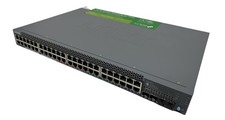
Juniper EX2300 48-Port Managed L4 Ethernet Switch, 10GbE/GbE, Modular 1U
$758.09

Juniper Networks EX2300-48P 48-Port Gigabit PoE Managed Ethernet Switch
$79.99

Juniper Networks AP33 Wireless Access Point Bluetooth WiFi 6 Cloud Managed NIB
$54.99
