-
eco2geek,
Line 2 in the fstab has mounted /dev/hda5 to /cdrom.
Log in as root and make a backup of the fstab file first. The edit it:-
Comment out the second line by adding a hex (#) in front of it.
Insert a 3rd line as such:-
/dev/cdrom /cdrom iso9660 defaults,ro,user,noexec,noauto 0 0
Goto to /dev directory and type:-
chmod 777 /dev/cdrom
chmod a+r /dev/scd0
After that try playing audio cd and see if it works. If it does, you would have to mount /dev/hda5 to somewhere else.
-
Senior Member
registered user
Oh, one thing I found out regarding audio CDs, if you have KDE v3.2.3 (doesn't work for KDE v3.2.2):
If you stick an audio CD in, fire up the Konqueror Web browser, and type audiocd:/ in the address bar, it'll show you a list of the tracks on your audio CD! On mine, it also shows a folder called "Ogg Vorbis", and I can drag track(s) out of that folder and Konqueror will convert/save them as Ogg Vorbis files.
Apparently some versions of Konqueror that you can download from KDE also have MP3 conversion support built in.
Other protocols Konqueror supports (such as "fish" for ssh) can be seen by pulling up the KDE Info Center and clicking on Protocols.
Edit: I should say, it works with KDE 3.2.3 on Kanotix BugHunter 7a, but not with KDE 3.2.2 on Knoppix 3.4. Haven't tested it with Knoppix 3.6 yet.
-
Senior Member
registered user
Oh, by the way, it's a DVD-ROM drive, (it plays cd's too  ) . Is this the problem?
-
No, should not be a problem.
Post the your /etc/fstab file here so we can see how are your drives mounted.
-
Senior Member
registered user
When I was trying to save the /etc/fstab output, it wouldn't let me save to the hard drive for some reason, so I tried a floppy disk. It said that mount point /mnt/auto/floppy doesn't exist, or something like that. It's that same basic thing I get with the cdrom. I think there's a problem with both of them.
-
Kowood,
I don't think there is anything wrong with your system (perhaps the mount points have been changed).
Go to your home directory and type the following:-
cat /etc/fstab > fstabfile.txt
The output of fstab should be in fstabfile.txt.
-
Senior Member
registered user

Originally Posted by
eco2geek
Oh, one thing I found out regarding audio CDs, if you have KDE v3.2.3 (doesn't work for KDE v3.2.2):
If you stick an audio CD in, fire up the Konqueror Web browser, and type audiocd:/ in the address bar, it'll show you a list of the tracks on your audio CD! On mine, it also shows a folder called "Ogg Vorbis", and I can drag track(s) out of that folder and Konqueror will convert/save them as Ogg Vorbis files.
Apparently some versions of Konqueror that you can download from KDE also have MP3 conversion support built in.
Other protocols Konqueror supports (such as "fish" for ssh) can be seen by pulling up the KDE Info Center and clicking on Protocols.
Edit: I should say, it works with KDE 3.2.3 on Kanotix BugHunter 7a, but not with KDE 3.2.2 on Knoppix 3.4. Haven't tested it with Knoppix 3.6 yet.
How did you do this?? With Konqueror 3.3.0 on Knoppix 3.4 all I get is a 'Protocol not supported" message. No 'audiocd' protocol in info center either.
-
Senior Member
registered user
Originally Posted by
CrashedAgain
How did you do this?? With Konqueror 3.3.0 on Knoppix 3.4 all I get is a 'Protocol not supported" message. No 'audiocd' protocol in info center either.
Thinking:
That tells me Konqueror's "audiocd:/" capability is preinstalled in Kanotix BH5 and BH7, but apparently not in Knoppix. (I didn't have to "do" anything...saw it mentioned in a "For Dummies" book, of all things, tried it, and it worked.) Some Googling indicates the capability was new in KDE 2.1.
And it's being referred to as an "I/O slave" and part of the "kio" package...so...there it is in a Debian package search, called "kdemultimedia-kio-plugins" (not installed)...so...on my Knoppix 3.4 installation...
# apt-get update && apt-get install kdemultimedia-kio-plugins
Bingo. Now it's there. Try that.
-
Senior Member
registered user
Where the heck do I find the KDE Info Center?
TIA,
AJG
-
Senior Member
registered user
On Knoppix 3.4, "K menu" > "System" > "Info Center", or use the command "kinfocenter &" in a console, or press Alt-F2 and type "kinfocenter" 
Similar Threads
-
By asearle in forum General Support
Replies: 0
Last Post: 04-16-2005, 12:15 PM
-
By cuberds in forum Hardware & Booting
Replies: 0
Last Post: 02-06-2005, 01:16 AM
-
By jjman123 in forum General Support
Replies: 2
Last Post: 10-13-2004, 11:31 PM
-
By rrfish72 in forum Hdd Install / Debian / Apt
Replies: 2
Last Post: 08-05-2004, 12:04 AM
-
By MorskNorsk in forum General Support
Replies: 10
Last Post: 09-15-2003, 12:20 PM
 Posting Permissions
- You may not post new threads
- You may not post replies
- You may not post attachments
- You may not edit your posts
-
Forum Rules

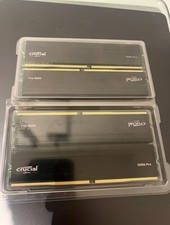
128 gb ddr4 ram 3200 mhz (32x4)
$1000.00
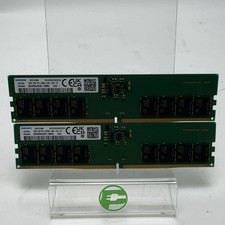
Samsung M323R2GA3EB0-CWM0L 32GB (2x16GB) RAM DDR5 5600MHz PC5-5600B-UA0
$374.99
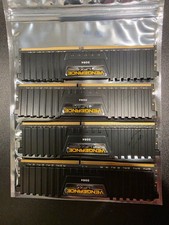
Corsair Vengeance LPX 128GB (4 x 32GB) (DDR4-3600) Memory (CMK64GX4M2D3600C18)
$899.00

DDR4 Laptop RAM 4GB 8GB 16GB 32GB 2400 2666 3200 Samsung Hynix
$31.00
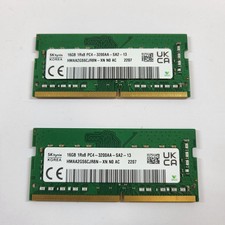
SK Hynix 2207 32GB (2x16GB) RAM DDR4 3200MHz PC4-3200AA-SA2-13
$114.99

RAMAXEL Lenovo 32GB LPDDR5X CAMM2 7500MHz Laptop RAM | UNTESTED
$445.00

A-Tech 8GB DDR3 1600 PC3-12800 Laptop SODIMM 204-Pin Memory RAM PC3L DDR3L 1x 8G
$21.68

Crucial DDR3L 16GB 2 x 8GB 1600 MHz PC3L-12800 Laptop RAM Sodimm Memory 1.35V
$41.00

Lot Of 50 8GB DDR4 RAM PC4-2666V-UA2 DIMM Desktop Memory Mixed Brands TESTED
$1750.00

Samsung 16GB DDR4 2666MHz PC4-21300 SODIMM RAM M471A2K43CB1-CTD Tested Working
$70.99



 Reply With Quote