

 Reply With Quote
How much RAM do you have in your machine?
What is your CPU type?
Any peculiar devices eg. wireless pcmcia?


Well, I just found out about this distro the other and it seems to be nice. I'm having a small probelm though. I have tried countless time to boot it up. But, everytime it hangs after the autodetection of my hardware. I have tried numerous combinations of cheat codes ( everything from no cheat code to failsafe ). I have downloaded this twice now. And, I really want to play with this. Please help me. Thanks in advance.
How much RAM do you have in your machine?
What is your CPU type?
Any peculiar devices eg. wireless pcmcia?
I have a P3 1gig with 640mb ram, on an Asus TUV4X mobo. I also have a ATI Radeon 64 ( a.k.a. 7200 ) video card, a Hercules GTXP sound card, and a realtek nic ( don't remember which brand ). I have two hard drives, one is a WD 80 gig special edition, and the other is an old Maxtor 12 gig drive. APM and PnP are disabled in the BIOS, even though APM is still detected. I have tried the nodma and noapm cheats, and neither one makes a difference. Thanks.
And it doesn't even boot with failsafe?
What about knoppix 2?
And what happens when you run expert?
By the way the new Knoppix has been released, and there should be a lot of bugfixes - so..
Well, I just got down downloading 3.2 and it's still doing the same thing. Right after the autoconfiguring devices it sits theres. I have let it sit for about 20mins before I finally gave up. When I try knoppix 2 or failsafe it hangs at the same spot.
So it tells you:
- Mouse is ...
Soundcard ...
Monitor is ...
Using Modes ...
And then stops or does it continue with:
- Scanning for Harddisk partition ... and creating /etc/fstab. . . Done
Or does it even tell you:
- Network device eth0 detected ...
First make sure that it autodetects your video card correct - it should be using the 'radeon' driver.
If it doesn't detect your harddisk partitions try using the 'knoppix noscsi' option since KNOPPIX default sets all ide to scsi. (but you've already done that, right?)
If it detects your network dev, and then hangs, try disconnect the device from the network.
If the above doesn't help, then please tell the last statement the system gives before locking up.
Good luck
Oh if only I got that far into it. After the boot prompt, I get the messages about accessing the cd-rom, and setting the ramdisk. After that I get all the CPU/APM/USB info. Then it goes into the autoconfiguring of the decives. I get the done message from that, and then the cursor disappears, and it just sits there and that is as far as I get. The noscsi option didn't make any difference. Thanks.
Does your CD-rom make odd sounds when it starts? if so try using a other device if you can find one. But before doing so start by trying the 'knoppix testcd' bootoption. I don't know how you have burned the iso-file, but I could imgaine that using a Windoze could cause problems
Besides have you ever checked the RAM with eg. memtest86 (http://www.memtest86.com/) I read that they should have a bootable CD-image.
Finally your 640 MB RAM - if anything else fail I would try booting with only one RAM block, or two similar blocks.
Good luck
I have the same problem. Gets to autoconfiguring and says done then does nothing else.Originally Posted by Bieren
I just tried the latest 3.2 as it's been a while since I tried using Linux and wanted to see where it's at.
I've got an Asus A7N266-VM MB with a Duron 1200 and 512MB. It seemed to detect all my hardware, but when it displayed the eye splash screen and displayed the icons showing the progress it froze on the one where it's detecting/configuring peripherals or something like that. Tried it twice.
The real downer is that when I took the CD out and tried to boot Windows 2000 I got stuck in a reboot loop.
Would Knoppix have written to the hard drive? All my partitions are NTFS.
I ended up re-installing Windows. Not happy
I've got plans to move to Linux one of these days, but this was not a good experience.
--
Steve
 Posting Permissions

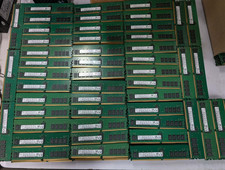
Lot 100 SK hynix 16GB 2Rx8 PC4-23400 DDR4-2933Y ECC Reg Server Memory RDIMM RAM
$9599.00

Netac DDR4 32GB 16GB DDR4 3200MHz UDIMM C16 Desktop Internal Memory RAM Kit
$99.99

SK Hynix 32GB 2RX4 PC4-2666V DDR4 RDIMM Server Memory RAM, HMA84GR7AFR4N-VK
$169.95
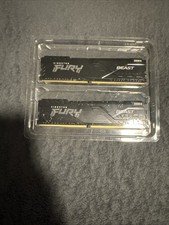
RAM: Kingston FURY Beast 16GB DDR4-3200Mhz
$100.00
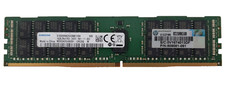
Samsung 16GB PC4-19200T 2Rx4 DDR4-2400 ECC RDIMM Server RAM M393A2G40EB1-CRC0Q.
$229.99

A-Tech 8GB DDR3 1600 PC3-12800 Laptop SODIMM 204-Pin Memory RAM PC3L DDR3L 1x 8G
$21.68

RAMAXEL Lenovo 32GB LPDDR5X CAMM2 7500MHz Laptop RAM | UNTESTED
$445.00

Samsung 8GB DDR4 SO-DIMM PC4-3200AA 260-Pin RAM M471A1G44BB0-CWE Module
$29.25
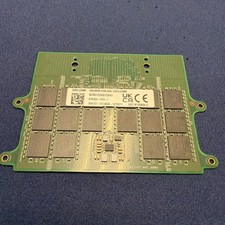
Dell 32GB DDR5 5600 CAMM KYHG6V Precision 7670 7680 7770 7780 16Gx8 Memory
$669.00

Corsair Vengeance DDR3 8GB 16GB 32GB 1866MHz PC3-14900 Desktop RAM Memory DIMM
$85.00
