

 Reply With Quote
This is very helpful.
I managed to make a 2.6.7 remaster, using the existing minirt26, but get the "cannot find KNOPPIX filesystem. sorry" on booting 2.6.8.1, presumably because I am not using a compatible mkcompressed_fs. Suggestions?


As some of you might have noticed, someone made a cloop kernel patch against linux-2.6.7.
To apply the patch, download it, stand in the linux-2.6.7 source dir and use the patch program:
Then configure the kernel as usual (ie make menuconfig) and choose Device Drivers->Block Devices->Compressed Loopback device support as a module <M>. And then build the kernel as usual. I use make-kpkg clean ; make-kpkg --revision=1 kernel_image. That creates a kernel_image .deb that can be installed with dpkg. The good thing is that cloop.ko will also be included in that .deb file and there's no need to compile it separately.Code:# cd /usr/src/linux-2.6.7 # patch -p1 < ../cloop_v5.patch
For kernel linux-2.6.8.1 there is a small change in a .h file which changes 2 lines. The following patch works agains linux-2.6.8.1:
cloop_linux-2.6.8.1.patch.gz.
Apply it with patch:
If anymody is new to compiling the kernel, here is the whole procedure:Code:# cd /usr/src/linux-2.6.8.1 # zcat ../cloop_linux-2.6.8.1.patch.gz | patch -p1
- Download linux-2.6.8.1.tar.bz2 into /usr/src.
- Unpack it:
# cd /usr/src
# tar jxvf linux-2.6.8.1.tar.bz2- Download cloop_linux-2.6.8.1.patch.gz into /usr/src.
- Apply the patch:
# zcat cloop_linux-2.6.8.1.patch.gz | patch -p0- Configure the kernel:
# cd linux-2.6.8.1
# make menuconfig- Build the kernel:
# make-kpkg clean
# make-kpkg --revision=1 --append-to-version="-cloop" kernel_image
The append-to-version argument will append -cloop to the kernel name (will be visible when running uname -r).
Now the kernel-image2.6.8.1*.deb file is created and can be installed inside the chrooted knoppix environment with dpkg -i. Remember to also rebuild minirt26.gz with the new modules (from /lib/modules inside the chrooted environment).
--Albert
This is very helpful.
I managed to make a 2.6.7 remaster, using the existing minirt26, but get the "cannot find KNOPPIX filesystem. sorry" on booting 2.6.8.1, presumably because I am not using a compatible mkcompressed_fs. Suggestions?
I had some problems before it worked. The first problem was how I created minirt26. After some googling I figured out the commands. Look in this thread.
Then I had troubles with which options that must be checked when building the kernel. After copying the original configuration from /boot/config-2.6.7 on the original Knoppix CD to .config in my custom kernel source dir, then it was easier getting it right. Take a look at linuxrc. Some of the USB modules are renamed (uhci-hcd.ko and ohci-hcd.ko). And all modules should be named .o, not .ko in minirt26. But look in linuxrc for details. And run the script after you are done.
Thanks. That worked for me, too. Don't know why. Recreating the filesystem, rather than copying the old one seems to have done the trick.
Perhaps I picked up the right modules, too.
Now the next problem that I have is there is no permission to write to the /tmp directory and so kde won't start.
Thanks for the patch. Hopefully I'll be able to mount the KNOPPIX file now. Patch applied cleanly to 2.6.8.1.
I haven't had any problem with cloop on 2.6.7 (that I am aware of ...).
What problem does the patch address? Why do I need it?
Steve F, this patch is for those wishing to include a custom kernel in their remaster without compiling & installing cloop externally.
musashi, the patch may apply but certainly does not work for me. Changes are required for 2.6.8+ kernel revisions.
I've changed the versions in the patch to make it work with the 2.6.9 kernel.
You can download it here:
http://www.knopper.tk/linux/cloop_linux-2.6.9.patch.gz
 Posting Permissions


Dell 6P85J 4TB ST4000NM0063 7.2k 6Gb/s 3.5” SAS SED Hard Drive with Tray
$39.99

Western Digital HUS726T4TAL5204 4TB 7.2K SAS 12Gb/s 3.5" 512e HDD NetApp X375A
$64.00

DELL 2TB Enterprise HDD (7200RPM, 3.5", SATA III, 128MB Cache) HUS722T2TALA600
$49.95

(ST8000NM0045) SEAGATE ENTERPRISE 8TB 7200RPM 4Kn SATA 6Gb/s 3.5" HARD DRIVE
$199.99

Seagate ST4000NM0034 Enterprise 4TB 7200RPM SAS 12Gb/s HDD v4
$39.00

Seagate ST500DM009 BarraCuda 500 GB 3.5" SATA III Desktop Hard Drive
$14.99

HGST HUS726060ALE610 0F23001 6TB HDD 3.5" SATA 6Gb/s 7.2K Hard Drive (V6315)
$69.95

Dell ST6000NM0034 1HT27Z-150 NWCCG 6TB SAS 3.5 7.2K ENTERPRISE SERVER DRIVE
$68.99

Seagate ST8000NM0075 Enterprise Capacity 3.5 HDD 8TB SAS Hard Drive 8TB EXOS
$184.99
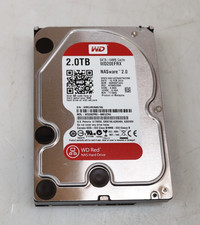
Western Digital 2TB WD20EFRX-68EUZN0 3.5" SATA Red NAS Hard Disk Drive
$69.99