

 Reply With Quote
I believe that knoppix now has 2 boot disks to cover the extra USB boot support.Originally Posted by maltrecho
I'm not exatcly sure where the images are though.


I've used Knoppix since 3.1 and then I moved to 3.3 and I've never had major problems. I've just download 3.6 and surprise, surprise... It seems I cannot run any more versions of knoppix because I cannot create the floppy/ies to boot the cd.
I've got an old laptop with an external cd-player/burner and I cannot run Knoppix directly from the cd. I have not access to the bios neither. I just have windows as my main OS but I love to explore linux in my spare time (in the hope to change one day).
So please, could anybody explain in plain english the way to create the boot floppy/ies needed to run the cd, knowing that I can only use windows for the task and knowing also that I'm not a linux guru?
Thanks in advance.
I believe that knoppix now has 2 boot disks to cover the extra USB boot support.
I'm not exatcly sure where the images are though.
Use this universal boot manager, Smart boot manager:
http://btmgr.webframe.org/index.php3?body=news.html
You can boot anything from your cdrom without going through your bios or create boot floppy for your particular cd.
The definitive solution to your problem is here:
http://www.knoppix.net/docs/index.php/FaqBooting
The faq was updated. Just follow the step-by-step instructions!
Good luck!
.
Sorry people, but I can't get it to work. I tried the first link, Smart boot manager, after reading everything, I tried to install, access, start, read, understand, reinstall, restart... and nothing, sorry.
The second link explains how to do it with knoppix already installed, but, If I cannot run knoppix, I can I make the floppy?
I can't understand why the project has changed this way. With prevous versions we could run knoppix without accessing the Bios. Smooth and easy. What have happend? Do they really want Knoppix for everybody?
I would really appreciate if anybody could upload somewhere the floppies needed to run this version of knoppix or some instructions to make them by myself.
Thanks for the answers fellows.
You don't need to install smart boot manager. Run it from floppy and choose to boot cdrom from menu.
Get sbm floppy image and write to floppy.
http://members.optusnet.com.au/atar/sbootmgr.img
http://slax.linux-live.org/dl/floppy.img.gz
To write to floppy in windows use this tool :
http://members.optusnet.com.au/atar/rawritewin.exe
To write img to floppy in linux:
dd if=image of=/dev/fd0

The 2.6.7 kernel that Knoppix 3.6 uses is too big to fit on a 1.44M floppy, even compressed. (The /usr/sbin/mkbootfloppy script errors out with kernel 2.6.7 because the floppy disk is full.)
Anyone remember if Knoppix 3.4 used the same 2.4.27 kernel that Knoppix 3.6 uses?
Thanks shah for the instructions. Now I can access smart boot manager but it won't run from cd-rom. Probably because of the USB device?
Why not to use 2 or more floppies then? (sorry for my ignorance).The 2.6.7 kernel that Knoppix 3.6 uses is too big to fit on a 1.44M floppy, even compressed.
Ok, I'm done. I used RaWrite for Windows (http://members.optusnet.com.au/atar/rawritewin.exe) to install Smart Boot Manager (http://members.optusnet.com.au/atar/sbootmgr.img) on a floppy under Windows. I ran knoppix using the floppy from other computer and not from my laptop (the program doesn't seem to read USB devices) and once in Knoppix I made the two floppies going to Knoppix -> Utilities -> Create bootfloppies for Knoppix. Finally I've got the floppies so I can run Knoppix anywhere (even form USB devices).
Hey, do you think this walk-around is worth? Wouldn't be easier to include two images of the floppies in the cd (removing some of the <lol>great</lol> games it comes with to make some room) ?
One more thing: how can I create images of the floppies?
Thanks for your time.
Yep, SBM cannot boot from usb and you don't have option in bios to boot from usb. Can't help anymore.
To create images from floppy in linux:
ex:
dd if=/dev/fd0 of=/home/usr/floppy.img
 Posting Permissions

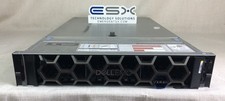
Dell R740XD VxRail P570 24x 2.5” 2U CTO Server– 2x Gold 6240, H740p, 2x 1600W
$699.00

NETAPP HCI NAF-1701 SuperMicro Server 4X BLADE H410C 8X GOLD 5120 4 NODE SERVER
$1499.97

Dell PowerEdge M640 Blade Barebone Server Dell P/N: HHB006 Tested Working
$149.99

Dell PowerEdge M620 Blade Server 2x Xeon E5-2680v2 256GB DDR3 RAM NO HDD
$349.99

Dell Poweredge C6400 24x 2.5’’ 2x 2400W 4x C6420 Nodes H330 | 2x SFP | 8x Trays
$799.99

Dell PowerEdge M630 Blade Server 2x Xeon E5-2680 v4, 2F3MP , 4GDP5 ,R10KJ ,JVFVR
$96.60
SUPERMICRO CSE-827 SERVER 4* E5645 2.4GHZ 12* 8GB PC3 RAM 11* 2TB SATA HDD 2*PSU
$679.99
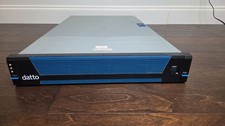
Datto S3E12000 RACK SERVER 2U 2x Xeon E5-2670 v3 2.30GHz 32GB RAM 2x PSU 14 BAY
$399.95

Supermicro 938-16 16-LFF MicroCloud SuperServer 5038MR-H8TRF *No Blade Servers*
$159.99
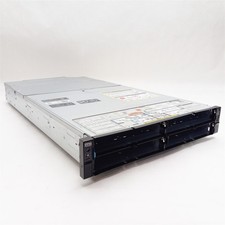
Dell PowerEdge FX2 FC630 Blade 4*Slot Server Chassis Enclosure NO BLADES/PSU/CMC
$199.97