-
Junior Member
registered user
2 more questions abou poor man`s install
1. Is it possible to instal aplications in my home directory, but not only these with klik, which are located on the http://klik.berlios.de (For example some network and system utilities, which are not included in the site above)
2. What are the exactly steps to install, configure and run GRUB (may be GRUB for DOS as I am not so familiar with linux yet). That`s because I want to boot knoppix not using any cd, usb drive or floppy (the last one is not present on my laptop). Just to remember that I`m using poor man`s install and I have WinXP. And what about using some othet boot loaders (there are so many over the NET). Is it possible or not?
Thanks in advance!
-
Senior Member
registered user
1. Absolutely. Be aware that there may be limitations associated with having your persistent home in the same partition as your knoppix image, because Knoppix tries to protect its image from being written while its running (I have had some success with saving the image in the PH partition after the PH is created, but it would actually be better to save the image to a partition that you don't plan on writing to).
2. Read through this thread . I haven't made it work yet, but several people have. It's a way to set up Knoppix to run from your Windows partition using GRUB, with not external boot device. Once I get mine working, I think it may well be my recommendation for new users of linux who still rely on Windows. Hopefully, much of this will make its way into the next release, possibly with some scripting. Meanwhile, it might be nice to boil the 9 pages down into a how-to. But hey, it's cutting edge stuff, right?
jd
jd
-
Junior Member
registered user
Thanks for the answers, but how can you explain to me how to install my applications in home directory. For example nmap, where to download tne source and how to install it?
-
Hello, morgan73;
I bypassed the poorman's install, since even this poor boy had a spare hard drive or two lying around gathering dust, so I went straight to knoppix-installer mode...
I use G.A.G. Bootloader, and I can tell you that this little gem is the cat's meow! You just install the bootable image onto a diskette or a CD, then boot with that in a bootable drive after your Linux boot partitions have their Superblocks installed to install it at startup.
It is very straightforward; it gives you directions, a FAQ, and licensing info (GNU), then options to install or remove the app. The really nice thing is that although you do have to install it into your MBR at IDE0, removing it returns the boot sector to exactly the same config it originally had. Sweeeet!
I suggest you cut out a portion of your HDD and partition in two 4-8GB slots and one 512MB part. Partition Magic (NEWEST VERSION!!) will do this if you have the spare HDD space. Boot Knoppix and use either QTParted or Parted from terminal to set the EXT2 and linux-swap format for them, and install from that point. BTW, the knoppix-installer command also brings QTParted up first.
Then after Knoppix is installed, you merely reboot and direct GAG's attention to the partitions you want it to boot, name them and give each a little icon, then choose the boot interval, the default OS, and save the settings to HDD after the setup is finished. That is it. The option is also there to lock its settings with a password.
The poorman's install seems to cause more problems than it is worth, probably due to the persistent home being on the same partition with the rest of the OS. The feedback and negative postings here are the reasons I avoided it.
I have mine set to boot Knoppix 3.4, Kpx 3.6, Mandrake 10, Windows 98 and XP Pro (which is on an ICH5R RAID0 array, BTW) at the same time. Default fires up XP after 20 seconds.
This bootloader just brings up the Lilo boot options for that partition by default, so essentially anything is possible with this little guy....changing lilo.conf will alter what you see when choosing a partition; for instance, if, like me, you customize your kernels, you can alter the Lilo settings regarding which Default kernel to boot from, as well as the actual nomenclature of the individual OS....and all this is totally independent of the GAG.
You can even reinstall the OS on a partition, and the GAG will find it anyway, so long as everything else is unchanged and a valid boot sector (from any OS) remains!
In fact, I recently blowed up a kernel trying to get ALSA 1.0.6a working, so I reformatted its 10GB part to FAT32 and slapped a modified copy of Win98 in there, and neglected to change the GAG configuration. I found that booting Knoppix 3.4 then gave me a '98 splash screen and booted Windoze as usual...the work of 10 seconds fixed that! Now GAG properly shows that partition as a FAT32 Win98 OS.
It is far better than anything Lilo or Grub are capable of, IMHO.
Good luck,
FastVFR
-
Junior Member
registered user
Well, I still can't understand how to install applications (diferent than these "kliks") while using knoppix poor man's install. Anybody to explain me exactly what to do?
Similar Threads
-
By xfiles in forum Knoppix DVD
Replies: 1
Last Post: 09-02-2005, 06:20 AM
-
By guyana in forum Hdd Install / Debian / Apt
Replies: 2
Last Post: 10-15-2004, 02:10 AM
-
By 00zero in forum General Support
Replies: 4
Last Post: 09-20-2004, 09:33 AM
-
By chc05dude in forum General Support
Replies: 0
Last Post: 06-29-2004, 06:13 AM
-
By Obsidian in forum Hdd Install / Debian / Apt
Replies: 1
Last Post: 08-28-2003, 06:34 AM
 Posting Permissions
- You may not post new threads
- You may not post replies
- You may not post attachments
- You may not edit your posts
-
Forum Rules


AMD Ryzen 5 5500 Processor ( read Description)
$59.00

INTEL CORE I7-870 SLBJG 2.93GHZ LGA1156 4 CORE CPU PROCESSOR
$23.00

(LOT OF 20) Intel Core i5-8400 CPU 2.80GHz Desktop Processor (SR3QT)
$700.00

INTEL CORE I9-10940X X-SERIES PROCESSOR | 3.30GHZ | SRGSH
$179.99

Intel Core i7-3770K 3.5 GHz Processor
$39.00

Intel Core i7-9700 Octa-Core 3 GHz Desktop Processor LGA 1151
$79.99

Intel Core i5-12500T SRL5W 2GHz 18MB 6 Core Socket LGA1700 Desktop CPU Processor
$114.99

Intel i7-8700 Coffee Lake 3.2GHz 6-Core Max Turbo 4.6GHz Processor
$67.99

Intel Core i7-10700 8-Core 16-Thread 2.9GHz Desktop CPU LGA1200 SRH6Y Z490 Z590
$129.00
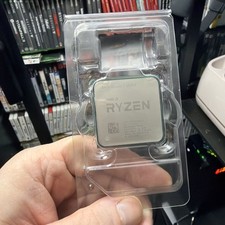
AMD Ryzen 7 5800X Desktop Processor (4.7GHz, 8 Cores, Socket AM4)
$150.00



 Reply With Quote