

 Reply With Quote
Your answer is in the router setup. Use your web browser and type in http://(ip-address-of-router). surf the settings of your router. and make any necsessary changes


network newbie + linux newbie = migraine
The setup: I have a cable modem, a basic 4-port wired linksys router and two computers. One network adapter on each computer. Everything "works" fine except... I have a problem with the ip addresses being consumed.
While trying to learn how to use ssh I discovered the local ip addresses on both machines were changing daily, going up, up up. After a few days they were using 192.168.1.107 & 108 respectively. Decided to take the spare puter offline, do a fresh install of latest kanotix on my main machine here and take it one step at a time. Rebooted cable modem and reset router to default. Spare puter is still offline, nothing should be using 192.168.1.100 or 101 but this machine is now up to 192.168.1.102. Why? Even using dhcp (for local), the router should issue the same ip unless it is taken by something else, no?
There is a metric ton of info out there on dhcp, static ip addresses and the like but it is a total blowout overload greymatterbufferoverrun for me. Where do I start?
Your answer is in the router setup. Use your web browser and type in http://(ip-address-of-router). surf the settings of your router. and make any necsessary changes
I changed router setup to allow only 2 ip addresses, so now it will at least limit the local to 100 or 101 and then if I can't connect both computers tomorrow there is something else wrong.
I didn't have to wait long. With the spare computer online and using 192.168.1.101, I rebooted the downstairs machine and it couldn't get an ip with dhcp broadcast. Got an error message along the lines of "no working leases in persistent directory". 192.168.1.100 was free. Why wouldn't it dish it out? Please help if you have an idea, I have been working of this almost a week (short by linux prob terms, I know) and it's more time than I can give to this anymore.
Your router sounds messed up is all....have you checke the lease settings on the router? How long do you have the dhcp lease set to?
Also, is your setup use mac filters or no? If so, I assume you haven't changed any nics in either PC?
If it were me, I would download and install the latest firmware update for your router or cntact them about it.
You PC's (or dhcp whichever way ya wanna look at it) should request the same Ip it was using before, thats the nature of dhcp, however, if that ip is not available the dhcp server will TELL the client to use this one...usually incremented by 1 until a free IP is found.
EI: PC uses 192.168.1.1 after reboot that IP is not available so after dhcp from the PC request's it, the dhcp server will deliver a nack(no)and send the next available IP to your PC incremented by 1.
This is normal dhcp server behavior.
Try setting up both PC's statically and turn the dhcp server of the router off....test, if after a few days you have no troubles then you KNOW it is the routers dhcp server that is in error and therefore the router manufacturer must fix it. Yes?
Curiousity demands I ask what type of router it is?
Cheers,
J
Did you recentl;y install guarddog or a similar firewalling program, if so, you need to allow incoming and outgoing dhcp requests...somewhere in the network setup of the firewalling program you may or may not be using..
Cheers,
J
Thanks for the help and Yes, tech, I did install guarddog and it looks like a possible culprit here. Not understanding the dhcp settings in the advanced section of the program, I have disabled it for now.
When I first had issues I did upgrade the firmware on the router. It is a linksys. No PC uses IP 192.168.1.1 that is router's address, the gateway. I manually set up the ip address on the spare PC to use 192.168.1.101 in both linux and windows there. Windows on it has other issues left over from dialup and I plan to reimage those partitions.
Main PC so far has been getting correct IP. Still using DHCP both linux and windows on it. Lease I think is up any minute now so we will see. Lease setting is 0 which linksys says is one day. I didn't see any point in making it longer since if the IP is available, DHCP should dish it out again, no? The aggravating part of this is after one "use" it won't reuse it. Like it isn't being released or something? I am probably too networking-dumb or something but I have seen plenty of machines of customers merrily using DHCP in windows and not "running out" of addresses. So maybe a linux thing and in particular iptables (guarddog is just a front end after all).
Hey,
open up guarddog and click the advanced tab--check the box that says enable dhcp on interface's (eth0 by default)-if you have another interface you want to enable dhcp on then do ifconfig in a term window and scope out the interface you need eth1 or 2 or 3 or whatever...you need to enter them in the box,seperated by onje space I beleive, but I am sure that it will giove you the proper syntax in the help or man pages... I do not yet know the proper syntax myself...ah-the life of a newbie, I feel so stupid-if it was Winblows I could give you expert advice, I'm not reallty used to being on the reciving end of the advice...
save the settings, say yes to the update prompt, and try it again...someonme else will have to post the manula steps for pump release/renew -if there is such a thing-I am also a linux newbie so I don't know hardly anything yet.
Cheers,
J
you have been a great help tech! You don't seem like a newbie to me and I have been at this...gosh...almost a year nowbut probably why you explained it in terms I understood. Everything I have googled up has been in linux engineer-speak or might as well be cyrillic or something

as I said, since I disabled sw firewall, I haven't had any ip addressing problems. When I saw the dhcp options in the advanced tab (I never go to "advanced" tab anything in linux) I figured that was what was happening. Odd though, the firewall was installed on main computer - not the spare and it was the spare that couldn't get an ip from dhcp broadcast. But will give a try with eth0...I have only one adapter in each machine and no firewire so it is eth0.
I spoke to soon.. AGAIN. Booted the main machine tonight and it pulled the next higher IP. It should've remained at 100, it was free. So, I shut it down. Booted spare that I have configured manually for 101 then booted the main machine. Sure enough, it broadcasted repeatedly, then finally said it was looking up the last recorded IP. It's about time. Ok, why isn't my PC doing that to BEGIN with? There is something wrong here. Thoughts?
 Posting Permissions


16GB KIT (2x8GB) DDR3 Gamer Desktop RAM PC3 MIXED BRANDS VIPER VENGEANCE FURY
$10.00

Netac DDR4 32GB 16GB DDR4 3200MHz UDIMM C16 Desktop Internal Memory RAM Kit
$99.99

Crucial 32GB(4 x 8GB) CT8G4DFS824A.C8FDD1 DDR4-2400 UDIMM Desktop RAM - CR352A
$89.95

Samsung 32GB DDR4-2666 PC4-21300 288-Pin DIMM RAM M393A4K40CB1CRC0Q
$185.00

Major Brand 16GB (2x8GB) PC3-12800U DDR3-1600MHz DDR3-12800 DESKTOP RAM NON-ECC
$29.99
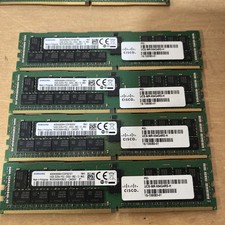
Samsung 64GB PC4-2666V-R 2S2Rx4 DDR4 ECC REG RDIMM - M393A8K40B22-CWD6Y
$270.00

A-Tech 8GB DDR3 1600 PC3-12800 Laptop SODIMM 204-Pin Memory RAM PC3L DDR3L 1x 8G
$21.68

DDR4 Laptop RAM 4GB 8GB 16GB 32GB 2400 2666 3200 Samsung Hynix
$66.00
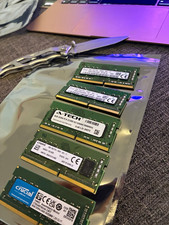
Lot of 5 - Mixed Brands 40GB (5x8GB) DDR4-2666 PC4-21300 SO-DIMM 260-Pin Non-ECC
$150.00

TeamGroup T-FORCE VULCAN Z 16GB (2 x 8GB) DDR4 3000Mz (PC4 24000) Desktop Memory
$97.76