

 Reply With Quote
I agree, that is very odd.Originally Posted by tslewe


Placing ':' between the hex digits also did not help.
Finally I got it working by first disabling WEP under Windows, then booting Knoppix, configure the wireless network card (KNOPPIX/Network-Internet/Network card configuration). Then enable WEP again on the access point, and run Network card configuration to set the WEP key. I cannot explain why it is working, and was not before.
I agree, that is very odd.
Knoppix version 3.2 (V3.2-2003-03-30) works much better! I don't have to disable WEP before I can connect to the access point. I only need to configure the network card.
However, the next problem is that when I save the configuration, I get lots of error messages when starting up, and the network card does not work and I have to configure it (again) manually.
 Posting Permissions


OPNsense pfSense 8-Core Atom C3758 2.2GHz 8GB DDR4 64GB SSD 8x NIC QAT AES VPN
$145.00

pfSense Firewall 16-Core Atom C3958 8GB DDR4 RAM 64GB SSD 8x 1Gbe QAT AES-NI VPN
$184.99

OPNsense pfSense 16-Core Atom C3958 16GB ECC RAM 512GB SSD 8-Port QAT AES-NI VPN
$258.00

Fortinet FortiGate FG-40F Network Security Firewall NO RACK EARS
$49.99

OPNsense Firewall VPN QAT 8-Core Atom C3758 2.20GHz 16GB DDR4 128GB SSD 8xNIC
$175.00

Fortinet FortiGate 60F FG-60F P24286-03-13 Network Firewall Security Appliance
$155.75

Fortinet FortiGate 60F FG-60F UTM UTP License Until 2027 Network Security FW VPN
$229.99

Fortinet FortiGate 80E 12 Ports Firewall Appliance
$20.25
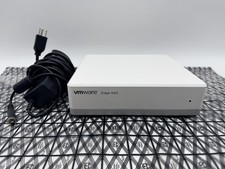
OPNsense Firewall Router VMware Edge 640 Atom C3758 32GB ECC RAM 256GB SSD 10Gbe
$284.99

Cisco Meraki MX67-HW Security Appliance Firewall NEW Unused Unclaimed
$202.50