


 Reply With Quote
See this link: http://www.knoppix.net/forum/viewtopic.php?t=11608


Hi,
under knoppix3.4 i was able to launch a emacs window with root-rights by just using a "su" in a terminal window and then starting emacs.
Now with knoppix 3.6 i get only this message:
--------------------------------
Xlib: connection to ":0.0" refused by server
Xlib: No protocol specified
emacs: Cannot connect to X server :0.0.
Check the DISPLAY environment variable or use `-d'.
Also use the `xhost' program to verify that it is set to permit
connections from your machine.
------------------------------------
How can i launch emacs or konqueror with super-user rights from a normal user-login (even using the su-way would be just fine... i just dont want to log off and log in as root).
I know i am dumb.. .so please dont laugh..
T'HX
Markus
See this link: http://www.knoppix.net/forum/viewtopic.php?t=11608
THX a lot!!!Originally Posted by CrashedAgain
"xhost local:" does the job wonderfully for me.
Sorry for replying so late, but the "topic reply notification email" got lost in my email pile....
I am really happy now!
THX again
Markus
 Posting Permissions


TP-Link TL-SG105, 5 Port Gigabit Unmanaged Ethernet Switch, Network Hub, Ethern
$15.25

NETGEAR GS308EP Essential Series 8-Port Gigabit PoE+ Unmanaged Switch
$44.99

5Ports Gigabit Network Switch w/ 4 PoE+ Ports Total 52W each port 30W Plug&Play
$31.99

Cisco WS-C3650-12X48UR-L 48-Port Stackable Layer 3 8x10G SFP+ Port Switch
$129.99

5 Port Gigabit Unmanaged Ethernet Switch, Home Network Hub, Office Ethernet S...
$9.64

10-Port Gigabit PoE Network Switch with 8 PoE+ Ports with 2 Combo SFP Slots 125W
$39.99

TP-Link TL-SG105 5-Port Gigabit Ethernet Unmanaged Metal Desktop Network Switch
$19.99
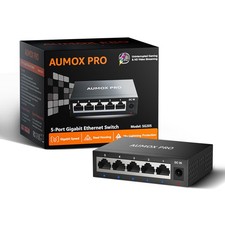
5 Port Gigabit Unmanaged Ethernet Switch, AUMOX PRO Home 5|5*1G Port, Black
$8.95

Extreme Networks 10GE X440-G2-24P-10GE4 16533 24Plus-Ports POE+ Switch UP
$127.00

Cisco Catalyst 2960-48TT-L 48-Port Fast Ethernet Managed Rackmount Switch
$46.99
