

 Reply With Quote
YesOriginally Posted by RockMumbles


VeeDubb,
On your card reader, are you booting up with cards installed?
rock
Yes
What does
cat /proc/bus/usb/devices
tell you?
T: Bus=01 Lev=00 Prnt=00 Port=00 Cnt=00 Dev#= 1 Spd=12 MxCh= 4
B: Alloc= 22/900 us ( 2%), #Int= 2, #Iso= 0
D: Ver= 1.10 Cls=09(hub ) Sub=00 Prot=00 MxPS= 8 #Cfgs= 1
P: Vendor=0000 ProdID=0000 Rev= 0.00
S: Product=USB OHCI Root Hub
S: SerialNumber=d2861000
C:* #Ifs= 1 Cfg#= 1 Atr=40 MxPwr= 0mA
I: If#= 0 Alt= 0 #EPs= 1 Cls=09(hub ) Sub=00 Prot=00 Driver=hub
E: Ad=81(I) Atr=03(Int.) MxPS= 2 Ivl=255ms
T: Bus=01 Lev=01 Prnt=01 Port=00 Cnt=01 Dev#= 2 Spd=12 MxCh= 0
D: Ver= 1.00 Cls=00(>ifc ) Sub=00 Prot=00 MxPS= 8 #Cfgs= 1
P: Vendor=04a9 ProdID=1056 Rev= 1.00
S: Manufacturer=Canon
S: Product=BJC-2100
S: SerialNumber=F.C6h0
C:* #Ifs= 1 Cfg#= 1 Atr=40 MxPwr= 2mA
I: If#= 0 Alt= 0 #EPs= 2 Cls=07(print) Sub=01 Prot=02 Driver=usblp
E: Ad=01(O) Atr=02(Bulk) MxPS= 64 Ivl=0ms
E: Ad=82(I) Atr=02(Bulk) MxPS= 64 Ivl=0ms
T: Bus=01 Lev=01 Prnt=01 Port=01 Cnt=02 Dev#= 3 Spd=12 MxCh= 4
D: Ver= 1.10 Cls=09(hub ) Sub=00 Prot=00 MxPS= 8 #Cfgs= 1
P: Vendor=0451 ProdID=1446 Rev= 1.10
C:* #Ifs= 1 Cfg#= 1 Atr=e0 MxPwr=100mA
I: If#= 0 Alt= 0 #EPs= 1 Cls=09(hub ) Sub=00 Prot=00 Driver=hub
E: Ad=81(I) Atr=03(Int.) MxPS= 1 Ivl=255ms
T: Bus=01 Lev=02 Prnt=03 Port=03 Cnt=01 Dev#= 5 Spd=12 MxCh= 0
D: Ver= 1.00 Cls=00(>ifc ) Sub=00 Prot=00 MxPS= 8 #Cfgs= 1
P: Vendor=04a9 ProdID=2207 Rev= 1.00
S: Manufacturer=Canon
S: Product=CanoScan
C:* #Ifs= 1 Cfg#= 1 Atr=80 MxPwr=500mA
I: If#= 0 Alt= 0 #EPs= 3 Cls=ff(vend.) Sub=00 Prot=ff Driver=usbscanner
E: Ad=81(I) Atr=03(Int.) MxPS= 1 Ivl=16ms
E: Ad=82(I) Atr=02(Bulk) MxPS= 64 Ivl=0ms
E: Ad=03(O) Atr=02(Bulk) MxPS= 64 Ivl=0ms
T: Bus=01 Lev=01 Prnt=01 Port=02 Cnt=03 Dev#= 4 Spd=12 MxCh= 0
D: Ver= 1.10 Cls=00(>ifc ) Sub=00 Prot=00 MxPS=16 #Cfgs= 1
P: Vendor=05dc ProdID=1017 Rev= 1.00
S: Manufacturer=Generic
S: Product=USB Storage Device
S: SerialNumber=0AEC305000001A004
C:* #Ifs= 1 Cfg#= 1 Atr=80 MxPwr=100mA
I: If#= 0 Alt= 0 #EPs= 2 Cls=08(stor.) Sub=06 Prot=50 Driver=usb-storage
E: Ad=01(O) Atr=02(Bulk) MxPS= 64 Ivl=0ms
E: Ad=82(I) Atr=02(Bulk) MxPS= 64 Ivl=0ms
This was with two cards. One in each of the two slots I realy care about. As before, most of this may as well be greek.
Okay, it looks like I will be able to install SynCE with apt-get next week after I get my new modem, so all I need now is that card reader to work. Just that one simple thing.......
I've gone well beyond my knowledge and you guys have gotten me through eerything else, just tell me what you need for that last...
This is probably moot at this point, but I just noticed this line, and I should point out that a PocketPC has NOTHING to do with a Tablet PC. Tablet PC's run a special version of WindowsXP and if it weren't for the mountains of proprietay hardware could probably run linux. A PocketPC runs on a different proccesser and WindowsCE (the same thing smartphones are based one) With the PPC UI on the top the same way KDE sits on top of the Xwindow.
OK VeeDubb - how are you trying to mount them? That is to say what are you entering on the command line?
At first I made a folder on my desktop and inside that, created what I guess you Linux guys call simlinks. I right clicked then selected new/harddrive and tried to mount using that, (I also tried makinga one f those for a floppy that pointed to the same place and a CD pointing to the same place. NO dice.
When that didn't work, I made them directly on the desktop.
When that didn't work I tried mounting fromt the command line. reguardless of how I try to mount it's allways the same error. "/dev/sdwhatever is not a valid block device"
IO think what I entered was mnt /dev/sdwhatever But I don't remember for sure. I looked up what the appropriate code was and used that. I'm certain it's something else.
Become root:
su
<give password>
mount -t auto /dev/sda1 /mnt/?
I don't know what mount points you have. You can make one like this:
su
<password>
cd /mnt
mkdir card
Then it would be
mount -t auto /dev/sda1 /mnt/card
 Posting Permissions


Lot of 500 Cisco 10-3145-02 QSFP-100G-CWDM4-S 100G CWDM4 QSFP28 Transceiver
$1500.00

Cisco Catalyst C9120AXI-B Wi-Fi 6 Access Points
$36.00

Cisco WS-C3650-12X48UR-L 48-Port Stackable Layer 3 8x10G SFP+ Port Switch
$129.99

$75.00

Cisco C9300-48UXM-A Switch 9300 Series 48-port UPoE Network
$874.99

Cisco C3850-NM-2-10G Catalyst 3850 2 x 10GE Network Module
$30.00

Cisco | N3K-C3232C | 32-Port 100G QSFP Network Switch W/ 2x PSU, 2x Power Cords
$205.00
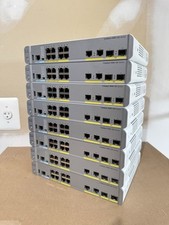
Cisco Catalyst WS-C3560CX-8PC-S Managed Switch 8 PoE+ Port | Quantity Available
$97.49
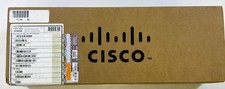
Cisco Catalyst PWR-C2-1025WAC 1025W AC Power Supply Unit - New Sealed In Box
$120.81
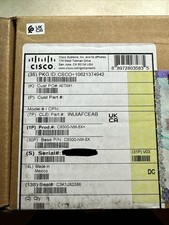
Cisco C9300NM8X Network Switch Module
$599.99
