
ok i have knoppix 3.6 and i have no idea how to make knoppix see it and pick up a net connection over the wireless its a usb one so i am really unshore
any help please


ok i have knoppix 3.6 and i have no idea how to make knoppix see it and pick up a net connection over the wireless its a usb one so i am really unshore
any help please
Hello,
If anyone is to help you -- myself included; we are going to need more details. We are not Charles Xaiver -- mind readers you know -- at least I am not.
As many details as you can supply. "Help," is not informative.
E.g. What is the model no. of the Belkin USB adaptor. This is important because that way we can find out which chipset is being used and knowing that is essential, because it tells us which method(s) could work.
I am virtually a complete Knoppix/Linux novice, except perhaps in this one area of getting Belkin wireless adaptors to work. I have no experience with USB, but I have managed to get a PCIMIA and a PCI cards going.
To give you _some_ idea of what you _could_ try; look at my Success with Knoppix 3.6 and Wireless Networking post -- its a sticky so it should be easier to find ...
There are also plenty of other resources to read if you look for them. Its not hard; just type in google Belkin wireless linux and that will get you started. Its the way I did it ...
Hope I can help ...
Grant D. Vallance
the model number is F5D6050Z and i had a go at your sticky thing but on the driver disk there is none of them files
Hello:
Well the model number is a good start.Originally Posted by fusion88
If you go to http://www.linux-wlan.org/docs/wlan_adapters.html.gz
You will see that your card either has the Atmel chipset, or perhaps even the Prism chipset, which is useful to know.
Unfortunately, the Atmel website; as far as I can find, do not supply drivers for their chipsets <sigh>
I had a look at the Belkin drivers for the F5D6050Z; and in the zipfile at least there are no .inf files.
I suspect they may be locked up in the .cab files; unfortunately the .cab reader I have will not read them
At the moment I do not have time to run the installation programme and see if my supposition is correct.
However, in the meantime, if you have not, if you could look for *.inf files, especially such files in "Belkin" directories. The installation programme may have extracted them and put them there.
On my XP box the relevant files are in C:\Program Files\Belkin\Belkin 54Mbps Wireless Utility\Drivers\
What kind of Windows Box are you running?
Of course, USB may use an entirely different system; I have never run a USB-based wireless network, and assume that the principles are similar.
Would anyone care to enlighten me if I am wrong?
Regards,
Grant D. Vallance
my box is running xp and as fare as i know there is no inf files in there well there are setup.inf and install.inf i will give them a go
I somehow doubt that these will work ... however, lets see if we can make progress.
I do not know how the USB system works viz. drivers; in Windows at least, it uses .sys files. Indeed, it uses the same name as the .inf file we need to find.
2 things to try:
(1) in the Program Files directory of XP, go to the Belkin folder for your device; I.e. C:\Program Files\Belkin, and explore around and see if there are any .inf files. On my laptop the .inf file is found in C:\Program Files\Belkin\Belkin 54Mbps Wireless Utility\Driver
Is there a .inf file there?
(2) Go to the Device manager in XP and find the wireless card; right click on the appropriate icon on properties and see if there is a driver tab. If there is note the name of the file (I guess a .sys file) and then do a search for that name only and see what comes up.
If you could post the results and I'll see if anything suggests itself to me.
Anyone more qualified PLEASE make suggestions if I am going about this in the right direction ...
I don't have much spare time at the moment to chase this down; a new baby in the household does that for you(and a toddler too)
We will find out eventually what to do ...
hmm still not working
That is really helpful to know ...
Of the suggestions/requests what did you do? What were the results?
I cannot help if you do not give details and respond as I ask ...
Regards,
Grant D. Vallance
 Posting Permissions


Netac DDR4 32GB 16GB DDR4 3200MHz UDIMM C16 Desktop Internal Memory RAM Kit
$99.99
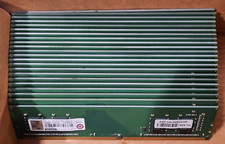
Lot of 88GB (22x4GB) ADVANTECH 1RX16 DDR4 PC4-2400U AQD-D4U4GN24-HP MEMORY RAM
$286.00

A-Tech 8GB DDR3 1600 PC3-12800 Laptop SODIMM 204-Pin Memory RAM PC3L DDR3L 1x 8G
$21.68
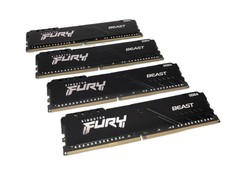
(Lot of 4) Kingston Fury Beast 32GB DDR4 Gaming RAM / KF436C18BB/32 - VGC
$799.95

Major Brand 16GB (2x8GB) PC3-12800U DDR3-1600MHz DDR3-12800 DESKTOP RAM NON-ECC
$29.99

Crucial DDR3L 16GB 2 x 8GB 1600 MHz PC3L-12800 Laptop RAM Sodimm Memory 1.35V
$41.00

Samsung 16GB LPCAMM2 PC5 7500 DDR5 LPDDR5X CAMM2 M561K1LC4DM0-CCTGM RAM Memory
$189.00

RAMAXEL Lenovo 32GB LPDDR5X CAMM2 7500MHz Laptop RAM | UNTESTED
$445.00
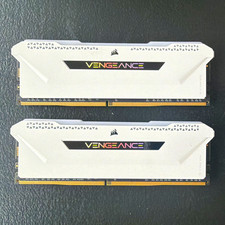
Corsair Vengeance RGB Pro 16GB (2x8GB) DDR4-3600 PC4-28800 DIMM White
$75.00

Micron 32GB 1x32GB DDR5 5600 CL46 ECC Unbuffered SO-DIMM MTC20C2085S1TC56BD1
$399.00

 Reply With Quote