-
Kpackage Problem installing Firefox
I am having a problem installing Firefox via Kpackage. Here's what I am getting:
installpkg //home/administrator/Downloads/firefox-1.0PR-i686-linux-gtk2+xft-installer.tar.gz ;echo RESULT=$?
firefox-installer/xpi/en-US.xpi
firefox-installer/xpi/help.xpi
firefox-installer/xpi/talkback.xpi
firefox-installer/xpi/xpcom.xpi
firefox-installer/config.ini
firefox-installer/header.xpm
firefox-installer/install.ini
firefox-installer/license.txt
firefox-installer/watermark.xpm
firefox-installer/firefox-installer
firefox-installer/firefox-installer-bin
RESULT=0
<.0PR-i686-linux-gtk2+xft-installer.tar.gz ;echo RESULT=$?
sh: installpkg: command not found
RESULT=127
What am I doing wrong?
-
Senior Member
registered user
try not using Kpackage, just apt-get install firefox.
-
Thanks for the apt-get info
BTW, I'm new to Linux, been using Windoze for way too many years. I am finding that it's this vibrant community of Linux users that really makes the difference!
-
Senior Member
registered user
You could also use klik: http://klik.berlios.de/
-
When I used the suggestion below, all I got was an error message about package not being found. I was in the directory with the install file and running under root.
try not using Kpackage, just apt-get install firefox.
-
Senior Member
registered user

Originally Posted by
jMon54
When I used the suggestion below, all I got was an error message about package not being found. I was in the directory with the install file and running under root.
try not using Kpackage, just apt-get install firefox.
Here's a brief overview of installing packages in a Debian based system:
Actual package installation is done by dpkg. For an already downloaded package you could do 'dpkg -i <path & package name>. But this may fail because there may be dependencies which dpkg does not know how to find and has not been told to install.
So the next level is apt-get which will search the net for the packages it needs (including dependency packages), download and install them. It uses dpkg to do the actual install and maintains a file called /etc/apt/sources.list to know where to search for packages. This file must be updated regularly as packages get moved around in the internet repositories. This is done with the command 'apt-get update'.
But to use apt-get you must know what packages are available, so you will need a 'package browser list.
The most basic of these is dselect, which is text based and not overly user friendly. It also maintains a package available database file which must be updated regularly with 'dselect update'. I've been told that dselect update will update both the dselect database and the apt-get sources.list so it is preferable to use this instead of the 'apt-get update' command which only updates sources.list.
More user friendly alternatives for seaching for packages are the gui based applications Kpackage and Synaptic. Both of these provide information on the packages available and can download and install the package.
Dselect, Kpackage and Synaptic all use apt-get to do the actual downloading & installing.
Debian based systems must use either Debian packages or applications compiled from source. To install an RPM package, first convert it to a .deb using 'alien'.
ie: alien -d <rpm packagename>
So, for an already download package, you can try dpkg -i <package> but be prepared for dependency problems which you will have to solve yourself by manually tacking down and installing any required dependencies.
Better way is to use apt-get & let it redo the download:
first 'dselect update'. Usually the first time it is run it will need to download quite a bit & some of the downloads may fail. If this happens, just run the command again, eventually it will get all the data it needs.
then 'apt-get install firefox'. It should download the application & all required dependencies & install the application.
Selecting 'firefox' from Kpackage & following the install procedure (check mark & install marked, etc) should do the same thing. But you do have to 'dselect update' first.
Hope this helps.
-
Thanks CrashedAgain! I'm gonna keep those instructions close by at least until I've got them memorized. 
Similar Threads
-
By jonm in forum General Support
Replies: 2
Last Post: 01-05-2006, 08:21 AM
-
By webguytx in forum MS Windows & New to Linux
Replies: 4
Last Post: 10-10-2005, 10:40 PM
-
By richardljohnson in forum Customising & Remastering
Replies: 4
Last Post: 01-06-2005, 02:35 AM
-
By styven in forum General Support
Replies: 20
Last Post: 12-06-2004, 07:27 AM
-
By extradudeguy in forum General Support
Replies: 14
Last Post: 03-29-2004, 09:54 AM
 Posting Permissions
- You may not post new threads
- You may not post replies
- You may not post attachments
- You may not edit your posts
-
Forum Rules


Kingston 16GB DDR4 3200MHz PC4-3200AA-SA2-12 Laptop RAM SODIMM (HP32D4S2S8ME-16)
$64.99

16GB KIT (2x8GB) DDR4 Gamer Desktop RAM PC4 MIXED BRANDS
$65.00
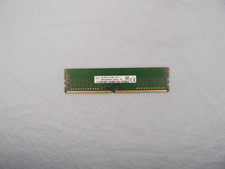
SK Hynix 8GB 1Rx8 PC4-2400T (HMA81GU6AFR8N-UH) DDR4 Desktop ram
$25.99

Netac DDR4 32GB 16GB DDR4 3200MHz UDIMM C16 Desktop Internal Memory RAM Kit
$99.99
![[ BULK LOT OF 10 ] UNITS of 8GB DDR4 Laptop RAM SAMSUNG, HYNIX etc. picture](/store/img/g/IKQAAeSwEK9qv9TG/s-l225/-BULK-LOT-OF-10-UNITS-of-8GB-DDR4-Laptop-RAM-SAMSU.jpg)
[ BULK LOT OF 10 ] UNITS of 8GB DDR4 Laptop RAM SAMSUNG, HYNIX etc.
$299.99
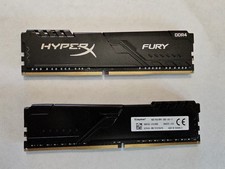
Kingston HyperX Fury 32GB 2x16GB DDR4 RAM 3200MHz X2YH1K-MIE
$150.00
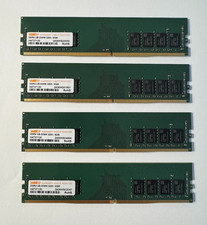
WARIS 32GB (4x8GB) DDR4-3200 PC4-25600 288-Pin UDIMM Desktop RAM H4737130
$109.99
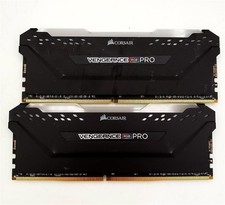
Corsair Vengeance RGB PRO 32GB 2x16GB DDR4 RAM 3200MHz CMW32GX4M2E3200C16
$169.99
CPU-RAM-MOBO COMBO- 32gb DDR4 3600MHz, i5 CPU, Asus Prime Motherboard
$370.00

16GB ( 4X 4GB ) MEMORY DDR3 PC3-10600 1333MHz FOR DELL OPTIPLEX 790 780 990 980
$39.99



 Reply With Quote