

After downloading and burning the Knoppix CD it just does not boot. My system is a pentium 4 with 256 MB of memory. The (Award)-Bios allows to boot off a CD-rom.
After booting the system hangs at the CD-rom drive. It is not possible to input anything.
Thanx.
Hi Harry,
Thanks for your input. After reading the DOCS (which I was unable to read before) I found out about the correct procedure concerning buming an image with Roxio EZ CD creator.
The sytem is booting up OK now. However, there seem to be many read/write errors on the CD. I tried to check the downloaded ISO file against md5sum under Knoppix. This was not succesful. May be too many errors in the download. Also I was unable to find files on the partitions of my harddisks. Same problem, I guess.
I will try another download some time.
Best. Taeke.
The MD5 helps ensure a good download. Even so, some burners, historically have been a little flakey when allowed to choose their own burn speed, even with buffer underrun protection. I have occasionally had to set the recording speed to numbers like 4 or 6 to achieve a good burn. There is an md5sum file in KNOPPIX which you can use with an md5summer to check the quality of the CD if you have doubts about it. The file has the md5sums for all of the files on the CD.
I would not try to check the MD5 under Knoppix (I didn't even realize we had a MD5 tool in Knoppix, although it figures that we would). I would check it before you burn, under Windows. There are plenty of md5 tools available that run under Windows, Google is your friend. I'm currently using the one from toast442.org. It's not perfect (it seems to hang while it calculates md5 sums with no clue that it's really working, and it will not accept an md5 file as input while it starts (open with ...) although it will let you drag and drop an md5 onto it once it has already started. Still, it and several others do the job.Originally Posted by Taeke
If you have a bad file I would bet money that you would find two things if you investigate closely: First that the file is somewhat larger than the size it should have been. Second that if you get a good copy of the file and byte by byte find the differences that you will see that Linux "newline" bytes have been replaced by MS CR/LF pairs. This is a translation that in intended to happen for text files, but should not happen for binary files. At least half of my Knoppix downloads have been bad this way. I've never had this happen with any other binary files I've downloaded from the Internet (and that's many), just Knoppix. I don't know any good fix except to try different servers and note where you got a good download from(I don't consider translating backwards reasonable). Next time a version is released I'll be using the BitTorrent download to avoid this issue.
I've also seen reports that some people write the iso at their full burner speed, even when they know the media isn't rated for it. I've seen too many problems when I write a CD at 48x or more. Yea, it should work, but I know I'm going to be punished for it. I write mine at 4x (even on 52x media) and as long as the md5 sum is good I've had no other problems. I can wait the 15-20 minutes, and can even use the computer to do other things while I'm waiting (although I avoid the intensive FPS games at that point).
I'm curious how you know/why you said "However, there seem to be many read/write errors on the CD.. Are there actual errors coming back from the CD (which would imply a bad burn) or are things just not working (which would imply the iso was corrupt)?
So if the md5 sum is bad, don't even bother to burn it, get a good copy (try BitTorrent). If it's good then try burning a copy nice and slow, at least for your first time.
Hi guys,
It is a pleasant surprise receiving your helpful replies so promptly on my questions. As a matter of fact I have used a recording speed of only 4. When booting, the progress is shown on screen. Many read-errors from the CD-rom are reported. That leads to my conclusion about the read/write errors.
So I have to try a download from some other mirror and use BitTorrent. Thanks again.
Best. Taeke.
I don't think a corrupt iso would show up as read-errors on booting. After all, if the iso is corrupt and then written, it's not a read error when you get the same corrupt data back. You could indeed have a drive problem, media problem, or something ralated.
My thoughts: Get an iso which has a good md5 sum (check it under Windows since you can hardly trust anything under Knoppix at the moment since your version could be corrupt). Burn it nice and slow (as you have done), use a different brand of media if you have more than one brand (I would have trouble counting how many brands I have around but I realize many people just have one brand at any one time). Maybe even use a 700 meg CDRW if you have one (to avoid further waste if problems persist). If you have access to a second burner, use that instead. And if you can try booting the CDs you make on more than on CD drive (multiple computers or a boot manager that lets you boot from other than the first drive) go for that too, as a test of is the problem with the written CD or with reading it on booting.
actually on some systems the CD gets trouble from the dma efforts. try to find out what device your CD is and boot with cheatcode
knoppix /dev/hdX=nodma
or perhaps
knoppix26 /dev/hdX=nodma
where X is driveletter of your CD.
dmesg|grep CDROM should display that infpo.
Hi guys,
About the errors: during boot up 4 times a 'cloop error in block number so and so is shown on screen. Two times a 'read error (with 13500 bytes lost)' is shown.
After boot up the system seems to be operating allright, except for the time shown on screen. It is about 16 hours off. The date is OK.
The size of the harddrive partitions (6 on drive 1 and 3 on drive 2) are all given as the same size (390 B), which is incorrect. In the properties all the partitions have a remark about a Ramdisk of 193.9 MB of which 191.9 is free. This does not make much sense to me. Maybe a quirk of Linux.
As for the MD5 checksum, I'm still wrestling with that one.
I tried booting with 'NODMA' and also from the other CDROM drive. Did not make any difference that I could tell.
Next thing I will do is making a fresh download and see what happens.
Thanks for your help so far.
Best. Taeke.
Everythng else you do is bogus until you do this. What are you wrestling about? I've used a few different MD5 tools, some command line based, some (like the one at toast442 I mentioned) GUI based. None are perfect, but all work in my experience. If you have a problem with these tools, post it.
 Posting Permissions


Kingston 32GB 64GB 128GB 256GB USB 3.0 Flash Drive Thumb Memory Stick Pen lot
$285.90

Lot Of 8 Micron 8GB 2Rx8 PC4-2666V-RE2-11 ECC REG Server Ram MTA18ASF1G72PDZ-2G6
$210.00
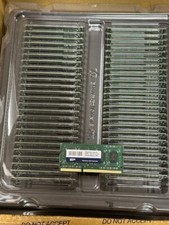
qty 50 Memory Module DDR3 SODIMM 4GB Module 1.6Ghz Silicon Power SDRAM
$80.00
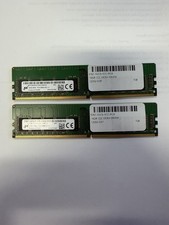
LOT OF 2 Micron 16GB 2Rx8 PC4-2666V-EE1-11 P/N: MTA18ASF2G72AZ-2G6D1ZG
$199.95

USB 3.0 Flash Drive 32GB 64GB 128GB Memory Stick Thumb Stick Lot Pack
$826.09

USB 3.0 Micro SD SDHC TF Card Reader Memory Adapter for PC Laptop Camera lot
$3.75
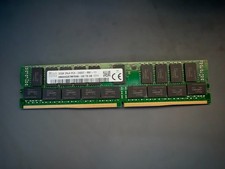
SK Hynix 32GB Server Memory 2Rx4 PC4-2400T-R81-11 HMA84GR7MFR4N-UH Server RAM
$169.99
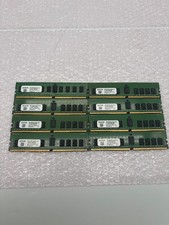
Lot of 8 A2ZEON 8GB DDR4-2133 RDIMM ECC 1Rx4 Server Memory RD4R8G44S2133
$529.99
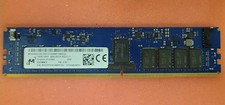
Micron MTA18ASF2G72XF1Z-2G9WP1ABVGD 16GB 1Rx4 NN4-2933Y DDR4 ECC NVDIMM
$74.50

LOT OF 4 Samsung 16GB DDR4-2666 ECC UDIMM 2Rx8 PC4-21300 M391A2K43BB1-CTDQ
$469.95


 Reply With Quote