-

Originally Posted by
Markus
Originally Posted by
greygooseplz

Works!!!
Glad to hear it.
I think it was the knoppix26 alas-intel8x0
AFAICT knoppix seems to have recognised the i8x0 as ac97 instead.
One of the strogest points in Linux seems to be the community...
I couldn't agree more.
Ok, im about to reinstall to my HDD
again ...How will i enter this code? i wont get that boot option again wil I....? I should know by now, as many times ive installed knoppix...
You should enter all the cheatcodes at boot when about to install to hd.
If alsa doesn't work anymore after the install try:
su
cd /etc/init.d
./alsa-autoconfig
sound worked after HDD install without any work 
I had to turn off CUPS printing though...I kinda guessed on it (NO CUPS) 
I kept getting a INIT :ID Respawning too fast disabled for five minutes...Over and over again...
Before I fixed that problem I booted with the 2.4 kernel, it worked but I had NO MOUSE...arggg!...
I tabbed my way to the forums typed thhat complete error from Cups and then couldnt "tab" onto the submit button 
So i booted up with the live cd and the internet didnt work
So I just guessed on a few commands to disable CUPS and my second guess was NO CUPS, it worked...
I still got sound, at least....
now I cant figure out how to install any of my games/software...
http://www.nvidia.com/object/linux_d..._1.0-4191.html
Which of those would I need...?
-
Originally Posted by
greygooseplz
I had to turn off CUPS printing though...I kinda guessed on it (NO CUPS)
I kept getting a INIT :ID Respawning too fast disabled for five minutes...Over and over again...
Before I fixed that problem I booted with the 2.4 kernel, it worked but I had NO MOUSE...arggg!...
You could look at /etc/X11/XF86Config-4, at the top you'll find:
InputDevice "PS/2 Mouse" "CorePointer" or some such.
Look at the corresponding section lower down:
Section "InputDevice"
Identifier "PS/2 Mouse"
Driver "mouse"
# Option "Protocol" "ExplorerPS/2"
Option "Protocol" "IMPS/2"
Option "Buttons" "7"
Option "ZAxisMapping" "4 5"
Option "Device" "/dev/input/mice" ### /dev/psaux for 2.4.x
Option "Emulate3Buttons" "true"
Option "Emulate3Timeout" "70"
Option "SendCoreEvents" "true"
So i booted up with the live cd and the internet didnt work
Did you try running netcardconfig, looking at the output of ifconfig if the nic is eth0 you could try ifup eth0 and pump -i eth0
So I just guessed on a few commands to disable CUPS and my second guess was NO CUPS, it worked...
To stop it do:
su
/etc/init.d/cupsys stop
To disable it from starting at bootup do:
update-rc.d -f cupsys remove
now I cant figure out how to install any of my games/software...
Mostly you do this with apt: http://www.knoppix.net/forum/viewtopic.php?t=2638
I don't use nvidia but you can search this forum for nvidia and have a look at http://www.knoppix.net/forum/viewtopic.php?t=12061
Similar Threads
-
By docbill in forum Hardware & Booting
Replies: 1
Last Post: 09-05-2005, 06:29 PM
-
By pgk3734 in forum Hardware & Booting
Replies: 2
Last Post: 04-30-2005, 09:03 PM
-
By BNU-FaNtAsMa in forum Hardware & Booting
Replies: 6
Last Post: 09-04-2004, 04:31 PM
-
By rblanken in forum Hardware & Booting
Replies: 12
Last Post: 07-01-2004, 09:54 PM
-
By myrrdex in forum Hardware & Booting
Replies: 1
Last Post: 06-07-2004, 04:16 PM
 Posting Permissions
- You may not post new threads
- You may not post replies
- You may not post attachments
- You may not edit your posts
-
Forum Rules


HP 2x 10GB OPNsense Quad Core i5-8500 8GB RAM 3Port Gigabit Firewall AES-NI SSD
$199.95

OPNsense Firewall 16-Core Atom C3958 16GB DDR4 RAM 64GB SSD 8x 1Gbe QAT AES-NI
$195.00
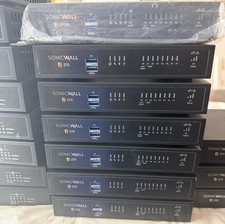
SONICWALL TZ270 Network Security Base Appliance Only (02-SSC-2821) - Open Box
$195.00

SonicWall TZ280 Firewall 03-SSC-6933 Advanced Edition 3YR NEW SEALED
$999.99

OPNsense pfSense 16-Core Atom C3958 16GB ECC RAM 512GB SSD 8-Port QAT AES-NI VPN
$258.00

Fortinet FortiGate 60F FG-60F UTM UTP License Until 2027 Network Security FW VPN
$229.99

OPNsense pfSense 8-Core Atom C3758 2.2GHz 8GB DDR4 64GB SSD 8x NIC QAT AES VPN
$125.00
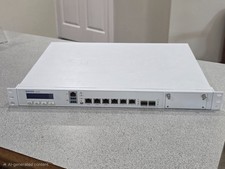
Sophos XG 210 Rev. 3 Firewall Appliance – 8GB RAM / 128GB SSD – Tested & Reset
$149.99
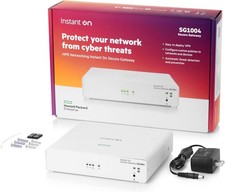
HPE Networking Instant On Secure Gateway Smart-Managed Switch (S0G33A#ABA) - New
$269.99

Check Point 1590 Firewall & w builtin WiFI and builtin LTE sim slot
$95.99



 Reply With Quote