

 Reply With Quote
Issue it as user not root.Code:man update-menus update-menus - generate Debian menu system


Hi I have installed Knopix to my hard disk (Knoppix-Myth). Basically it's knoppix but with MythTV already installed.
Anyway I installed KDE and a few other things and so far everything looks good.
The problem is that the version of Knoppix I have isn't properly updating my menus in KDE for applications I install. Does anybody know of a working script anywhere that will automatically update my menus after every boot? It seems like it should be a simple thing to do. I mean all it needs to do is to use whatever the file it is that tells apt-get what files are installed and under what catagories and update the existing menu catagories accordingly. How hard can it be?
GJ
Edit: I found a file called update-menus-kde.tar.gz here - but it was for KDE 3.2. Anyway it didn't seem to work too well as it quit with a bunch of errors. The ouput of running the script is as follows:
Is there any way to fix this? Like I said it would be very nice to have a script that would automatically update my menus after every reboot. But I have no clue how to achieve this.Code:root@box1:/home/raid517/update-menus-kde/update-menus-kde# ./update-menus-knoppix ./update-menus-knoppix: line 18: update-menus: command not found ./update-menus-knoppix: line 93: /etc/menu-methods/freedesktop-desktop-entry-spec-apps: No such file or directory ./update-menus-knoppix: line 94: /etc/menu-methods/freedesktop-desktop-entry-spec-dirs: No such file or directory ./update-menus-knoppix: line 95: /etc/menu-methods/kdelibs-bin: No such file ordirectory cat: /var/lib/kde/debian-dirs/*.directory: No such file or directory ./update-menus-knoppix: line 124: /var/lib/kde/debian-dirs/*.directory: Datei oder Verzeichnis nicht gefunden ./update-menus-knoppix: line 124: /var/lib/kde/debian-dirs/*.directory: No existe el fichero o el directorio Can't open /var/lib/kde/debian-dirs/*.directory: No existe el fichero o el directorio. root@box1:/home/raid517/update-menus-kde/update-menus-kde#
Issue it as user not root.Code:man update-menus update-menus - generate Debian menu system
I issued both of those commands (literally) but all I got were error messages saying "command not found".
GJ
Sorry if my post was confusing. The command is update-menus.
This isn't making much sense at all, sorry... I issued the commands like you suggested and the output is as follws:
That second line certainly isn't a Linux command.Code::~$ update-menus bash: update-menus: command not found raid517@box1:~$ man update-menus No manual entry for update-menus raid517@box1:~$ update-menus - generate Debian menu system bash: update-menus: command not found raid517@box1:~$
I tried just doing update-menus - but I got a similar output.
What gives?
GJ
update-menus most certainly is a Linux command. Why it doesn't work on your machine I have no idea.
man update-menus
Code:$ which update-menus /usr/bin/update-menus
 Posting Permissions


Original Vintage Old Style STANDARD Black CD Jewel Case (Heavy Duty) 90g Lot
$316.95

Vintage Computer Keyboard Northgate OMNIKEY Ultra
$120.00

Lot of 2 Vintage Plextor PX-43CS SCSI CD-ROM Caddy Drives + 4 Caddies Used
$55.99

Vintage HP 21MX 1000 M-Series Minicomputer Chassis Backplane Parts AS-IS
$325.99
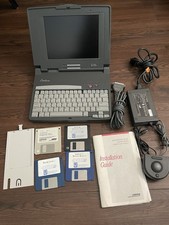
Vintage Compaq Contura 4/25c laptop trackball mouse Power Adapter parts Only
$139.00
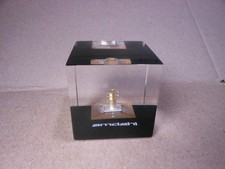
Vintage Amdahl Computer Chip Lucite Paperweight Air Cooled Logic Chip
$89.00
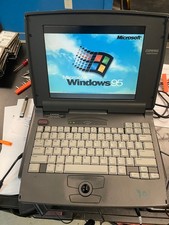
Compaq Contura 430cx Vintage Laptop 9.5" Intel 486DX2 50MHz Windows 95 Working
$150.00
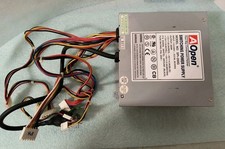
VINTAGE AOPEN MODEL SPI-200 200W AT POWER SUPPLY WITH SWITCH DS-PS-8
$34.95

VINTAGE COLLECTIBLE Comp USA Maxtor 20 GB 3.5 Inch EIDE Hard Drive NEW SEALED
$500.00

Vintage HP DVD Writer dvd210i Internal IDE Drive Q2116A BRAND NEW FACTORY SEALED
$58.85