

 Reply With Quote
A bit of guess here but you need to allow icmp which fish uses to check the connection.


I had to back-up my home as I messed-up my knoppix hdinstall and needed to reinstall the KNOPPIX CD with knoppix-installer. So I fished to another hdd on my home network and dragged and dropped all my home dirs on this PC to the other. OK, no problem.
So, I reinstalled KNOPPIX on this box and tried to reverse the process by copying the backed-up files from the other PC using fish again. The problem is that now I can only do so one file at a time or fish stalls out!
Anyone else have a problem with fish? Am I missing something? I've done this before with other PCs and all was a ok....
Regards,
AJG
A bit of guess here but you need to allow icmp which fish uses to check the connection.
I enabled ssh on both PCs using
update-rc.d ssh defaults
shouldn't that set it all up to work?
TIA,
AJG
It should.Originally Posted by A. Jorge Garcia
Have you checked if the keys are generated on the server? If not do:
su
ssh-keygen -t rsa -f /etc/ssh/ssh_host_key
ssh-keygen -t rsa -f /etc/ssh/ssh_host_rsa_key
ssh-keygen -t rsa -f /etc/ssh/ssh_host_dsa_key
You might want to ssh in the first time from the shell with ssh login@ip_or_hostname as I'm not sure how fish accepts the keys, a popup perhaps?
EDIT: Hmm, the keys are probably fine if you can connect. Why I asked about icmp is that I once had fish stalling like you said and the solution was to accept ping in the router.
OK, the keys are probably OK as I can sftp and ssh from shell. I can even fish from konqueror but I can only copy one file at a time, not a whole dir or home fir for that matter!
What can I do with icmp, this is new to me.
BTW, I had reinstalled both these machines with KNOPPIX 3.6 2004.0816 and used update-rc.d before this problem started!
TIA,
AJG
I think you can ONLY fish from konqueror. Isn't fish a KDE protocol? Outside of Konq you have to use ssh.
I don't know why you can only copy one file at a time, normally I can copy multiple files or directories with fish in konqueror using drag'n'drop.
Besides regenerating the host keys as above, the other cause of problems with fish is with the known_hosts file. If fish refuses to connect (usually just gives an error 'unable to connect to <ip address>'), just delete the hidden file /home/user/.ssh/known_hosts & retry, fish will give a warning message about an unknown host then recreate the known_hosts file when you confirm to proceed.
Ok, forget about the keys then.
icmp is a protocol used by ping, although I think fish needs mtu which still goes over icmp. Have you looked in the router for any blocking of icmp/ping or tried pinging the computers?What can I do with icmp, this is new to me.
Also do you run software firewalls, if yes: disable them just for testing.
You mean it worked before you used update-rc or before reinstalling?BTW, I had reinstalled both these machines with KNOPPIX 3.6 2004.0816 and used update-rc.d before this problem started!
Just to rule out fish, try WinSCP from a windows box.
I mean everything worked fine before reinstalling.
However, as far as I recall, originally I installed every PC the same way as I reinstalled them now! In other words, knoppix-installer from a liveCD boot of KNOPPIX 3.6 and then rebooting as root to update-rc.d ssh defaults not to mention editting lilo.conf for dual boot and using netcardconfig to setup DHCP.
I do all this with all my hdinstalled dual boot PCs as I find ssh, sftp and fish (in konqueror) very useful (better than telnet and ftp, BTW)! I never had a problem like this....
TIA,
AJG
Sorry to say but if pinging worked and the install was just like before, I'm out of ideas.
Perhaps do a testdisk at bootup to rule out a faulty cd.
One thing more to look at is:
cat /proc/sys/net/ipv4/icmp_echo_ignore_all /proc/sys/net/ipv4/icmp_echo_ignore_broadcasts
You should get two zeros as output.
I give up! I don't know what's wrong with this dubm thing. I got the 2 zeros, BTW. I'll just refer to my backups on an as needed basis....
BTW, maybe I should have set-up /home in a separate partition to begin with! I've never done that. Is it hard to do?
TIA,
AJG
 Posting Permissions


Intel Core i7-3770K 3.5 GHz Processor
$39.00

Intel Core i7-9700 3.0 GHz Octo-Core (SRG13) Processor
$79.00
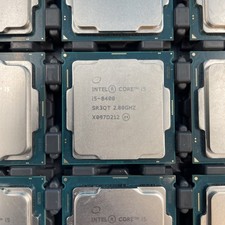
(LOT OF 20) Intel Core i5-8400 CPU 2.80GHz Desktop Processor (SR3QT)
$700.00

GAMING COMBO: ASUS Prime H470M-PLUS MOTHERBOARD + i5-10600KF CPU + 16GB DDR4
$229.95

Intel SRG17 Core i7-9700T Desktop Processor CPU
$74.99

Matched Pair _ Intel Xeon E5-2698 V4 2.2GHz 20-Core Processor CPU LGA2011 SR2JW
$94.99
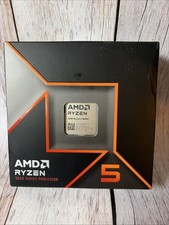
AMD Ryzen 5 9600X Processor (Zen 5) 6-Core 3.9GHz AM5 65W Desktop CPU
$169.99

Intel Core i5-14600KF Unlocked Desktop Processor
$259.99

AMD Ryzen 7 PRO 8700GE 8-Core/16-Thread Up to 5.1GHz AM5 (FL1)
$189.00

PS5 Over Heating Problem Solver 1.5 Grams Liquid metal thermal paste CPU, GPU
$15.99