

 Reply With Quote
yep i tried kanotix, works properly, no problems anywhere, and its got Firefox.... but it seems to similar to knoppix, i mean the logout screen shows 'do u wish to exit knoppix' or something like that, anyways its cool


Kanotix
yep i tried kanotix, works properly, no problems anywhere, and its got Firefox.... but it seems to similar to knoppix, i mean the logout screen shows 'do u wish to exit knoppix' or something like that, anyways its cool
kanotix is based on knoppix much like alot of live cds out at the moment.
http://www.frozentech.com/content/livecd.php
I like Free BSD Live CD, working fine : http://www.freesbie.org
thank you for shareing that im using the freebsd live cd now its very nice. it didnt boot up first time with the default settings so i set apci off and it works.
As a developer, I like Pollix. However, it doesn't have MySQL with it.
I have problem with Pollix and Stux: I can not persist configuration info (which I can do with Knoppix and Kanotix).
It would be nice if in future Pollix would have MySQL and the capability of creating "/home" on harddisk and persisting configuration (like Knoppix and Kanotix).
Pollix does allow you to create a persistant home. Pollix is Knoppix based and you can create a home. I have mine on a 256 meg thumb drive. Stux is Slackware based and currently does not allow creation of persistant home on USB but you can save your configuration to a hard drive. Stux .08 is going to allow persistant home when it is released.
Hi Bodhi,
Thanks for the tip. Could you please let me know what menu in Pollix I must go in to create "/home" on the
harddisk?
I use pollix-20040309.iso to create the Pollix CD, but it seems that the Pollix from that CD doesn't have the
menu "KNOPPIX", in which I can find the menu "Configure".
However, the lack of MySQL on Pollix makes it less attractive.
I currently use Kanotix from the ISO file: KANOTIX-BUG-HUNTER-X-2004-FIX1.iso
With this version of Kanotix, I have MySQL, and I can download Eclipse, JDK + NetBean, ArgoUML ... to do the
software development.
However it still has some problems:
- The USB devices (thumb flass memory, external USB hard driver) are not plug-and-play. It means you have to
plug them to the USB ports before you start Kanotix. In the contrary, in Knoppix 3.7, you can plug devices when
Knoppix is already running.
- I can not install RPM software packages with Kanotix, because the packages database is on CD, read-only.
- I can run Tomcat4 and JBoss4, but can not run Tomcat 5 and Sun App Server 7 because of some privilleges
troubles with JMS.
- KGhostview of this version of Kanotix can not read Adobe PDF files (just blank documents appear)
However, to play around, I think Kanotix and Knoppix are OK.
How to create a persistant home with Pollix.
Pollix has 4 X-window managers; Fluxbox,IceWM,Twm, and Xfwm/XFce. IceWM is the default X-window manager. Each X-interface has different program menus. You can not access the Knoppix create a persistant home from the IceWM interface. (so far as I can see) You can access the program from XFce X-wnidow. Here is the steps I took to create a persistant home in Pollix.
1. switch to XFce X-window.
On the start menu select programs>windows managers>XFwm/XFce. The interface will change.
2. Left click on the desktop an a drop down menu appears. follow these steps:select User menu>KDE>Knoppix>configure>create a
persistant Knoppix Home Directory. The create a home wizard will launch. You are familar with creating a home so I won't bore you
with the details.
3.To go back to IceWM from XFce interface: Left click desktop and select User menu>Debian>windows managers>IceWM.
I haven't had good result from trying to use the boot cheat for loading the configuration, so at boot just use the cheat for home:
knoppix home=/dev/sda1 (or where ever you create it). I set up my desktops the way I like them first and then create my home, that way the configuration is saved the way I like it.
Hope this helps.
PS: Pollix does have mysql, go here to read the package list.
http://moe.tnc.edu.tw/~kendrew/polli...ollix.packages
I have never used mysql so I don't know how to access it in Pollix. I would suppose one would have to use the command line.
Hi Bodhi,
Thank you so much. If Pollix has MySQL, I definitely vote to use it as a software developer CD.
To use MySQL on Linux, one can run like this
- Start MySQL server by using console as root, run "mysqld", or run "sudo mysqld"
- Start MySQL client by using console, run "mysql". The schema one sees in the database will depend on the user privillege.
However, JBoss on Polix is on the CD, so the "deploy" directory of JBoss is on the CD, and I can not deploy J2EE WAR files or EAR files in JBoss.
If I copy JBoss to hard disk, it will have a lot of error with registering JMX beans and JMS when I start it from the hard disk. I don't have those problems if I run it from the CD (then I can not deploy apps) or run it from Window XP (which I don't like).
Do you have any suggestion ?
Thank you,
Linh.
 Posting Permissions


INTEL XEON E5-2680V4 SR2N7 2.40GHZ CPU
$11.00

Dell EMC PowerEdge R440 Xeon silver 4215 2.5GHz 16 GB ram 2x 550W PSU No HDD
$275.00

Intel Xeon Phi 5110P 60-Core 1.053GHz Coprocessor
$50.00

Dell Precision T7820 2x Xeon Silver 4114 2.20GHz 950W No RAM GPU HDD 4x SATA
$350.48

Dell Precision T5820 Workstation 3.70GHz W-2135 No RAM/ GPU/ HDD/ OS
$179.98

Intel Xeon E5-2699 V4 2.20GHz 55M 22-CORES LGA2011-3 Server Processor 145W SR2JS
$84.49

Lenovo ThinkStation P520c Intel Xeon W-2133 6-Core 3.60GHz -NO RAM/ HDD/ GPU/ OS
$127.54

Intel Xeon E5-2690 v4 SR2N2 14 Core 2.6GHz 35MB LGA2011-3 CPU *km
$15.99

Dell Precision Tower 7810 Xeon E5-2630 v3 @ 2.40GHz , 32GB Ram, NO HDD, NO OS
$239.99
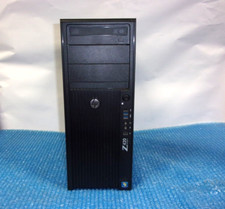
HP Z420 Tower Workstation Xeon E5-1620 3.60GHz, 4GB Ram, NO HDD, NO OS
$140.00