

 Reply With Quote
yeah knoppix is good, but i have to go back to xp because i cant get my damn modem workinstupid thing


To try zerwekh's suggestion:look for the device for your cdrom - but it very likely is sr0 with a 2.6.x kernel - might be /dev/hdc without SCSi emulation...Code:su <type password; ->prompt changes to '#'> dmesg | more
then try mounting "mount -r /dev/sr0 /mnt/cdrom" (still as root)
good luck...
yeah knoppix is good, but i have to go back to xp because i cant get my damn modem workin
Try a different linux distro. Mandrake or red hat are pretty cool. Kanotix is the one I choose and is awesome.
Hi, I'm on hd install and i have no problems with my cdrom and dvd drive until yesterday.
Simply the error display to me is that doesn 't exists. I've tried all comands I've read but don't works:
This is what i get when I use dmesg:
hdc: TOSHIBA DVD-ROM SD-M1712, ATAPI CD/DVD-ROM drive
hdd: SONY CD-RW CRX225E, ATAPI CD/DVD-ROM drive
hdc: attached ide-scsi driver.
hdd: attached ide-scsi driver.
scsi0 : SCSI host adapter emulation for IDE ATAPI devices
Vendor: TOSHIBA Model: DVD-ROM SD-M1712 Rev: 1004
Type: CD-ROM ANSI SCSI revision: 02
Vendor: SONY Model: CD-RW CRX225E Rev: QYB2
Type: CD-ROM ANSI SCSI revision: 02
Attached scsi CD-ROM sr0 at scsi0, channel 0, id 0, lun 0
Attached scsi CD-ROM sr1 at scsi0, channel 0, id 1, lun 0
sr0: scsi3-mmc drive: 48x/48x cd/rw xa/form2 cdda tray
Uniform CD-ROM driver Revision: 3.12
sr1: scsi3-mmc drive: 40x/40x writer cd/rw xa/form2 cdda tray
Type:
sudo mount /dev/sr1 /cdrom
/dev/sr1: Error de entrada/salida
mount: dispositivo de bloques /dev/sr1 está protegido contra escritura; se monta como sólo lectura
/dev/sr1: Error de entrada/salida
sudo mount /dev/hdd /cdrom1
/dev/hdd: Error de entrada/salida
mount: debe especificar el tipo de sistema de ficheros
I've tried to change /etc/fstab but the error message is the same
I don't know which can be the problem cos I can burn cds with hdd dispositive and k3b (k3b recognise the cdrom)
Thanks
my cdrom stopped working after 3.7 hdd install.
this command fixed it for me
mount -r /dev/sr0 /dev/cdrom
good luck all.
 Posting Permissions


Seagate ST6000NM0115 6TB 256MB 7200RPM 3.5" SATA 6.0Gb/s Enterprise Hard Drive
$159.99

Seagate Exos X14 10TB 7200RPM 3.5" SAS 12Gb/s Hard Drive HDD ST10000NM0528
$165.00

Seagate 14TB Exos X14 7200RPM SATA 6Gb/s 256MB 3.5" Enterprise HDD ST14000NM0408
$354.99

Seagate Exos X16 ST10000NM010G 10TB 7200RPM SAS 12Gb/s 3.5" 512e/4Kn HDD
$199.00

Seagate Enterprise Capacity 2TB 2.5in SATA Internal HDD ST2000NX0403
$60.00

HGST HUS724040ALA640 4TB 7200 RPM SATA 3.5" Internal Desktop Drive 100% Health
$78.00

ST6000NM0034 DELL 6TB 7.2K 12G SAS 512E 3.5" ENTERPRISE HARD DRIVE 8D1V4 08D1V4
$54.99

Dell ST91000640SS 1TB 2.5" 6Gb/s 64MB 7.2K RPM SAS Hard Drive Dell P/N: 0VXTPX
$16.99
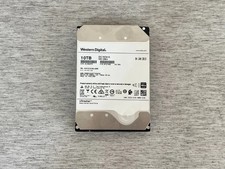
HGST HUH721010AL4200 10TB SAS 12Gb/s 4Kn 3.5 in Enterprise HDD | 0F27402
$199.99

MG08SCA16TE Toshiba 16TB 7.2K SAS 12gb/s 512e 3.5inch HDD HDEPN10GEA51 NEW
$454.44