

 Reply With Quote
That's commonly stated, and there's many posts in this forum on this partcular subject. Click on the link that says search at the top of the page, and search your problems away.


Boy this is a weird problem.
I can dial out in root mode clicking on the modem dialer.
But in user mode, when I try click on the Modem dialer in in the menu nothing happens.
If I try to create a link from that, I get a message saying KPP Not Found.
But, if I get into the File Manager Super User Mode, still in user mode, I can navigate to this folder and click on it and run the modem dialer:
/root/.kde/share/apps/kicker/kppdesktop
'Kppdesktop' is the modem dialer and has the modem dialer icon.
How do I get the normal modem dialer back in user mode?
sakiZ
That's commonly stated, and there's many posts in this forum on this partcular subject. Click on the link that says search at the top of the page, and search your problems away.
Well, thanks for the tip. I'll search around. The problem seemed pretty bizarre.
Glad to know I'm not alone, I guess.....
I did "solve" the problem short term. I just set up my root mode the same way as I have my user mode set up. New mail account and all.
I must say, the amount of permission denied messages in user mode is quite annoying.
Access denied. Need password. etc etc. I realize Linux likes to be more secure, but this is a little much.
I'm the only user and I'm only on line briefly. Ah well. Better then Windoze, eh?
sakiZ
You don't acually have to be logged in to a desktop as root, you can simply use this command as a normal user:Originally Posted by sakiZ
This will ask for your root password, then run kppp as root, assuming you gave the correct password.Code:gksu kppp
Thanks,
Saki
OK, this could be a real plus if we could do something like write a short little script (batch file)
that automates this procedure.
Slap an dialer icon on it and put it on your desktop???
That would give users the best of both worlds, user convenience and an ultra secure desktop!
Is that too Windows like?
Hmm?
sakiZ
It depends: If you are talking about automating the password, then yes, otherwise it sounds like a good idea.
Just to get you started, type the following lines in a terminal to get a script such as you described to appear on your desktop:Code:echo '#''!'/bin/bash > kppp echo 'gksu kppp' >> kppp chmod a+x kppp mv kppp ~/Desktop/
echo '#''!'/bin/bash > kppp
echo 'gksu kppp' >> kppp
chmod a+x kppp
mv kppp ~/Desktop/
After I created the script you sent me above, I then changed the icon for it to the KPPP icon and renamed it to
"Dial Jade" which is my ISP.
Very user friendly!!!
Thanks so much.
Have a happy New Year!!!!!
sakiZ
 Posting Permissions


IBM System X3850-X5 Server w/4x Intel Xeon E7-4870 CPU , 512 GB DDR3 RAM,NO HDD
$1599.99

IBM 7915 AC1 M4 E27R704 Server Intel 2650V2 32GB RAM NO HDD w/ 2x 750w PSU
$225.00

Unused IBM 09P0037 MAINBOARD For RS/6000 7044-170 P-Series
$375.00

IBM QRadar xx29 2x Xeon E5-2650v4 2x 900W PSU M5120 12x 3.5" Bay Server No RAM
$179.99

IBM Power 8 S822L Server 8247-22L POWER8 Enterprise 256GB RAM 2x 00KV626 CPU
$999.99

IBM SYSTEM X3500 M3 SERVER 7380AC1 TOWER Server XEON E5620 8GB RAID SEE NOTES
$110.30

IBM System x3550 M3 1U Server 2x Xeon E5645, 192GB RAM, 2x 300GB HDD (7944-AC1)
$150.00
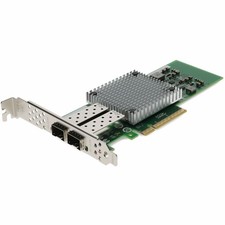
AddOn IBM 42C1800 Comparable 10Gbs Dual Open SFP+ Port Network Interface Card
$383.99

IBM ADP Server Type 7870 AC1 NO HDD | 128GB RAM PC3L | 2 x Xeon E5620
$199.99

IBM EMC 091-000-091 17 Inch Rackmount LCD Keyboard KVM Console 03N7012
$109.99