

 Reply With Quote
I just had that problem and this is how I fixed it: edit /etc/kde3/kdm/kdmrc AllowRootLogin=false to true. I could not login at the login screen anymore because the root option was not there, now it is again.


Have you noticed that you can't login as root anymore from the login screen after a hdd install? Right after knoppix-installer terminates, I usually reboot without the liveCD and edit /etc/lilo.conf and run to set up a dual boot, run netcardconfig and update-rc.d ssh defaults as root. In 3.6 you login via the KDM screen (GUI) and run kate to edit lilo.conf and then open a shell to run netcardconfig and update. Now I have to login on a console screen as root and startx to do the same thing. root isn't even listed as a user anymore on the KDM login! Why is that?
Regards,
AJG
I just had that problem and this is how I fixed it: edit /etc/kde3/kdm/kdmrc AllowRootLogin=false to true. I could not login at the login screen anymore because the root option was not there, now it is again.
My knoppix 3.7 just boots directly to the desktop in knoppix-user mode. If I need any root privilages then I am usually prompted for root password in order to continue. Is this situation ok or should I be seeing a login screen when my system boots?
Did you do a knoppix-style install? If you did then that is what is going to happen.
yes I did a knoppix style install. Is there still a way to have a login screen for root and users??
Knoppix-style is set up to run just like from the live cd, so there will not be any login screen to log into anywhere. I'm not sure if it is possible to create more users with this type of install.
Ok, I just installed 3.7 , up from 3.6. I would like the root option back.Originally Posted by rrfish72
But how do I edit the kdmrc file if I am in user mode and don't have write privilages to the file? And can only get them if I am in 'root'. Catch 22.
I found the file, even edited it and saved the changed file to the home directory. But I can't save the file back to the original kdm directory.
I'm sure this is easy for experienced Linux people but I'm new at this.
sakiZ
You have to find the root terminal i the K menu. I think it is system. Once you get there and click on it it will ask for the root password and then you can edit anything you want.
Ok, so you edit it from the root terminal
Thanks,
sakiZ
just do kate kdmrc once you get to the correct directory.
 Posting Permissions

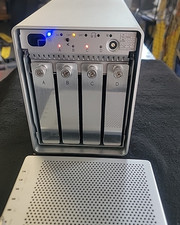
OWC Mercury Elite-AL Pro Qx2 4-Bay RAID Enclosure + SATA 1394 -USB 2.0 (8TB)
$180.00
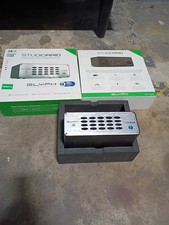
Glyph StudioRAID 28TB External RAID Hard Drive Thunderbolt 2 USB 3.0 7200RPM
$300.00

OWC Mercury Elite Pro 2 Bay RAID Enclosure with USB 3.2 for Dual 3.5 inch HDDs
$87.99

Broadcom 9600-24i Tri-Mode RAID Controller 4.0 NVMe SAS SATA NEW 05-50111-01003
$639.69

2-Bay/4-Bay Hard Drive Enclosure for 3.5"/2.5'' SATA HDD/SSD 10Gbps USB-C 3.2
$75.99

WAVLINK RAID 2 Bay Hard Drive Docking Station SATA 2.5/3.5'' SSD HDD Enclosure
$119.99

Dell PowerEdge HBA330 LP PCI-E 12GBs RAID SAS Controller Adapter J7TNV
$18.95

Acasis USB 3.2 2 Bay HDD RAID Enclosure for 2.5/3.5" SATA Drives External Array
$55.00

Intel VROC Premium RAID Controller Card PCIe Add-On Module VROCPREMMOD
$265.00

Adaptec ASR-71605 16-Port 1Gbps PCIe RAID Card High Profile
$18.49
