

 Reply With Quote
Please make sure that the file /etc/filesystems contains the following lines
cramfs
iso9660
Please post pack whether this solves the problem.
Greetings,
probono


Help.
I did the sudo wget klik.atekon.de/client/install -O -|sh command and it seems to have gone okay. Got a message afterwards that say it was successfull and i could run the software. now when i go to run something i get the following errors
So how can I fix this and get it working?Code:phxguy@ubuntu:~$ ~/.zAppRun ~/Desktop/xvier.cmg ioctl: LOOP_CLR_FD: Device or resource busy mount: I could not determine the filesystem type, and none was specified /home/phxguy/.zAppRun: line 123: /mnt/app/1/wrapper: No such file or directory umount: /mnt/app/1 is not mounted (according to mtab)
Thanks
Please make sure that the file /etc/filesystems contains the following lines
cramfs
iso9660
Please post pack whether this solves the problem.
Greetings,
probono
Im Using kubuntu Hoary 5.04 and i dont seem to have a filesystems file located there. I did a search for filesystems and the only one I found was located in /proc and it is 0 bytesOriginally Posted by probono
Besides that error I get the Error unable to mount /mnt/apps/1
Simply create the file /etc/filesystems with the following two lines in it:
cramfs
iso9660
This file makes mount probe for the correct filesystem, otherwise cmg files cannot be mounted.
Thanks to Kano for hinting me towards this solution.
Greetings,
probono
Unfortunately that isn´t working for me either. I created the file using kate and added those 2 lines. I then issued sudo mv filesystems /etc/ and rebooted my computer. tried to open nvu.cmg and i still get the error Unable to mount /mnt/apps/1
Oh yeah i also did sudo mount -a as well and no luck
Don know if this helps but here is the output of cat /etc/fstab
phxguy@ubuntu:~$ cat /etc/fstab
# /etc/fstab: static file system information.
#
# <file system> <mount point> <type> <options> <dump> <pass>
proc /proc proc defaults 0 0
/dev/hdb1 / ext3 defaults,errors=remount-ro 0 1
/dev/hdb5 none swap sw 0 0
/dev/hdc /media/cdrom0 udf,iso9660 ro,user,noauto 0 0
/dev/hdd /media/cdrom1 udf,iso9660 ro,user,noauto 0 0
/dev/fd0 /media/floppy0 auto rw,user,noauto 0 0
/dev/sde /media/usb0 auto rw,user,noauto 0 0
/dev/sdf /media/usb1 auto rw,user,noauto 0 0
/dev/hda1 /media/windows vfat umask=000,user,auto 0 0
/mnt/app/1/image /mnt/app/1 auto user,noauto,ro,loop,exec 0 0
/mnt/app/2/image /mnt/app/2 auto user,noauto,ro,loop,exec 0 0
/mnt/app/3/image /mnt/app/3 auto user,noauto,ro,loop,exec 0 0
/mnt/app/4/image /mnt/app/4 auto user,noauto,ro,loop,exec 0 0
/mnt/app/5/image /mnt/app/5 auto user,noauto,ro,loop,exec 0 0
/mnt/app/6/image /mnt/app/6 auto user,noauto,ro,loop,exec 0 0
/mnt/app/7/image /mnt/app/7 auto user,noauto,ro,loop,exec 0 0
here is my latest results trying to run something from a terminal.
phxguy@ubuntu:~$ ~/.zAppRun ~/Desktop/xvier.cmg
mount: could not find any free loop device
/home/phxguy/.zAppRun: line 123: /mnt/app/1/wrapper: No such file or directory
[mntent]: warning: no final newline at the end of /etc/mtab
umount: only root can unmount /mnt/app/1/image from /mnt/app/1
phxguy@ubuntu:~$
and this is the error as su:
root@ubuntu:/home/phxguy # ~/.zAppRun ~/Desktop/xvier.cmg
bash: /root/.zAppRun: No such file or directory
root@ubuntu:/home/phxguy #
You could try mounting it by hand:
su
mkdir /mnt/test
mount /home/knoppix/Desktop/nvu.cmg /mnt/test -o loop -t cramfs
/mnt/test/wrapper
Does that work?
I get this error:
root@ubuntu:/home/phxguy # mount /home/phxguy/Desktop/nvu.cmg /mnt/test -o loop -t cramfs
mount: could not find any free loop device
then of course this gives an error:
bash: /mnt/test/wrapper: No such file or directory
Does mounting by hand still fail after a reboot?
here is what happened this time. I have rebooted my system before doing this.
root@ubuntu:/home/phxguy # mount /home/phxguy/Desktop/nvu.cmg /mnt/test -o loop -t cramfs
root@ubuntu:/home/phxguy # /mnt/test/wrapper
Xlib: connection to ":0.0" refused by server
Xlib: No protocol specified
(nvu-bin:9904): Gtk-WARNING **: cannot open display:
I then did it as non su and issued the following:
phxguy@ubuntu:~$ sudo mount /home/phxguy/Desktop/nvu.cmg /mnt/test -o loop -t cramfs
Password: **********
phxguy@ubuntu:~$ /mnt/test/wrapper
and it worked!!! however i then closed nvu and tried to click on the icon and i still got the ¨unable to mount /mnt/app/1 error
Hopes this helps..
 Posting Permissions

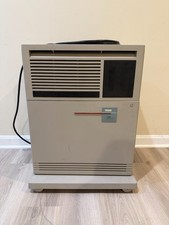
DEC VAX 4000-500 - Vintage - excellent condition - UPS shipping
$3999.00
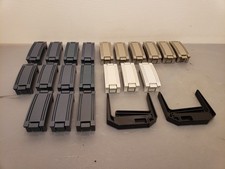
Vintage DEC Digital Equipment Corp HP Compaq Drive Pullers, Bay Slot Covers
$100.00

Vintage DEC Digital Starion 200 Desktop PC Powers On Boots To BIOS NO HDD - DW
$269.99

Vintage DEC/Mostek memory systems MK 8015 AA-00 6805-08015 1100 REV C(B7)
$279.99
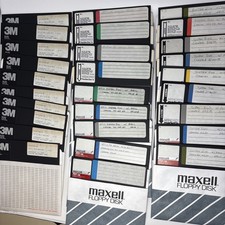
Vintage DEC RT-11 V5.0 8” Floppy Disks HT-11 System BASIC FORTRAN Software Lot
$199.95

6 Vintage DEC Digital System Building Blocks - Flip Chips
$75.00
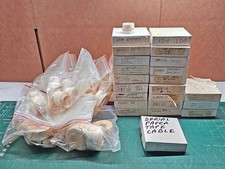
Vintage DEC LSI-11 PDP-11 Paper Tape Software Lot (96 Tapes) Cables Hardware
$649.00

DEC T2053-DE MS65A-DA 128MB VAX 6000 Memory Board Gold Scrap Vintage
$64.99
Vintage DEC Digital M8048 5013995C PDP-11 LSI 11 ROM (B3)
$149.99

VINTAGE DEC/MDB Systems MLSI-TEV Circuit Board #40040340 1976 (B5)
$69.99