

 Reply With Quote
Right click on icon ->Properties->Permittions-> (Make neccessary changes) -> Advanced Permittions-> (Make neccessary changes) ->OK->OK
The idea behind: everything is read only by default


Hi,
When I use the Knoppix-CD to boot the PC, the hda en hdb drives (with an existing Redhat install on it, ext3) are mounted OK by Knoppix. I can read them.
But when I want to write to these drives, I get an 'no permission to write' error.
Can someone plz help me out with this?
tnx, Eric
Right click on icon ->Properties->Permittions-> (Make neccessary changes) -> Advanced Permittions-> (Make neccessary changes) ->OK->OK
The idea behind: everything is read only by default
RT click on icon, select 'actions', select 'change read/write mode'.
Hmm, OK tried that, still not able to write on them.
Maybe it is something to do with the rwxr-xr-x settings, eg. knoppix is considered not the owner?
 Posting Permissions


Dell 6P85J 4TB ST4000NM0063 7.2k 6Gb/s 3.5” SAS SED Hard Drive with Tray
$39.99

Western Digital HUS726T4TAL5204 4TB 7.2K SAS 12Gb/s 3.5" 512e HDD NetApp X375A
$64.00

HGST Ultrastar HUS726040AL5210 4TB 7200RPM SAS 12Gb/s Enterprise HDD
$41.00

20TB 7200 RPM SATA III Internal 3.5" White Label Hard drive
$349.99

Seagate Barracuda ST1000DM003 1 TB SATA III 3.5 in Desktop Hard Drive
$23.99

Dell ST6000NM0034 1HT27Z-150 NWCCG 6TB SAS 3.5 7.2K ENTERPRISE SERVER DRIVE
$68.99

Seagate Exos ST2000NX0253 HDD 2TB SATA 7.2K 2.5" 512b/s
$58.00

Lot of 2 HP 4TB / 128MB SATA 7.2K RPM 3.5" Hard Drive MB4000GCWDC /ST4000NM0033
$125.00
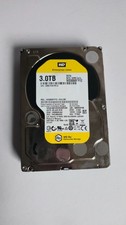
WD Re 3TB Enterprise 3.5" HDD SATA 6Gb/s 7200RPM 64MB Cache
$70.00

Toshiba DT01ACA100 1 TB 3.5" SATA III 3.5 in Desktop Hard Drive
$24.99