

 Reply With Quote
if u boot from cd just type as cheatcode
orCode:screen=1280x1024or anything u wantCode:screen=1600x1200
if u have a hdd install u have to change the XF86config-4 in /etc/X11
just search for resolution and edit


Hye, just wondering if there is a way to force the screen resolution to change. In windows, and on my macs I always run 1280*1024.... Highest knoppix will let me go is 1024*768....which can get really annoying. Being used to seeing things much smaller, this 1024 shit is annoying. Is there any way to force it to goto 1280*1024? Any file I can edit? Or am i running the risk of blowing something up, like my monitor or graphics card, lol. Any help/comments would be greatly appreciated.
if u boot from cd just type as cheatcode
orCode:screen=1280x1024or anything u wantCode:screen=1600x1200
if u have a hdd install u have to change the XF86config-4 in /etc/X11
just search for resolution and edit
Ok, i opened that file as root. Searched for resolution, and found nothing.... But I scrolled down and found all the different modes.... like this....
ModeLine "1280x960" 148.5 1280 1344 1504 1728 960 961 964 1011 +hsync +vsync
1280x1024 @ 60Hz (VESA) hsync: 64.0kHz
ModeLine "1280x1024" 108.0 1280 1328 1440 1688 1024 1025 1028 1066 +hsync +vsync
1280x1024 @ 75Hz (VESA) hsync: 80.0kHz
ModeLine "1280x1024" 135.0 1280 1296 1440 1688 1024 1025 1028 1066 +hsync +vsync
1280x1024 @ 85Hz (VESA) hsync: 91.1kHz
And as you can see there, I made it so these were not comments anymore..... and then there was something else below....
I made these changes to this part.....
SubSection "Display"
Depth 24
Modes "1280x1024" "1024x768" "800x600"
EndSubSection
SubSection "Display"
Depth 32
Modes "1280x1024" "1024x768" "800x600"
EndSubSection
I messed around and would un-comment those first things, and have only the second part, crap like that.... but ummmm, now I only have the option for 1024x768 at 76hz.......
What the hell did I mess up? lol
Perhaps this modeline calculator can help: http://www.mcamafia.de/mcapage0/timeconv.htm
Just add the calculated modeline to your XF86Config-"Modeline" section. I think you can also use the command "fbset" to calculate modelines.
when i do fbset, it just pulls this up
mode "1024x768-76"
# D: 78.653 MHz, H: 59.949 kHz, V: 75.694 Hz
geometry 1024 768 1024 768 16
timings 12714 128 32 16 4 128 4
rgba 5/11,6/5,5/0,0/0
endmode
I did the mode calculator.... and added the modeline into the XF86Config-4 in the middle of the modelines.... but I still cant choose 1280-1024..... only 1024x768 still....... I booted off the cd and put in the code for 1280, and it went in fine, looked beautiful...... im stuck with what to do next.
can anybody else help? I've been looking online, and i see things relating to this, but they always just say add this modeline, or change this one thing, which ive done..... i know i have ot be missing one thing..... anymore help?
Hmm, I'm not sure but I think XF86Config-4 needs no Modelines anymore. So it should work if you just add the Mode "1280x1024" to the "Screen"-Section". Of course you have to make sure, that your monitor is described right. Here's an example:
Section "Monitor"
Identifier "AOC Spectrum 7GLR"
HorizSync 30-96
VertRefresh 60-100
Option "DPMS"
EndSection
Section "Screen"
Identifier "Default Screen"
Device "Geforce4 Ti 4200"
Monitor "AOC Spectrum 7GLR"
DefaultDepth 24
SubSection "Display"
Depth 1
Modes "1280x1024" "1024x768" "640x480"
EndSubSection
SubSection "Display"
Depth 4
Modes "1280x1024" "1024x768" "640x480"
EndSubSection
SubSection "Display"
Depth 8
Modes "1280x1024" "1024x768" "640x480"
EndSubSection
SubSection "Display"
Depth 15
Modes "1280x1024" "1024x768" "640x480"
EndSubSection
SubSection "Display"
Depth 16
Modes "1280x1024" "1024x768" "640x480"
EndSubSection
SubSection "Display"
Depth 24
Modes "1280x1024" "1024x768" "640x480"
EndSubSection
EndSection
Try changing DefaultDepth 24 to 16
haha, this will be fun....trying to figure out all the specs of my monitor.... I bought this thing refurbed, doesnt have any tags on it, I know its an HP monitor, but.... is there any program that will tell me the refresh rates? or am i gonna have to do some research?
If you get it working with the liveCD, you can just copy it over to hd:
boot liveCD with the cheatcodes that work
open a console
sudo su
mount /mnt/hd?? (your linux install partition being ??)
mount -t ext3 -o remount,rw /dev/hd?? /mnt/hd?? (if already mounted of you need to specify filesystem, choose to needed options)
mv /mnt/hd??/etc/X11/XF86Config-4 /mnt/hd??/etc/X11/XF86Config-4_OLD1
cp /etc/X11/XF86Config-4 /mnt/hd??/etc/X11/XF86Config-4
ctrl-d
reboot to hd install
 Posting Permissions


GIGABYTE A520M DS3H AC AMD AM4 Motherboard mATX
$59.99

GIGABYTE Z790 AORUS ELITE AX LGA 1700 Intel Z790 ATX Motherboard with DDR5
$189.99
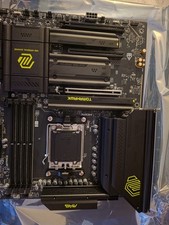
MAG X870 TOMAHAWK WIFI Motherboard, ATX - Supports AMD Ryzen 9000 / 8000 / MSI
$143.50

Intel H310 LGA1151 8-9th Gen DDR4 M.2 NVMe mATX Motherboard IO Shield Battery
$54.99

GIGABYTE B365 HD3 LGA1151 Intel 9th Gen motherboard
$59.99

Intel H81 Motherboard M.2 NVMe LGA 1150 mATX w/ IO Shield (Random Slot Color)
$29.90

ASUS PRIME B360M-C MicroATX Intel LGA1151 DDR4 HDMI VGA USB RJ-45 Audio
$34.99

ASUS TUF GAMING B550-PLUS WIFI II AM4 AMD B550 ATX AMD Motherboard
$95.99

ASUS PRIME Z490-V Motherboard Intel Z490 10th gen DDR4 LGA 1200 ATX w/ IO Shield
$84.99

ASUS B85M-G / B85M-G PLUS LGA1150 DDR3 Micro ATX Motherboard HDMI Support 4thCPU
$45.00