

 Reply With Quote
The command you need is sudo konppix-installer.


Ok, I just booted with the cheat code string knoppix26 noswap DMA splash twice, and KDE launched both times. However, knoppix-installer didn't work. It just ran through the same lines of code about a bazillion times and didn't stop until I quit the shell. If I can get knoppix-installer to work, then I can use alien to open a modem driver in .rpm format, and I might not ever have to touch Windows again! I mean, I've got a debian package for Cedega ready to go, if I can get knoppix-installer and KDE to work, I'm free from evil corporate ties!I had a big problem with KDE, my thread on that is here:http://www.knoppix.net/forum/viewtopic.php?t=16817 I started getting on the installer things, and they told me I should post here.
The command you need is sudo konppix-installer.
 Posting Permissions


Refurbished Working 1960's Heathkit EC-1 Educational Electronic Analog Computer
$2999.99

Vintage George A Philbrick Researches Tube Analog Computer Module Serial 005503
$109.99

1969 EAI TR-20 Analog Computer Programming PACE Philbrick Electronic Associates
$36.00

Vintage Donner Scientific Analog Computer Patch Cords Banana Plugs & Resistor
$70.00

Vintage Early Week 12 1984 Apple Macintosh 128K Computer M0001 w/Analog Board+
$209.99

Vintage 1970’s Analogic MP2110 10-Bit A/D Converter Computer Circuit Board
$24.99

Vintage Analog Computing Magazines For Atari Computer Owners No 11-20 Acceptable
$75.00

Extron RGB-160XI Analog Computer Video 60-378-01
$127.06
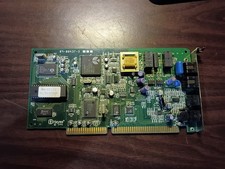
vintage internal ISA Dial-Up Modem from the Accura 28.8 series. 5617us
$15.99

NOB VINTAGE Earthlink MailStation Standard 120 - Email Appliance
$29.99