

 Reply With Quote
That's the only way to do it. Read this thread:
http://www.knoppix.net/forum/viewtopic.php?t=13867
//er


Is it possible to create my own version of KNOPPIX by first installing it on HD... then adding/removing software from it... and then pack it up into a CD image file? Please give me some pointers on doing this.
Jimmy
That's the only way to do it. Read this thread:
http://www.knoppix.net/forum/viewtopic.php?t=13867
//er
I think he ment when you did a hd install, like knoppix-installer
I also want to know this because it would be much better to wotk with then
greets
OK, here's what I did.
1) Boot LiveCD normally with what ever cheatcodes you normally use (lang etc)
2) Use root terminal (from Knoppix menu) and type 'knoppix-installer' <hit return>
3) Install to hdd using 'KNOPPIX TYPE INSTALL' not Beginner, not Debian. Oh and use lilo to mbr, unless you know better!
4) When done remove LiveCD and boot system normally.
5) You now have an OS that is like the CD only writable. i.e. you can now use apt to add and remove stuff
6) When finished modding, YOU MUST REMOVE THE FOLLOWING!
a) All files inside the '/etc/sysconfig' directory and any files in sub folders thereof.
b) Move '/etc/lilo.conf' and ' /etc/X11/XF86Config-4' to somewhere else for safe keeping or rename or remove.
c) Remove your DNS server info from '/etc/resolv.conf '. Leave only ' # nameserver 127.0.0.1' in file.
The above is important to do, otherwise your remaster will be a CLONE of YOUR system!! This defeats the object of autodetect!!
carry out usual cleanup operation (KnoppixRemasteringHowTo-- in Wiki doc's)
Now, references to mkisofs (compress file & make iso steps in HowTo) use ' /mnt/hda1/knx/source/KNOPPIX '
Replace this with (in my case) '/mnt/hda1/ '
As for '/mnt/hda1/knx/master/ ' I used '/mnt/hda3/knx/master/ ' . That's right. Another partition, hda2 being swap
If you need specific info, post here accordingly. Best LUCK and wait for it.......er.. have fun ! that's the one..
Firstly, Sorry for double post on HowTo
Secondly, I missed out another consideration...
When upgrading with APT, at some point you're bound to be asked about updating specific package scripts.
This depends how far you go with updates and new packages. When prompted by Debian APT about scripts the default option is 'N' . Unless you know better I stick with this. option 'Y' installs package maintainers version and may or might not alter Knoppix. Your Choice...
Also, before rebooting just to check your 'handywork' prior to remastering, Make sure the following directories contain only the following files:-
All directories below are In ' /etc/ '
rc0.d = K10xsession + S90knoppix-halt
rc1.d to rc4.d = K10xsession
rc5.d and rc.boot = empty
rc6.d = K10xsession + S90knoppix-reboot
rcS.d = S00knoppix-autoconfig + readme
The above is standard. If you wish to experiment, feel free
This I mention because APT WILL put extra scripts into the above directories. Unchecked, this is messy and causes errors...
Any comments please reply...
Adios Amigos
Hello ..I am kinda new to linux ...I have played around some with other distributions of linux and some of the knoppix . I like knoppix and was looking into the kiosk stuff you can do with knoppix. I have been a bit frustrated latley with trying to create my own kiosk using knoppix. Some of the instruction are confusing. I like your directions you give because they seem less complicated than the tutorial everyone else points to for remastering from HD install of linux. The
http://www.knoppix.net/wiki/Remaster...Install_How_To
however I do have problem hope you can help
I followed instructions you gave but i get an error. After i type the long mkisofs command:
mkisofs -pad -l -r -J -v -V "KNOPPIX" -no-emul-boot -boot-load-size 4 -boot-info-table -b boot/isolinux/isolinux.bin -c boot/isolinux/boot.cat -hide-rr-moved -o knoppix.iso master/
I get back :
mkisofs: Uh Oh, I cant find the boot catalog directory 'boot/isolinux'
Rember I new to linux much of the cripted command stuff you have to type in at promt is just techno bable to me means absolutly nothing to me. Just following instructions like a recipe. In a recipe i dont have to understand what i am doing, its a formula, as long as i follow directions i should get the same axact result.
What i am basically trying to do is create a knoppix cd that when insterted in computer and started up it automatically boots into kiosk mode.
I need it to boot into kiosk mode immediately. I dont want people to have the choice to look around.
In kiosk mode when it boots up it opens browser to a specific site i have it set to.
I have it open in fullcreen and they cannot change that.
I have disbaled the F11 key
I have changed the browser throbber icon and pointed it to another url
I have changed the title bar icon.
I made it so they cannot do a search or go to other websites.
I disable menu bar and such.
Basically they can only go to the specific site I set the browser home page to.
To do some of that I had to go into some of the .jar files in the browser app and change a few things. It works and it does what i need.
But now i need to know how to make a .iso of the HD install of knoppix so i can keep all the settings and the .jar files the way i changed them. I need the new Knoppix cd( the remaster)that boots to kiosk mode with my settings immediately.
The way you pointed out seemed the way to go?
I have on computer installed :
hda1 -windowsXP ( i dont want this to change i dont want to write to this it must stay put untouched)(one of the guides talked about writing to windows OS. sounds dangerous to me if you want stuff left alone)
hda2 - this is data partition for windows. Dont want touched either
hda3 - knoppix swap 2Gigs
hda4 - Knoppix 3.4 intall and Home is on this to - about 23 Gigs
hda 5 - partitoned as ext3 - about - 10gigs was using this as free space to do .iso
This ok? or you suggest differnt partition setup to try with?
Thank you for time, any help much apprecitated
OK. Firstly, your swap partition (hda3) should be fine as is.
Knoppix should detect it (AFAIK..).
If hda5 is 10GB you should be ok IF you split it in half (hda5=5GB/hda6=5GB) use qtparted.
Doing this means your current Linux install can be left alone. As hda5 (my hda1) hda6 (my hda3).
Alternatively, if you want to use your hda4 linux then hda5 can be left as is. So hda4(my hda1) and hda5 (my hda3).
ok?
Hey,
We made the compressed KNOPPIX file system file, but we are not sure what else needs to go on the CD.
Whats suppose to be in the "master" directory that you specify when making the actual ISO to burn the CD from?
We did a knoppix type install like you suggested. But when you are talking about making the ISO you refer to
"/mnt/hda3/knx/master/" and we don't know where this points too. Where are you getting the master from? What files should be in that directory?
ok. It should be understood that the 'Remastering HowTo' that I refer to is NOT the 'HDD HowTo' but the standard chroot method.
See this Link:
http://www.knoppix.net/wiki/Knoppix_Remastering_Howto
Sorry if that has confused anyone!
So all I am saying is that your standard chroot remastering enviroment is normally '/mnt/hda1/knx/...blah blah'
However, your Knoppix type hdd install will be '/mnt/hda1/ ..blah blah!' so you have to take this into account.
Your boot image/syslinux/isolinux/miniroot.gz (depends which Knoppix you are using i.e <=3.3 or =>3.4) must be on a seperate partition. Hence I use '/mnt/hda3/knx/master/KNOPPIX' for simplicity. Hda2 of course, is swap partition.
I'm no expert but to simplify the layout, hda1 is your main customisable part of your OS (apt-getting and all that) and hda3 contains your 'booting up' part of the CD (cheatcodes/hw params etc).
Hope that helps (a little..)
 Posting Permissions


Netac 2TB 1TB 512GB 256GB Internal SSD 2.5inch SATAIII Solid State Drive lot
$549.00

SSD 880EVO SATA III 2.5 4TB INTERNAL STATE DRIVE
$214.99

Samsung 860 EVO 250GB SSD MZ-76E250 2.5" SATA III Solid State Drive
$39.99
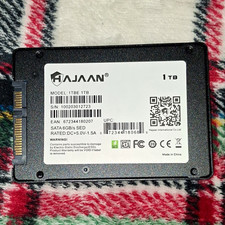
HAJAAN 1TB 2.5" SATA III Internal SSD SED Black for Laptop/PC
$60.00

Crucial MX500 500GB 2.5" SATA III Internal SSD CT500MX500SSD1
$56.99

SAMSUNG SSD 512GB 500GB 480GB 256GB 250GB 240GB SSD 2.5 Solide State Drive 6Gbps
$37.99

Fanxiang 1/2/5/10Pcs 2.5'' SATA SSD Lot 1TB 2TB 4TB 512GB 256GB TLC Internal SSD
$129.99

Samsung 256 GB Internal SATA SSD Fully Tested 50%-79% Health
$24.00

Samsung 850 EVO 250GB SATA III 2.5" Internal SSD (MZ7LN250HMJP) dell Lenovo hp
$32.99
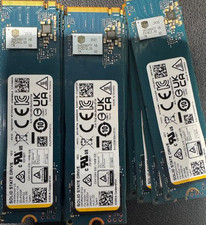
KIOXIA KBG6AZNV512G 512GB M.2 NVMe SSD — TESTED & READY TO USE
$58.99
