

 Reply With Quote
I do undertand what you are trying to accomplish. There are many projects & thought on mounting & mapping filesystems. Please elaborate.
Thanks,
James


I would like to have all prtitions to show up in one folder instead of being scatared all over the desktop. This is similler to My Computer in Windows. Does any body know how to?
I do undertand what you are trying to accomplish. There are many projects & thought on mounting & mapping filesystems. Please elaborate.
Thanks,
James
just make new folder and drag all icons or which u want into that folder
James
I am remastring knoppix and would like the system to show the icons for the hard disk partitions inside a folder on the desktop instead of having them on the desktop. I hope I am clear now.
ramaswamyps
I did that and got all partitions shown inside the folder but when I restart my PC the partitions icons come back again on the desktop also.
As far as I can tell the script /usr/bin/mkdesktophdicons creates the desktop icons on bootup. I don't know how it is getting called, although I have a feeling it is getting called from the /etc/X11/xessions.d/45xsession file. You might be able to edit the /usr/bin/mkdesktophdicons script so that it creates the icons in a folder.
I hope I am right and I hope this helps.
James
James
Thanks. You are right. It did work.
i seem not able to edit the mkhdicons file
can u please post a copy of edited file so ican copy and paste to my comp
i am not experienced in linux
thanks
ramaswamyps
Here it is:
#!/bin/bash
# (C) Klaus Knopper Nov 2002
# Recreate desktop icons for CD-Roms and harddisks in KDE and GNOME
# This script must be run as the logged in user.
DIR="$HOME/My Computer"
scan=""
verbose=""
for i in "$@"; do
case "$i" in
-s*) scan="true" ;;
-v*) verbose="-v" ;;
*) echo "Usage: $0 -s[can] -v[erbose]" >&2 ;;
esac
done
# rebuildfstab requires root privileges, calls su if necessary
[ -n "$scan" ] && rebuildfstab -r $verbose
# KDE desktop
if [ ! -d "$DIR" ]; then
mkdir -p "$DIR"
else
rm -f "$DIR"/cdrom?* "$DIR"/[hs]d[a-z][1-9]* 2>/dev/null
fi
# CD/DVD-Roms/Writers
while read p m t relax; do
case "$t" in swap) continue ;; esac
case "$p" in /dev/cdrom*)
d="${p##*/}"
cat >"$DIR"/"CD-ROM [$d]" <<ENDCDROM
[Desktop Entry]
Actions=Music;Burn;Eject
Type=FSDevice
Dev=$p
MountPoint=$m
FSType=auto
ReadOnly=1
UnmountIcon=cdrom_unmount
Name=CD-ROM [$d]
Icon=cd-record
Comment=File System Device
UnmountIcon=cdrom_unmount
[Desktop Action Eject]
Exec=kdeeject %v
Name=Eject
Dev=$i
MountPoint=/mnt/$d
Icon=player_eject
[Desktop Action Burn]
Icon=k3b
Exec=k3b %i %m -caption "%c";true
Name=Burn CD
Dev=$i
MountPoint=/mnt/$d
[Desktop Action Music]
Icon=xmms
Exec=xmms $i;true
Name=Play Music CD
Dev=$i
MountPoint=/mnt/$d
ENDCDROM
;;
esac
done </etc/fstab
# HD partitions (except swap)
while read p m t relax; do
case "$t" in swap) continue ;; esac
case "$p" in /dev/[hs]d[a-z][1-9]*)
d="${p##*/}"
cat >"$DIR"/"$d" <<ENDHD
[Desktop Entry]
Actions=Remount
Type=FSDevice
Dev=$p
MountPoint=$m
FSType=auto
ReadOnly=1
Icon=hdd_mount
UnmountIcon=hdd_unmount
Name=Hard Disk Partition [$d]
[Desktop Action Remount]
Icon=hdd_mount
Exec=remountrw $p;true
Name=Change read/write mode
ENDHD
;;
esac
done </etc/fstab
exit 0
You have to create folder My Computer in desktop folder and have an icon for it on disktop. Actually I did not prepare this file, I got it from a new distro.
thank U very much for posting this file copy
i hope i can make it work for me too
ramaswamyps
 Posting Permissions


Original Vintage Old Style STANDARD Black CD Jewel Case (Heavy Duty) 90g Lot
$316.95

Vintage Jetway J-620BF Socket 370 Celeron AT Motherboard SiS 620 Brand New
$75.00

Lot of 2 Vintage Plextor PX-43CS SCSI CD-ROM Caddy Drives + 4 Caddies Used
$55.99

Vintage Microsoft Visual Studio.NET Professional Software suite Version 2002 New
$82.00
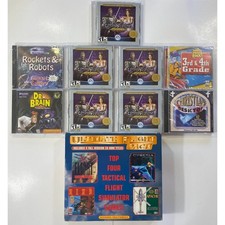
Vintage Software - Ultimate Flight Pack, Ultima Online, School House Rock Mac PC
$33.00
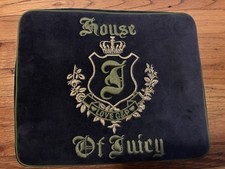
Vintage 2006 Juicy Couture House of Juicy Velour Laptop Sleeve Y2K NWT Rare
$199.99

Huge Lot of Vintage Computer Brochures, Catalogs, etc. - 1980's - SEE PICS
$100.00
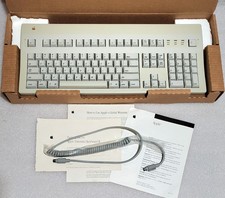
Apple Extended Keyboard II Vintage Keyboard with Original Box & Cable
$110.00

🔥 RARE VINTAGE HP 2112A 21MX M-SERIES 16-BIT MINICOMPUTER HP
$299.99

🔥 RARE VINTAGE HP 2113A 21MX 1000 E-SERIES MINICOMPUTER CHASSIS BACKPLANE
$249.00