-
Problem booting with PCMCIA wireless card
I have spent several hours reading the forum and most of the faqs and I can't seem to figure this one out. I have narrowed it down to my PCMCIA wireless Orinoco 802.11b card. If I boot "knoppix nopcmcia" everything is fine but, of course, no network connectivity. If I remove the "nopcmcia" I get the following:
**** Begin output ****
PCMCIA starting cardmgr
cardmgr[58] version 3.2.2
... modprobe hermes
... modprobe orinoco
... modprobe orinoco_cs
executing '.network start eth0'
...
cardmgr[58]: + Operation failed
cardmgr[58]: start cmd exited with status 1
**** End output ****
At this point the system hangs.
Any pointers as to how to get past this issue?
Thanks in advance.
Alex
-
Senior Member
registered user
iwconfig eth0 essid "your essid" enc "s xxxx" where xxxxx is the 5 character WEP key
The network will not be functioning properly until the Wi-Fi part is properly configured which the auto script can never handle.
-

Originally Posted by
garyng
iwconfig eth0 essid "your essid" enc "s
xxxx" where xxxxx is the 5 character WEP key
The network will not be functioning properly until the Wi-Fi part is properly configured which the auto script can never handle.
The main problem is that the system is hung at this point. I can't enter any commands. I think I need to address the fact that the PCMCIA wireless card isn't being "configured" appropriately at boot time, thus the need to start with "knoppix nopcmcia".
Are you suggesting I continue to boot with "nopcmcia" and then run iwconfig each time?
-
Senior Member
registered user
oops. miss the last line. nothing I can help then. May be it is google time to see if someone use similar cards.
-
Junior Member
registered user
Does the system boot w/o the 802.11 card?
If not, then I wonder if your basic card services are flakey. I had LOTS of problems with the system freezing solid until I fixed that. Do an lspci and find out what CardBus chip your notebook uses: My Toshiba Satellite 1115-S103 uses a the 02 Micro OZ6933 which is NOT correctly supported by Knoppix 3.2. My Orinoco-based Speedstream SS1021 card would light up and Cardmgr would appear to run, but the card wasn't recognized, and any attempt to eject, shut down or restart the card would cause the system to hang.
The solution for me was to recompile the kernel with all PCMCIA support turned off. I then applied PCMCIA-CS-3.2.3 separately (orinoco_cs appears to be broken in 3.2.4). I had to edit /etc/modules and change "yenta_socket" to "i82365". At this point, I could shut down and eject cards just fine but the card wasn't being recognized. From there, it was a relatively simple matter of polling the card for it's hardware ID info and entering that into the appropriate data files. Result: 802.11b services work great!
-
Re: Does the system boot w/o the 802.11 card?
Originally Posted by
4season
If not, then I wonder if your basic card services are flakey. I had LOTS of problems with the system freezing solid until I fixed that. Do an lspci and find out what CardBus chip your notebook uses: My Toshiba Satellite 1115-S103 uses a the 02 Micro OZ6933 which is NOT correctly supported by Knoppix 3.2. My Orinoco-based Speedstream SS1021 card would light up and Cardmgr would appear to run, but the card wasn't recognized, and any attempt to eject, shut down or restart the card would cause the system to hang.
The solution for me was to recompile the kernel with all PCMCIA support turned off. I then applied PCMCIA-CS-3.2.3 separately (orinoco_cs appears to be broken in 3.2.4). I had to edit /etc/modules and change "yenta_socket" to "i82365". At this point, I could shut down and eject cards just fine but the card wasn't being recognized. From there, it was a relatively simple matter of polling the card for it's hardware ID info and entering that into the appropriate data files. Result: 802.11b services work great!
The system doesn't boot either w/ or w/o the 802.11 card. BTW, it is not a notebook if that matters. Just a standalone Dell 8100 box.
I did an lspci and it shows:
- 02:0b.0 CardBus Bridge: TI PCI1225 (rev 01)
02:0b.1 CardBus Bridge: TI PCI1225 (rev 01)
I am hoping to avoid having to recompile kernels, etc.
Then I lose the joy of Knoppix...
Any other thoughts?
-
Hmmm...
I have a Toshiba Satellite 1135-S125. It has the same base hardware sans CPU.
I am running Knoppix v3.2 dated 5/3/2003. I think it's a beta. Forgive a newbie!
I do get a warning about the IDE controller right under Tux at boot, but everything works just fine.
I can boot with my Orinoco Gold Card and lease an IP address from my University's unsecured WLAN without problems. I'm going to try and figure out what to do with my home secure stuff, but that's another subject. Of course, anyone willing to help... 
Have you tried updating the WiFi card to it's latest firmware? It might help as I have the latest on my Gold card and it works in an open environment.
I have the CardBus Bridge 02 Micro, Inc. OZ6933 Cardbus Controller (rev 01) and I am able to effortlessly lease an IP on our open WLAN. This is with
For the guy with the Dell, I am going to assume you have an Orinoco Gold or Silver card in a PCMCIA/PCI adapter? Just another point of contention. I'd go with a D-Link PCI adapter as it does not have the PCMCIA card - it's all PCI hardware (no slot). You could also try the firmware update - it can't hurt and you can download the current version just in case.
Overall, I am most impressed with this distro. I took the CD I made yesterday around to our Helpdesk folks showing them what I could do from a boot CD. All of our currently running hardware works without user intervention of any kind. I will be cutting CD's for the Helpdesk as it's a good way to check for simple machine operation and network connectivity. If you boot and can go to www.random.com, you are working just fine IMHO.
Hope this helps!
Kenny P.
Visualize Whirled Peas
Similar Threads
-
By Gobitron in forum Hardware & Booting
Replies: 2
Last Post: 06-01-2005, 08:57 AM
-
By karloss in forum Hardware & Booting
Replies: 0
Last Post: 12-10-2004, 08:59 PM
-
By bob58 in forum Hardware & Booting
Replies: 3
Last Post: 10-16-2004, 06:40 AM
-
By averylowiq in forum Hdd Install / Debian / Apt
Replies: 5
Last Post: 11-07-2003, 10:14 PM
-
By dnt in forum General Support
Replies: 9
Last Post: 04-21-2003, 07:15 PM
 Posting Permissions
- You may not post new threads
- You may not post replies
- You may not post attachments
- You may not edit your posts
-
Forum Rules

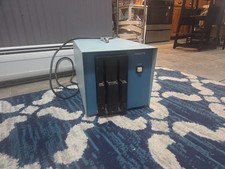
Vintage Industrial micro systems dual 8" Floppy disc drive for Altair system
$450.00
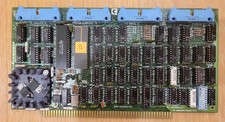
Cromemco TU-ART S-100 Serial and Parrallel Board - IMSAI Altair
$69.95

Cromemco PRI S-100 Printer Interface - Altair IMSAI
$45.00
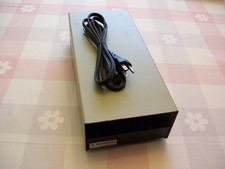
External Half Height Case For a 5 1/4 Inch Floppy Disk (Altair, IMSAI)
$49.95

S-100 backplane motherboard bare PCB 9 slot (for Altair/IMSAI)
$34.99

1976 Scelbi 6800 Software Cookbook Altair 680 SWTPC Assembly Language Motorola
$39.99
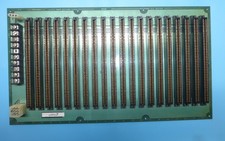
Morrow MIS S-100 20 Slot Backplane PDC Motherboard 1977 Altair IMSAI Board
$295.00
S100 Extender Board IMSAI ALTAIR
$49.99
MITS Altair 8800 System Full Provenance and Documentation
$15000.00

CP/M 86 1.1R 8086 Highmonitor 8 Inch Floppy Diskette 80s IMSAI Altair
$40.00



 Reply With Quote