

 Reply With Quote
Can you post the message from what you enter onwards and your /etc/lilo.conf please.I can try running lilo from my commandline,(!) but get an error refering to
/dev/mapper/control


Tried to do HD install....created bootdisk, said install succesful.
Reboot, and "Operating system not found".
The bootdisk will only get me to runlevel 2, from a floppy lilo.
I can try running lilo from my commandline,(!) but get an error refering to
/dev/mapper/control
anyone got any useful info?
a link to some info bout how boots operate would be good, too.......
Can you post the message from what you enter onwards and your /etc/lilo.conf please.I can try running lilo from my commandline,(!) but get an error refering to
/dev/mapper/control
w/ no disk it says:"Operating System not found"
W/ boot disk I get
<LILO 22.6.1>
In the gui:
<
Linux
Linux 2.4
Linux 2.6
>
boots linux
<INITRD-TOOLS:0.1.74
mount: devfs not supported by kernal>
Goes thru hardware config, ect. fine
running kernal 2.4.27
<mounting local filesystems...
mount: usb devfsalready mounted or /proc/bus/usb busy
mount: according to mtab /proc/bus/usb already mounted on /proc/bus/usb
mount: fs type sysfs not supported by kernal
INIT: entering runlevel: 2
starting print system services: cupsys
Debian GNU/Linux 3.1 box tty1
box Login:*****
Password:*****
>as root<
~#LILO
/dev/mapper/control: open failed: no such device
is device mapper driver missing from kernal?>
says this 2x
<incompatible libdevmapper 1.00.19-IOCTL (2004-07-03)(COMPAT) and Kernal Driver
added Linux *
added Linux (2.4)-1
added Linux (2.6)-2
#>
Also, I should be able to run x/kde from here, no?
lilo.conf:
<# /etc/lilo.conf - See: 'lilo(' and 'lilo.conf(5)',
# --------------- 'install-mbr(
# and '/usr/share/doc/mbr/'.
# +---------------------------------------------------------------+
# | !! Reminder !! |
# | |
# | Don't forget to run 'lilo' after you make changes to this |
# | conffile, '/boot/bootmess.txt', or install a new kernel. The |
# | computer will most likely fail to boot if a kernel-image |
# | post-install script or you don't remember to run 'lilo'. |
# | |
# +---------------------------------------------------------------+
# Support LBA for large hard disks.
#
lba32
# Overrides the default mapping between harddisk names and the BIOS'
# harddisk order. Use with caution.
#disk=/dev/hde
# bios=0x81
#disk=/dev/sda
# bios=0x80
# Specifies the boot device. This is where Lilo installs its boot
# block. It can be either a partition, or the raw device, in which
# case it installs in the MBR, and will overwrite the current MBR.
#
boot=/dev/hda
# Specifies the device that should be mounted as root. ('/')
#
root=/dev/hda1
# Enable map compaction:
# Tries to merge read requests for adjacent sectors into a single
# read request. This drastically reduces load time and keeps the
# map smaller. Using 'compact' is especially recommended when
# booting from a floppy disk. It is disabled here by default
# because it doesn't always work.
#
# compact
# Default menu for Debian. (Using the images from debian-bootscreen)
# from Philipp Wolfer <[email protected]>.
bitmap=/usr/share/lilo/debianlilo.bmp
bmp-colors=1,,0,2,,0
bmp-table=120p,173p,1,15,17
bmp-timer=254p,432p,1,0,0
# Install the specified file as the new boot sector.
# LILO supports built in boot sectory, you only need
# to specify the type, choose one from 'text', 'menu' or 'bitmap'.
# new: install=bmp old: install=/boot/boot-bmp.b
# new: install=text old: install=/boot/boot-text.b
# new: install=menu old: install=/boot/boot-menu.b or boot.b
# default: 'menu' is default, unless you have a bitmap= line
# Note: install=bmp must be used to see the bitmap menu.
# install=menu
# install=bmp
install=bmp
# Specifies the number of _tenths_ of a second LILO should
# wait before booting the first image. LILO
# doesn't wait if DELAY is omitted or if DELAY is set to zero.
delay=20
# Prompt to use certaing image. If prompt is specified without timeout,
# boot will not take place unless you hit RETURN
prompt
timeout=50
# Specifies the location of the map file. If MAP is
# omitted, a file /boot/map is used.
map=/boot/map
# Specifies the VGA text mode that should be selected when
# booting. The following values are recognized (case is ignored):
# NORMAL select normal 80x25 text mode.
# EXTENDED select 80x50 text mode. The word EXTENDED can be
# abbreviated to EXT.
# ASK stop and ask for user input (at boot time).
# <number> use the corresponding text mode. A list of available modes
# can be obtained by booting with vga=ask and pressing [Enter].
vga=791
# You can set a password here, and uncomment the 'restricted' lines
# in the image definitions below to make it so that a password must
# be typed to boot anything but a default configuration. If a
# command line is given, other than one specified by an 'append'
# statement in 'lilo.conf', the password will be required, but a
# standard default boot will not require one.
#
# This will, for instance, prevent anyone with access to the
# console from booting with something like 'Linux init=/bin/sh',
# and thus becoming 'root' without proper authorization.
#
# Note that if you really need this type of security, you will
# likely also want to use 'install-mbr' to reconfigure the MBR
# program, as well as set up your BIOS to disallow booting from
# removable disk or CD-ROM, then put a password on getting into the
# BIOS configuration as well. Please RTFM 'install-mbr(
#
# password=tatercounter2000
# You can put a customized boot message up if you like. If you use
# 'prompt', and this computer may need to reboot unattended, you
# must specify a 'timeout', or it will sit there forever waiting
# for a keypress. 'single-key' goes with the 'alias' lines in the
# 'image' configurations below. eg: You can press '1' to boot
# 'Linux', '2' to boot 'LinuxOLD', if you uncomment the 'alias'.
#
# message=/boot/bootmess.txt
# prompt
# single-key
# delay=100
# timeout=100
# Kernel command line options that apply to all installed images go
# here. See: The 'boot-prompt-HOWO' and 'kernel-parameters.txt' in
# the Linux kernel 'Documentation' directory.
#
# append=""
# Boot up Linux by default.
#
default="Linux"
image=/boot/vmlinuz
label="Linux"
initrd=/boot/initrd.img
append="ramdisk_size=100000 init=/etc/init lang=us apm=power-off nomce quiet 2"
read-only
image=/boot/vmlinuz-2.4.27
label="Linux(2.4)-1"
initrd=/boot/initrd.img-2.4.27
append="ramdisk_size=100000 init=/etc/init lang=us apm=power-off nomce quiet 2"
read-only
image=/boot/vmlinuz-2.6.9
label="Linux(2.6)-2"
initrd=/boot/initrd.img-2.6.9
append="ramdisk_size=100000 init=/etc/init lang=us apm=power-off nomce quiet 2"
read-only
# If you have another OS on this machine to boot, you can uncomment the
# following lines, changing the device name on the 'other' line to
# where your other OS' partition is.
#
# other=/dev/hda4
# label=HURD
# restricted
# alias=3
>
See page 2 of this post: http://www.knoppix.net/forum/viewtopic.php?t=16328Originally Posted by purpleturnip
 Posting Permissions


Gigabyte 4U AI Server 10x Nvidia GPU 2x Xeon Gold 6150 36 Core 2.7GHz DDR4 RAM
$1499.00

Dell EMC PowerEdge R440 Xeon silver 4215 2.5GHz 16 GB ram 2x 550W PSU No HDD
$275.00

Dell Poweredge R630 2x Intel Xeon E5-2650 v4 32GB RAM No Drives/OS Server
$325.00
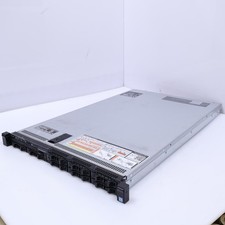
Dell Poweredge R630 2x Intel Xeon E5-2650 v4 64GB RAM No Drives/OS Server
$490.00

Dell PowerEdge C4130 1U AI GPU Server | 2x E5-2690 v3 | 64gb Ram | 2x 1600W
$524.99

Dell PowerEdge C4130 1U AI GPU Server | 2x E5-2680 v3 | 32gb Ram | 2x 1600W
$409.99

Dell PowerEdge R730XD 28 Core Server 2X Xeon E5-2680 V4 H730 32GB RAM No HDD
$378.93

Dell PowerEdge C4130 1U AI GPU Server | 2x E6-2699 v3 | 128gb RAM | 2x 1600W
$899.99

Dell PowerEdge R240 Intel Xeon E-2224 3.50GHz 8GB DDR4 ECC NO HDD 250W
$285.97

867959-B21 HPE ProLiant DL360 G10 CTO Server W/ 2x 865414-B21 1x 840140-001
$245.00