

 Reply With Quote
Maybe you need to do "Configure networ card" from K -> KNOPPIX?


This simple problem I'm having seems to be quite common (for me anyways), since out of 4 computers I acquired cheaply, three of them exhibit the same problem.
I boot up knoppix v3.4 (also have tried v3.on each computer, and they exhibit the same problem where the ethernet connection does not work, even though knoppix apparently recognizes the network card.
In each case, during the hardware autodetection it says "network device eth0 detected; DHCP broadcasting for IP (Backgrounding)", then KDE boots normally.
HOWEVER once in KDE, there is no network connection, and ifconfig only lists "lo", not the "eth0" device, and "pump -i eth0" results in a pause, then "operation failed".
I have verified that this works with popular ethernet cards that are known to work in a couple other computers of mine (booting off the same exact knoppix v3.4 CD). I have tried 2 popular network cards (3com 3c905b-tx and realtek) that are known to work, and have verified that the driver module DOES load. For example, the realtek NIC (which uses 8139too.o and mii.o) does indeed have those modules loaded by knoppix, as verified with lsmod.
As for the cause, since I've eliminated the NIC and the OS (knoppix liveCD), I it appears to be a hardware issue with the computer itself, which I expect must surely have a workaround in the form of
1) a boottime cheatcode, or
2) changing the way the network driver modules are loaded (specifying parameters?), or
3) some unix command/utility that I am unaware of?
The computers are a 500 MHz HP Vectra, 500 Mhz Dell Optiplex, and 550 MHz clone of unknown manufacturer, which have NO other cards in them. And my computer is connected to a 4 port router.
Any ideas?
Maybe you need to do "Configure networ card" from K -> KNOPPIX?
I have seen problems with one router (Belkin) where Knoppix couldn't do a DHCP setup with it, even though the router worked (sorta) with Windows. I have trouble seeing how that dould be it in your case though since 1 in 4 does work.Originally Posted by redss
The only other thing I know of that might explain this is a problem I saw after running a Microsoft "security update". My computer could connect to the network fine before it, not after even with the very same CD. I don't really have enough to go on to even guess if this is your problem or not, but it's very likely that Microsoft got to download and run some software on those systems before you got them. You might want to read through the folloewing threads:
http://www.knoppix.net/forum/viewtop...er=asc&start=0
and
http://www.knoppix.net/forum/viewtop...er=asc&start=0
One simple test might be to swap around NICs, since you have one NIC that apparently does work. Don't run any windows software after you swap in a working NIC, and if Knoppix still can't connect then it's not the NIC. If it turns out that you have 3 NICs that don't work you might want to post back what they are just to be sure that Knoppix supports them. And, of course, I'm assuming that everything else is right, like your network cables are good and your router's ports are good, and you don't have any feature running in the router that would let only NIC cards with known MAC addresses work.
Thanks for the tip - problem solved! My router is indeed a belkin router (the standard 4 port model) and when I stuck a different router in between, knoppix was able to complete DHCP setup on all computers. Since the actual physical network card worked in a different computer, I can't imagine how the computer itself would impact DHCP negotiation, but such is the case.
Belkin router owners BEWARE!
I find it disturbing that a windows security update can also break linux networking, as you discovered. I didn't notice a solution from scanning the many posts from that thread, so what is the solution, is it to reset the NIC EEPROM to factory settings? Also I'm very curious why M$ found it necessary to step beyond the OS and change settings in the NIC. I gather that prevents a hacker from spoofing a certificate? I wonder what the technical details (what kind of hacking technique) are of how that is necessary to maximize security in windows XP, and is that something that needs to be addressed to maximize security in Linux also?
Yup, that's why I mentioned it!
Resetting the NIC isn't easy, or more to the point finding out what the factory setting were isn't easy. I did find a utility that claimed to reset the NIC, but since it would modify the EEROM on my notebook NIC and if anything went wrong my notebook would be nearly useless to me, I held off on doing it. If I had a desktop NIC this happened to I would try the fix without a second thought.
I found some commands that would do it, a software reset with the mii-tool program and then a netcardconfig. This was a pain. I also found some cheat codes would help, including starting with the Expert cheat code (also a pain). This was all posted to the forums somewhere, I thought it was to those threads. But if you want to search, look in the forums for mii-tool or mii-tools (the brain cell that remembers which one it is has died). Then around Knoppix 3.3 or 3.4 something else in Knoppix changed and I had to use cheat codes to boot. I ended up needing the combination of noscsi and acpi=off. Together these let the notebook use knoppix again and resolved the nic problem at the same time. A pain, but nothing to do about it as long as I needed the codes to boot. With 3.8.1 I find that I no longer need cheat codes to boot. And I find that the NIC now works without any cheat codes or resetting. Older versions of Knoppix still have the problem with the NIC (all the way back to my original 3.1).
 Posting Permissions


SK Hynix 32GB 2RX4 PC4-2666V DDR4 RDIMM Server Memory RAM, HMA84GR7AFR4N-VK
$169.95
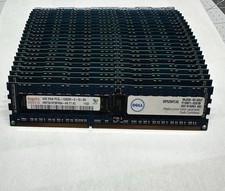
Hynix & Samsun (Lot Of 36) 4GB 2Rx8 PC3L-10600R DDR3 Server Memory 144GB Total
$120.00

SMART(Micron)SafeStor 32GB(1X32GB) 1RX4 NN4-3200AA(DDR4) HPE Server Memory
$159.98

Dell 16GB PC4-21300 (DDR4-2666) Memory (SNPPWR5TC16G)
$89.99
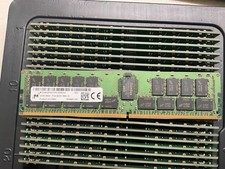
MTA36ASF4G72PZ-2G9E2 MICRON 32GB (1X32GB) 2RX4 PC4-2933Y MEMORY
$229.00

Kingston 32GB 64GB 128GB 256GB USB 3.0 Flash Drive Thumb Memory Stick Pen lot
$285.90
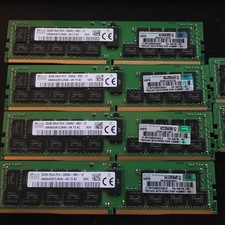
lot of 5 SK Hynix 32GB (160GB) PC4-2666V ECC Server RAM HMA84GR7CJR4N-VK Tested
$1000.00

USB 3.0 Flash Drive 32GB 64GB 128GB Memory Stick Thumb Stick Lot Pack
$826.09

Micro SD Adapter To SD HC SDHC Memory Card Adapter Reader NEW
$1.39

x4 Intel 128GB NMB1XXD128GPS Optane Memory 200 Series PMEM Module 3200 DDR4 RAM
$329.99