

 Reply With Quote
Prepend your PATH variable with that directory in your .bashrc file.


I am using Knoppix 3.8.1 and it is bundled with Java 1.4.2. I do not know how to uninstall Java 1.4 and since I need the new features of Java 1.5, I decided to install Java 1.5 over it (some of you may think its not a very good idea).
Now, when I run a java -version at the command prompt, it still says 1.4.2. So I explicitly exported the PATH of my new Java 1.5
"export PATH=/home/java1_5/bin"
After that "java -version" replies with 1.5, which is correct. However when I restart the shell, the PATH seems to be reset to its original state and won't recognize my Java 1.5!
Please help!
Prepend your PATH variable with that directory in your .bashrc file.
Redo your symlink in /usr/bin to point to your copy of the java.
 Posting Permissions


IBM Power S822 POWER8 1x CPU 32GB DDR4 RAM 2U Rack Server No HDD.
$629.99

Lot of 2 IBM blade center Type H chassis 8852
$559.00

IBM 7915 AC1 M4 E27R704 Server Intel 2650V2 32GB RAM NO HDD w/ 2x 750w PSU
$200.00

IBM QRadar xx29 2x Xeon E5-2650v4 2x 900W PSU M5120 12x 3.5" Bay Server No RAM
$149.99

IBM 4262 SYSTEM x3200 Tower - HDD Wiped, NO OS
$80.00

IBM SYSTEM X3500 M3 SERVER 7380AC1 TOWER Server XEON E5620 8GB RAID SEE NOTES
$108.92

IBM Power 8 S822L Server 8247-22L POWER8 Enterprise 256GB RAM 2x 00KV626 CPU
$999.99

IBM X3650 M5 5462-AC1,2 X E5-2640V3 2.6GHZ 8C, 16 GB, DUAL 750W, 2 X 1TB SERVER
$349.99
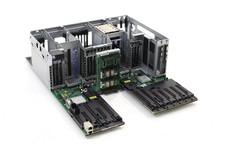
IBM System S822 Dual Socket Server Motherboard W/Cage FRU P/N: 74Y4343 Tested
$499.99
$400.00