-
Sudo knoppix-installer doesn't work :-(
I have 2 pc, knoppix 3.8.1 and 3.7.
In the first, a SCSI workstation, I've performed sudo knopixx-installer and worked correctly.Very fine.
In the second, an older K6-3 400 128 MB, 6.8 GB HD with a fresh 2GB ntfs partition for WinNT and a 1GB FAT partition for data, I have created with no prolem a 3.3 GB reiserfs partition and swap with fdisk. But sudo knoppix-installer said me conditions for install knoppix wasn't satisfied. "Disk dev/hda doesn't contain a valid partition table".Both knoppix 3.8.1 and 3.7.
I have tried IGNORE_CHECK=1 sudo knoppix-installer, but the same problem: impossible to format partition. 
-
I don't know, but I doubt you could make a satisfied valid linux partition setup using fdisk.
you need cfdisk from knoppix or qtparted
(explain reiserfs please) (guessing german (or something) for reserved)
I gues you are trying to dual boot as well.
-
-
I have tried also cfdisk, diskdruid (from Mandrakelinux), Partition Magic in WinNT, qtparted but with no result.
The trouble is the same: /dev/hda doesn't contain a valid partition table.
I have also tried to install MEPIS from livecd, and it works (but with hardware issuses: speedtouch modem!).WHY???
I prefer knoppix for his Debian-like character, and I'd like to install it...  MEPIS is a bit buggy!
Any ideas?
-

Originally Posted by
Mustang64
I've have had to re-install many times (if any one can mess up an install - it's me

) This is my routine -
Using my System Rescue disk, I reformat the partition in question using qtparted.
I've used both ext2 and ext3 with good results.
Mepis uses reiserfs, Knoppix uses ext3.
Exit qtparted.
Fire up the live CD
Do an apt-get for the latest knoppix installer
Start the installer and enter your info upto the point of actually selecting "install"
Save your settings and exit the installer
Modify the installer info file to use grub, and any other stuff you want to change
Save changes
Restart installer and select install!

Lots of "details" have been omitted, because I have to "re-learn" each time I mess things up. I have learned to do use partimage at least once a month to keep from falling too far behind. If I could just figure out anacron to do the partimage thing once a week, I'd be better off!
Hope this helps
GMD
I hadn't thought of the apt-get for knoppix-installer thing. That's a good tip.
I'm having trouble with an install at the moment. Even the boot floppy won't get to the system:
Loading LinuxEBDA is big; kernal setup stack overlaps LILO second stage
is all that I get with the boot floppy. The HD boot just shows a bunch of '99' symbols but I can control-alt-delete and reboot from there. Any ideas?
Similar Threads
-
By IM2Slick in forum Hdd Install / Debian / Apt
Replies: 2
Last Post: 04-22-2007, 05:27 AM
-
By Art McClure in forum Hdd Install / Debian / Apt
Replies: 0
Last Post: 06-29-2006, 03:22 PM
-
By GameMage in forum General Support
Replies: 2
Last Post: 11-12-2005, 06:44 AM
-
By boycott in forum Hdd Install / Debian / Apt
Replies: 3
Last Post: 07-27-2005, 01:19 PM
-
By jodef in forum Hdd Install / Debian / Apt
Replies: 4
Last Post: 07-19-2004, 01:57 AM
 Posting Permissions
- You may not post new threads
- You may not post replies
- You may not post attachments
- You may not edit your posts
-
Forum Rules

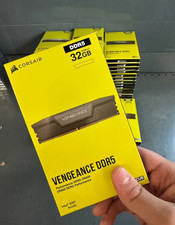
Corsair Vengeance DDR5 32GB (2x16GB) 6000MHz Desktop RAM Kit – New Sealed
$349.95

DDR4 Laptop RAM 4GB 8GB 16GB 32GB 2400 2666 3200 Samsung Hynix
$66.00

RAMAXEL Lenovo 32GB LPDDR5X CAMM2 7500MHz Laptop RAM | UNTESTED
$445.00

NEW Kingston 8GB DDR4 2666MHz Desktop RAM KCP426NS8/8 PC4-21300
$26.00

Crucial DDR3L 16GB 2 x 8GB 1600 MHz PC3L-12800 Laptop RAM Sodimm Memory 1.35V
$41.00
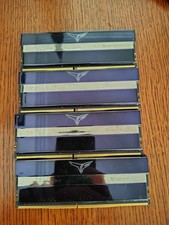
TEAMGROUP T-Force Xtreem ARGB 32GB (4x8GB) DDR4-4000 CL18 Gaming RAM
$179.99
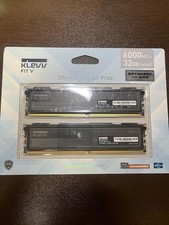
KLEVV FIT V DDR5 32GB (16GB x 2) 6000MT/s Desktop RAM - Brand New
$354.00

A-Tech 8GB DDR3 1600 PC3-12800 Laptop SODIMM 204-Pin Memory RAM PC3L DDR3L 1x 8G
$21.68

Micron MTC40F2046S1RC48BA1 DDR5 64GB (1x64GB) 4800MHz RDIMM ECC Server Memory
$2999.99

Lot Of 50 8GB DDR4 RAM PC4-2666V-UA2 DIMM Desktop Memory Mixed Brands TESTED
$1750.00



 Reply With Quote