

 Reply With Quote
Well I don't have that problem anymore, I ended up copying /home/knoppix/* to /etc/skel/ after making the changes and now everything shows up correctly, I'm not sure why I didn't do that from the beggining.


Hello, I was trying to change KDE's look so when you boot you'll have more than one panel. First, I changed the look of KDE in the live-cd, went to /home/knoppix/.kde/share/config and copied kickerrc( the main panel ) to /etc/skel/.kde/share/config/kickerrc. For the child panels I noticed that a separate file is created for each child panel you add, so I copied /home/knoppix/.kde/share/config/childpanel-extension-*rc to /etc/skel/.kde/share/config/ the problem is that the main panel's( kickerrc ) configuration takes effect when I boot from my remastered copy, but any child panel I created will not be displayed correctly, an empty panel will be created instead, like if you just added a new panel. Is there any other file needed for these child panels to display correctly? Anyone ever experienced something like this? Any help would be appreciated.
Well I don't have that problem anymore, I ended up copying /home/knoppix/* to /etc/skel/ after making the changes and now everything shows up correctly, I'm not sure why I didn't do that from the beggining.
 Posting Permissions


Intel Core i7-3770K 3.5 GHz Processor
$39.00

Intel Core i7-9700 3.0 GHz Octo-Core (SRG13) Processor
$79.00
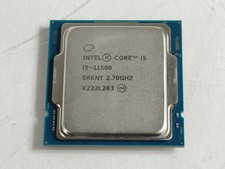
Intel Core i5-11500 2.70 GHz LGA 1200 Desktop CPU Processor SRKNY
$94.99

Corsair RM750e 750W Fully Modular 80 Plus Gold ATX 3.1 PSU Certified Refurbished
$44.99

Intel 4th Gen Core i7-4790 SR1QF 3.60GHz (Turbo 4.00GHz) 8M 4-Core LGA-1150 CPU
$39.99

Intel Core i7-7700T 2.9GHz 8MB Socket LGA1151 Quad Core Processor SR339
$39.99

Intel i7-8700 Coffee Lake 3.2GHz 6-Core Max Turbo 4.6GHz Processor
$69.99
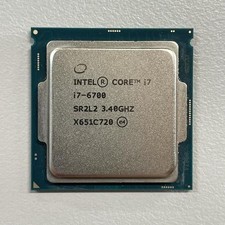
Intel Core i7-6700 3.40 GHz QUAD Core (4 Core) Desktop Processor 8MB LGA 1151
$29.99

GAMING COMBO: ASUS Prime H470M-PLUS MOTHERBOARD + i5-10600KF CPU + 16GB DDR4
$229.95

LAST BATCH *Brand New-Sealed* AMD Ryzen 9 9950X3D2 Dual Ed. 4.3GHz 16Core AM5
$798.00