-
HDD Installation problem
root@1[knoppix]# knoppix-installer
swapon: /dev/hdb2: Device or resource busy
/usr/bin/mkdesktophdicons: line 42: cannot create temp file for here document: Permission denied
/usr/bin/mkdesktophdicons: line 100: cannot create temp file for here document: Permission denied
/usr/bin/mkdesktophdicons: line 100: cannot create temp file for here document: Permission denied
/usr/bin/mkdesktophdicons: line 100: cannot create temp file for here document: Permission denied
/usr/bin/mkdesktophdicons: line 100: cannot create temp file for here document: Permission denied
Can't open /mnt/hdinstall/home/cryptos/.mozilla/default/*/prefs.js: No such file or directory.
/usr/sbin/alsactl: save_state:1194: No soundcards found...
/proc/misc: No entry for device-mapper found
Is device-mapper driver missing from kernel?
/dev/mapper/control: open failed: No such device
Failure to communicate with kernel device-mapper driver.
/proc/misc: No entry for device-mapper found
Is device-mapper driver missing from kernel?
/dev/mapper/control: open failed: No such device
Failure to communicate with kernel device-mapper driver.
Incompatible libdevmapper 1.00.20-ioctl (2005-01-06)(compat) and kernel driver
Warning: '/proc/partitions' does not match '/dev' directory structure.
Name change: '/dev/cloop0' -> '/dev/cloop'
Warning: Partition 1 on /dev/hdb is not marked Active.
Warning: Unable to determine video adapter in use in the present system.
Warning: CHANGE AUTOMATIC assumed after "other=/dev/hdd1"
Warning: CHANGE AUTOMATIC assumed after "other=/dev/hdd2"
Device 0x1640: Inconsistent partition table, 2nd entry
CHS address in PT: 1020:0:1 --> LBA (1028160)
LBA address in PT: 16386300 --> CHS (16256:4:1)
Fatal: Either FIX-TABLE or IGNORE-TABLE must be specified
If not sure, first try IGNORE-TABLE (-P ignore)
What to do?
-
from a live-cd install, and a command prompt screen
it's
sudo knoppix-installer
or run from a super user command prompt screen
everything is in read-only mode in live-CD mode
-
i am root when ronnig knoppix-installer
-
perhaps, the hdd is on the wrong controller or set as slave instead of master ....
hdb2 /
is it what you wanted ?
usually it goes to hda1, might be hard coded in the knoppix-installer script files.
where is your hdd physically connected and should it be ?
other ide devices ?
lspci or what's the command to show the ide list of devices attached ?
-
I want to install on hdb1.
hdb2 is swap
hdb3 is NTFS
I have two HDDs - hdb and hdd, and 2 CD-ROM - hda and hdc
-
very odd you want to do it the hard way.
change the master slave switches on the hdds and cds so the hdb is hda
the install script is written perhaps not too smartly.
it is trying to install to your hda drive.
-
Senior Member
registered user
the install script is written perhaps not too smartly.
it is trying to install to your hda drive.
Maybe: but I suspect some kind of cabling/jumpering error (or even the dreaded cable select)
WTH, you'll have to open the box up anyway. Why not just put the drive you want to install Knoppix to as the primary master, install to it, write lilo (or grob) to a floppy for the time being, reset the drives to the original order and run lilo again.
-
If there is a cabling/jumpering error or if it trays to install on my cd-rm then why it copies file without any errors. The Thing above is happening when all the files are copied and the system is converted to multy-user.
However my motherboard is old and when i connect my brand new 80GB HDD as a master my old drive dose not work at all!?!?!?!?! so i heve to put my CD-R and CD-RW as masters.
Sorry for my poor English! I hope you can understand me.
-
the knoppix-install script is written to install to
/dev/hda3 and
/dev/hda2
now, if your HDD is on hdb, ........
Similar Threads
-
By masoom in forum Hdd Install / Debian / Apt
Replies: 0
Last Post: 02-18-2008, 05:06 AM
-
By xmasih in forum Networking
Replies: 0
Last Post: 04-04-2006, 09:20 PM
-
By fused in forum Hdd Install / Debian / Apt
Replies: 5
Last Post: 10-30-2005, 08:10 PM
-
By kingarthur in forum Networking
Replies: 5
Last Post: 09-21-2003, 12:39 AM
-
By Tortoise in forum General Support
Replies: 1
Last Post: 06-13-2003, 12:54 AM
 Posting Permissions
- You may not post new threads
- You may not post replies
- You may not post attachments
- You may not edit your posts
-
Forum Rules


Dell Poweredge R630 2x Xeon E5-2680 v3 2.5ghz 24-Cores / 64gb / Raid / 2x 1Tb
$374.99

Dell EMC PowerEdge R440 Xeon silver 4215 2.5GHz 16 GB ram 2x 550W PSU No HDD
$275.00

Dell Poweredge R630 2x Xeon E5-2680 v3 2.5ghz 24-Core | HBA330 | No RAM or HDD
$149.99

Dell PowerEdge R530 2x E5-2630v4 H330 iDRAC8 Port Card Riser No PSU/RAM/HDD
$99.99

Dell PowerEdge C4130 1U AI GPU Server | 2x E5-2680 v3 | 32gb Ram | 2x 1600W
$409.99

Dell Poweredge R730xd 12LFF 2*2660v4 4*1Gbe h730 2x 750W Server CTO
$248.00

Dell PowerEdge C4130 1U AI GPU Server | 2x E5-2690 v3 | 64gb Ram | 2x 1600W
$524.99

Dell Poweredge T420 SFF 2x E5-2430 v2 2.5Ghz / 64gb / H710 / 8x Trays / 2x 495w
$394.99

Dell PowerEdge R730 Server 2x Xeon E5-2630 V4 64GB DDR4 2TB HDD Rackmount
$489.99
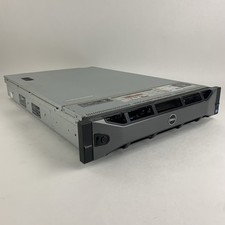
Dell PowerEdge R720 Server 2x Xeon E5-2670 2.6 GHz 64 GB RAM No OS No HDD Read-
$239.95



 Reply With Quote