

 Reply With Quote
From memory (I'm writing this from a HD install), right click on the drive icon, select actions, select (something like) enable read/write.


I am new to Linux and actually was just trying to use Knoppix as a way of saving a corrupt file in my c:\windows\system32 file. I changed my ntoskrnl.exe file to a new one and it failed to load. I had saved a copy of the original ntoskrnl.exe, but now my computer will not load to recover it. I got Knoppix from a friend so that I could go in and put the origional ntoskrnl back in and delete the new (corrupt one) Everytime I try to delete it I get a message that says " access denied." I have tried changing the permissions, unchecking read only, renaming the file, moving the original back in and trying to rewrite it, etc. Non of these methods have worked so far. What do I need to do?
From memory (I'm writing this from a HD install), right click on the drive icon, select actions, select (something like) enable read/write.
 Posting Permissions


Dell 6P85J 4TB ST4000NM0063 7.2k 6Gb/s 3.5” SAS SED Hard Drive with Tray
$39.99

Western Digital HUS726T4TAL5204 4TB 7.2K SAS 12Gb/s 3.5" 512e HDD NetApp X375A
$64.00

HGST Ultrastar HUS726040AL5210 4TB 7200RPM SAS 12Gb/s Enterprise HDD
$41.00

Tested WD Ultrastar DC HC520 12TB 7.2K RPM SATA 6Gb/s 3.5" HDD HUH721212ALN600
$239.99

Seagate Barracuda ST1000DM003 1 TB SATA III 3.5 in Desktop Hard Drive
$23.99

Toshiba DT01ACA100 1 TB 3.5" SATA III 3.5 in Desktop Hard Drive
$24.99

Dell ST6000NM0034 1HT27Z-150 NWCCG 6TB SAS 3.5 7.2K ENTERPRISE SERVER DRIVE
$68.99

Seagate Exos ST2000NX0253 HDD 2TB SATA 7.2K 2.5" 512b/s
$58.00

20TB 7200 RPM SATA III Internal 3.5" White Label Hard drive
$349.99
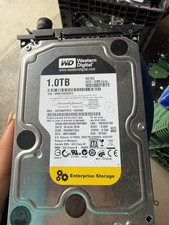
1TB SATA 7200RPM 3.5” Enterprise Hard Drive WD Hitachi HDD
$59.99